
RF-DETR — a real-time detection transformer
RF-DETR (Roboflow) is a real-time object detector in the DETR family, built on a DINOv2 backbone. Like all DETR models it treats detection as set prediction: a fixed set of learned queries directly outputs boxes, with no anchors and no NMS, matched to ground truth by the Hungarian algorithm.
Symbols used on this page are defined in the Nomenclature → deep learning & training.
DETR paper (arXiv:2005.12872)
12-notebook deep dive in deeplearning/notebooks/rfdetr/ — from-scratch model, loss, training loop
Architecture
backbone
(intra-scale attn)
(cross-scale fusion)
(deformable)
- DINOv2 backbone — strong self-supervised features (see DINOv2).
- AIFI — attention-based intra-scale feature interaction on the coarsest map.
- CCFM — a CNN cross-scale feature-fusion neck (PAN-like).
- RT-DETR decoder — object queries + deformable attention that samples a few points instead of attending to the whole map, making it real-time.
Set prediction & Hungarian matching
DETR outputs $N$ predictions (queries). Training finds the optimal one-to-one assignment $\sigma$ between the $N$ predictions and the ground-truth objects (padded with "no object") minimizing a matching cost, via the Hungarian algorithm:
$$ \hat\sigma = \arg\min_{\sigma}\sum_{i}\Big[-\mathbb{1}_{\{c_i\neq\varnothing\}}\hat p_{\sigma(i)}(c_i) + \mathbb{1}_{\{c_i\neq\varnothing\}}\,\mathcal{L}_{\text{box}}(b_i,\hat b_{\sigma(i)})\Big] $$The box loss combines L1 and GIoU; classification uses focal loss. Because each object is matched to exactly one query, there is no duplicate suppression needed.
Watch the assignment happen. Each ground-truth box is matched to exactly one query at minimum total cost; every leftover query is pushed to "no object". Change the cost weights and the matching flips — and note that because the assignment is a permutation, two queries can never claim the same object:
Deformable attention — why it's fast
Standard attention over an $HW$ feature map is $O((HW)^2)$ — prohibitive at high resolution. Deformable attention has each query attend to only a small set of learned sampling offsets around a reference point:
$$ \text{DeformAttn}(q) = \sum_{k=1}^{K} A_{qk}\; \mathbf{v}\big(\mathbf{p}_q + \Delta\mathbf{p}_{qk}\big) $$with $K$ tiny (e.g. 4). This linear-in-tokens cost is the key to real-time DETR.
And here is why deformable attention is affordable. Raise the feature-map size: dense attention grows with $(HW)^2$ while the deformable cost grows linearly, because $K$ is a small constant (typically 4) that does not depend on resolution:
Contrast: the anchor-based world it replaces
Classic detectors emit many overlapping boxes per object and rely on NMS to deduplicate. DETR/RF-DETR avoid this entirely — but it's worth seeing what they save you from. Here's NMS pruning redundant boxes:
Full notebook deep-dive
The complete, code-free explanations, math, and figures extracted from the model's Jupyter notebooks. The runnable notebooks are bundled with this site — browse the RF-DETR notebooks (local copies).
RF-DETR: Introduction & Architecture Overview
Series: RF-DETR Detailed Tutorial | Notebook 16a of 5
---
What is RF-DETR?
RF-DETR (Roboflow Detection Transformer) is a real-time object detection model built on the DETR (Detection Transformer) family, designed for high accuracy at practical inference speeds. It was released by Roboflow in 2025 and achieves state-of-the-art results on COCO.
Key properties:
- Transformer-based end-to-end detection — no NMS (Non-Maximum Suppression) needed
- DINOv2 backbone — leverages powerful self-supervised visual features
- Real-time capable — optimized for practical deployment
- Fine-tunable — easily adapted to custom datasets via Roboflow Universe
---
Tutorial Series Overview
| Notebook | Topic |
|---|---|
| 16a (this) | Introduction & Architecture |
| 16b | Environment Setup & Installation |
| 16c | Model Loading & Inference Basics |
| 16d | Training on Custom Dataset |
| 16e | Advanced Features & Visualization |
---
Learning Objectives
By the end of this notebook you will understand:
- The evolution from CNN detectors → DETR → RT-DETR → RF-DETR
- How the DINOv2 backbone integrates with the DETR decoder
- The role of bipartite matching and Hungarian algorithm in training
- Key architectural innovations in RF-DETR vs prior work
1. Object Detection: A Brief History
1.1 Two-Stage Detectors (R-CNN Family)
Image → Region Proposals → CNN Features → Classification + Regression
         (Selective Search /                per proposal
          RPN in Faster R-CNN)
- R-CNN (2014): Selective search + CNN per region — very slow
- Fast R-CNN (2015): Shared CNN features — much faster
- Faster R-CNN (2015): Region Proposal Network (RPN) — end-to-end trainable
1.2 One-Stage Detectors
Image → CNN Backbone → Dense Predictions (anchors/points) → NMS
- YOLO (2016–2024): Divide image into grid, predict boxes per cell
- SSD (2016): Multi-scale feature maps
- RetinaNet (2017): Focal loss for class imbalance
- FCOS (2019): Anchor-free, center-ness prediction
Problem with all of the above: Require hand-crafted components:
- Anchor boxes (size, aspect ratio tuning)
- Non-Maximum Suppression (NMS) post-processing
- Complex training pipelines
1.3 DETR: Detection Transformer (2020)
Facebook AI Research introduced DETR — the first fully end-to-end detector:
Image → CNN Backbone → Transformer Encoder → Transformer Decoder → N object queries → Boxes + Classes
                                                                     (learned embeddings)
Key innovations:
- Object queries: N learnable embeddings that 'ask' about N possible objects
- Bipartite matching: Hungarian algorithm matches predictions to ground truth
- No NMS: Each query predicts at most one object
- Global context: Transformer encoder sees the full image
Limitation: Very slow to train (500 epochs on COCO)
1.4 Improvements: Deformable DETR, DAB-DETR, DN-DETR, DINO-DETR
| Model | Year | Key Innovation |
|---|---|---|
| Deformable DETR | 2021 | Deformable attention (sparse, multi-scale) |
| DAB-DETR | 2022 | Dynamic anchor boxes as queries |
| DN-DETR | 2022 | Denoising training for faster convergence |
| DINO-DETR | 2022 | Contrastive denoising + mixed query selection |
| RT-DETR | 2023 | Real-time DETR with hybrid encoder |
| RF-DETR | 2025 | DINOv2 backbone + RT-DETR decoder |
1.5 RF-DETR: The Synthesis
RF-DETR combines the best of both worlds:
- DINOv2 backbone: Rich self-supervised features, no ImageNet labels needed
- RT-DETR decoder: Fast, real-time capable transformer decoder
- Roboflow ecosystem: Easy fine-tuning on custom datasets
2. RF-DETR Architecture Deep Dive
2.1 High-Level Architecture
┌─────────────────────────────────────────────────────────────────┐
│                        RF-DETR Pipeline                         │
│                                                                 │
│  Input Image (H×W×3)                                            │
│       │                                                         │
│       ▼                                                         │
│  ┌─────────────────┐                                            │
│  │  DINOv2 Backbone│  ← Self-supervised ViT (frozen or fine-   │
│  │  (ViT-S/B/L/g)  │    tuned). Outputs multi-scale features.  │
│  └────────┬────────┘                                            │
│           │  Feature maps at multiple scales                    │
│           ▼                                                     │
│  ┌─────────────────┐                                            │
│  │  Hybrid Encoder │  ← Intra-scale attention + cross-scale    │
│  │  (RT-DETR style)│    fusion (AIFI + CCFM modules)           │
│  └────────┬────────┘                                            │
│           │  Enhanced multi-scale features                      │
│           ▼                                                     │
│  ┌─────────────────┐                                            │
│  │ Transformer     │  ← N object queries attend to encoder     │
│  │ Decoder         │    features via cross-attention           │
│  │ (6 layers)      │                                            │
│  └────────┬────────┘                                            │
│           │  N query embeddings                                 │
│           ▼                                                     │
│  ┌─────────────────┐                                            │
│  │  Detection Head │  ← FFN for class + box regression         │
│  │  (FFN × N)      │                                            │
│  └────────┬────────┘                                            │
│           │                                                     │
│           ▼                                                     │
│  N × (class_logits, bbox [cx,cy,w,h])                          │
└─────────────────────────────────────────────────────────────────┘
2.2 DINOv2 Backbone
RF-DETR uses DINOv2 as its backbone — a Vision Transformer trained with self-supervised DINO (self-DIstillation with NO labels) objectives.
Why DINOv2?
- Patch tokens carry rich spatial semantic information
- No ImageNet labels needed — trained on LVD-142M (142M curated images)
- Excellent transfer learning properties
- Available in multiple sizes: ViT-S (21M), ViT-B (86M), ViT-L (307M), ViT-g (1.1B)
Multi-scale feature extraction: DINOv2 outputs intermediate layer features at different depths, providing multi-scale representations similar to FPN (Feature Pyramid Network).
2.3 Hybrid Encoder (RT-DETR style)
The encoder has two components:
- AIFI (Attention-based Intra-scale Feature Interaction):
- Self-attention within each scale
- Captures long-range dependencies at each resolution
- CCFM (CNN-based Cross-scale Feature Fusion Module):
- Fuses features across scales using convolutional layers
- Efficient multi-scale feature aggregation
2.4 Transformer Decoder
The decoder uses N learnable object queries (typically 300):
Object Queries (N × d_model)
       │
       ▼
┌─────────────────────────────┐
│  Decoder Layer (×6)         │
│  ┌─────────────────────┐    │
│  │ Self-Attention      │    │  Queries attend to each other
│  └──────────┬──────────┘    │
│             ▼               │
│  ┌─────────────────────┐    │
│  │ Cross-Attention     │    │  Queries attend to encoder features
│  └──────────┬──────────┘    │
│             ▼               │
│  ┌─────────────────────┐    │
│  │ FFN                 │    │  Feed-forward network
│  └─────────────────────┘    │
└─────────────────────────────┘
       │
       ▼
N × (class, bbox)  — auxiliary losses at each layer
2.5 Hungarian Matching Loss
During training, predictions are matched to ground truth using the Hungarian algorithm (optimal bipartite matching):
Cost matrix C[i,j] = λ_cls × L_cls(pred_i, gt_j)
                   + λ_bbox × L1(pred_box_i, gt_box_j)
                   + λ_giou × L_giou(pred_box_i, gt_box_j)

Optimal assignment: σ* = argmin_σ Σ_i C[i, σ(i)]
This ensures:
- Each ground truth object is matched to exactly one query
- No duplicate detections
- No NMS needed at inference
3. RF-DETR vs Other Detectors: Performance Comparison
3.1 COCO Benchmark Results
| Model | mAP (COCO val) | Params | FPS (A100) | Notes |
|---|---|---|---|---|
| YOLOv8-L | 52.9 | 43M | 375 | Anchor-free one-stage |
| YOLOv9-C | 53.0 | 25M | 300 | Programmable gradient |
| RT-DETR-L | 53.0 | 32M | 114 | Real-time DETR |
| RF-DETR-B | 53.3 | 29M | 60 | DINOv2-S backbone |
| RF-DETR-L | 56.5 | 128M | 25 | DINOv2-B backbone |
| DINO-DETR | 58.5 | 47M | 12 | Slower, higher accuracy |
3.2 Key Advantages of RF-DETR
- Fine-tuning efficiency: DINOv2 features transfer extremely well to new domains
- Few-shot capability: Good performance with limited labeled data
- No anchor tuning: No need to design anchor boxes for your domain
- Roboflow integration: Direct pipeline from annotation to deployment
3.3 When to Use RF-DETR
✅ Good fit for RF-DETR:
- Custom domain with limited data (robot manipulation, medical imaging, etc.)
- Need high accuracy over maximum speed
- Objects with unusual shapes/sizes not covered by standard anchors
- End-to-end trainable pipeline without NMS tuning
⚠️ Consider alternatives if:
- Need >100 FPS on edge devices (use YOLOv8-nano)
- Very large dataset with standard objects (YOLO may be sufficient)
- Extremely limited compute budget
4. Summary & Key Takeaways
What we covered:
- Detection history: R-CNN → YOLO → DETR → RF-DETR
- RF-DETR architecture: DINOv2 backbone + Hybrid Encoder + Transformer Decoder
- Hungarian matching: How predictions are matched to ground truth without NMS
- Performance: RF-DETR-L achieves 56.5 mAP on COCO, excellent for custom domains
Key architectural insights:
DINOv2 patch tokens  →  Rich spatial features (each 14×14px patch = one token)
Object queries       →  N learnable 'slots' that compete to detect objects
Hungarian matching   →  Optimal assignment, no duplicate detections
No NMS              →  Cleaner, end-to-end trainable pipeline
Next: Notebook 16b — Environment Setup & Installation
In the next notebook, we'll install RF-DETR and all dependencies, verify the installation, and prepare our working environment.
RF-DETR: Environment Setup & Installation
Series: RF-DETR Detailed Tutorial | Notebook 16b of 5
---
What we'll cover
- Verify Python & CUDA environment
- Install
transformers(≥5.8.0 for RF-DETR support) - Inspect the local RF-DETR model checkpoint at
/mnt/mydata/huggingface/rf-detr-base - Understand the model config: backbone, decoder, queries
- Verify the full dependency stack
---
Prerequisites
- Python 3.9+
- PyTorch 2.0+ (with CUDA recommended)
transformers≥ 5.8.0 (RF-DETR was merged in PR #36895)
Local model path: /mnt/mydata/huggingface/rf-detr-base
1. Installation
RF-DETR is available natively in 🤗 Transformers ≥ 5.8.0. Run the cell below to install/upgrade if needed.
2. CUDA / GPU Environment
3. Inspect Local Model Checkpoint
The RF-DETR-base checkpoint is stored locally at /mnt/mydata/huggingface/rf-detr-base. Let's inspect its files and configuration.
4. Understanding the Configuration
4.1 Backbone: DINOv2-Small with Windowed Attention
hidden_size = 384          → DINOv2-Small (vs 768 for Base, 1024 for Large)
num_hidden_layers = 12     → 12 transformer blocks
num_attention_heads = 6    → 6 attention heads per block
patch_size = 14            → 14×14 pixel patches
image_size = 518           → 518×518 input (37×37 = 1369 patches)
window_block_indexes = [0,1,3,4,6,7,9,10]  → 8 windowed blocks
                                              4 full-attention blocks
Windowed attention (RF-DETR innovation):
- 8 of 12 blocks use local window attention (4 windows, efficient)
- 4 blocks use full global attention (captures long-range context)
- This alternation gives efficiency without sacrificing global context
Multi-scale outputs from stages 2, 5, 8, 11: `` stage2 → early features (edges, textures) stage5 → mid-level features (parts) stage8 → high-level features (objects) stage11 → final features (semantics) ``
4.2 Decoder Configuration
num_queries = 300          → 300 object query slots
decoder_layers = 3         → 3 decoder transformer layers (lightweight!)
d_model = 256              → query/key/value dimension
decoder_ffn_dim = 2048     → FFN hidden dimension
decoder_cross_attention_heads = 16  → deformable cross-attention
decoder_n_points = 2       → 2 reference points per head (deformable)
group_detr = 13            → 13 parallel decoder groups during training
Group DETR: During training, 13 copies of the decoder run in parallel with different query initializations, providing 13× more positive samples for the Hungarian matching loss → faster convergence.
4.3 Loss Configuration
class_cost = 2             → weight for classification in matching cost
bbox_cost = 5              → weight for L1 bbox in matching cost
giou_cost = 2              → weight for GIoU in matching cost

class_loss_coefficient = 1
bbox_loss_coefficient = 5
giou_loss_coefficient = 2
focal_alpha = 0.25         → focal loss alpha (class imbalance)
eos_coefficient = 0.1      → weight for 'no object' class
5. Verify Model Can Be Loaded
6. Summary
What we verified:
| Component | Details |
|---|---|
| Model | RfDetrForObjectDetection (transformers ≥ 5.8.0) |
| Checkpoint | /mnt/mydata/huggingface/rf-detr-base |
| Backbone | DINOv2-Small (384-dim, 12 layers, 6 heads) |
| Decoder | 3 layers, 300 queries, d_model=256 |
| Classes | 80 COCO categories |
| Input size | 518×518 pixels |
| Patch size | 14×14 pixels → 37×37 = 1369 patches |
Key insight: Windowed attention
RF-DETR uses alternating windowed/full attention in the backbone:
- 8 blocks: local window attention (4 windows) → efficient
- 4 blocks: full global attention → captures long-range context
This is the key efficiency innovation over standard DINOv2.
Next: Notebook 16c — Model Loading & Inference Basics
In the next notebook, we'll run RF-DETR inference on real images, visualize detections, and understand the output format.
RF-DETR: Model Loading & Inference Basics
Series: RF-DETR Detailed Tutorial | Notebook 16c of 5
---
What we'll cover
- Load RF-DETR-base from local checkpoint
- Run inference on the real robot manipulation image
- Understand the raw output format (logits, boxes)
- Post-process detections with confidence thresholding
- Visualize bounding boxes with class labels and scores
- Benchmark inference speed
- Compare different confidence thresholds
---
Model path: /mnt/mydata/huggingface/rf-detr-base Image: vla_taskgraph/output/images/real_robot_image_518.jpg
1. Setup & Model Loading
2. Load & Preprocess the Robot Image
3. Run Inference & Understand Raw Outputs
4. Post-Processing: From Raw Outputs to Detections
The processor's post_process_object_detection method:
- Applies sigmoid/softmax to logits
- Filters by confidence threshold
- Converts normalized
[cx, cy, w, h]→ pixel[x1, y1, x2, y2]
Box format conversion: `` cx, cy, w, h (normalized 0-1) → x1, y1, x2, y2 (pixels) x1 = (cx - w/2) W y1 = (cy - h/2) H x2 = (cx + w/2) W y2 = (cy + h/2) H ``
5. Best Detection Result (threshold=0.35)
6. Inference Speed Benchmark
7. Understanding the Output Format
Raw model outputs
outputs.logits      # [batch, 300, 92]  — class logits per query
outputs.pred_boxes  # [batch, 300, 4]   — (cx, cy, w, h) normalized
outputs.auxiliary_outputs  # list of intermediate decoder layer outputs
Post-processed results
results = processor.post_process_object_detection(
    outputs,
    target_sizes=torch.tensor([[H, W]]),
    threshold=0.35
)[0]

results['scores']  # [N]    — confidence scores
results['labels']  # [N]    — class indices (COCO)
results['boxes']   # [N, 4] — (x1, y1, x2, y2) in pixels
Box coordinate systems
Raw output:  (cx, cy, w, h)  normalized [0, 1]
Post-processed: (x1, y1, x2, y2)  in pixels

Conversion:
  x1 = (cx - w/2) * image_width
  y1 = (cy - h/2) * image_height
  x2 = (cx + w/2) * image_width
  y2 = (cy + h/2) * image_height
8. Summary
What we learned:
| Step | Details |
|---|---|
| Load | RfDetrForObjectDetection.from_pretrained(path) |
| Preprocess | processor(images=img, return_tensors='pt') → 518×518 normalized tensor |
| Inference | model(**inputs) → logits [B,300,92] + boxes [B,300,4] |
| Post-process | processor.post_process_object_detection(outputs, target_sizes, threshold) |
| Output | scores, labels, boxes (x1,y1,x2,y2 in pixels) |
Key observations:
- 300 queries → most have very low scores (background)
- No NMS needed — each query predicts at most one object
- Threshold matters — 0.35 is a good default for COCO-pretrained model
- Sigmoid (not softmax) for multi-label capability
Next: Notebook 16d — Training on Custom Dataset
In the next notebook, we'll fine-tune RF-DETR on a custom dataset using the Roboflow/HuggingFace training pipeline.
16d — RF-DETR PyTorch Model from Scratch
This notebook walks through every building block of the RF-DETR architecture, implementing each component in pure PyTorch and visualising its behaviour.
Architecture overview
Input (B, 3, H, W)
    │
    ▼
DINOv2Backbone  (ViT-B/14 from scratch)
    │  taps blocks 3, 6, 11  →  [s8, s16, s32]
    ▼
HybridEncoder
    │  AIFI  — self-attention on finest scale (s8)
    │  CCFM  — top-down + bottom-up FPN with RepVGG blocks
    ▼
flatten + sinusoidal pos-enc  →  memory (B, S, D)
    ▼
RTDETRDecoder  (6 layers)
    │  learnable object queries × 300
    │  self-attn → cross-attn → FFN
    ▼
pred_logits (B, Q, C)   pred_boxes (B, Q, 4)
Sections
- Imports & helpers
- Patch embedding
- Multi-head self-attention
- ViT block
- DINOv2 backbone (multi-scale)
- AIFI encoder
- CCFM neck
- Sinusoidal positional encoding
- RT-DETR decoder
- Full RFDETR model + parameter count
- Visualisations
---
1. Patch Embedding
A single Conv2d with kernel_size = stride = patch_size splits the image into non-overlapping patches and projects each to embed_dim.
---
2. Multi-Head Self-Attention
---
3. ViT Block (pre-norm)
---
4. DINOv2 Backbone — Multi-Scale Feature Extraction
We tap intermediate ViT blocks (indices 3, 6, 11) and reshape their tokens back to 2-D spatial grids, then project to different channel widths.
---
5. AIFI — Attention-based Intra-scale Feature Interaction
Applied to the finest feature map (stride-8) to capture global context.
---
6. CCFM — Cross-scale Channel Fusion Module
FPN-style top-down + bottom-up fusion using RepVGG blocks.
---
7. Sinusoidal Positional Encoding
---
8. RT-DETR Decoder
---
9. Full RFDETR Model
---
Summary
| Component | Role | Key idea |
|---|---|---|
PatchEmbed | Tokenise image | Conv2d with stride = patch_size |
ViTBlock | Contextualise tokens | Pre-norm MHSA + MLP |
DINOv2Backbone | Multi-scale features | Tap blocks 3, 6, 11 |
AIFI | Global context on finest scale | Transformer encoder layer |
CCFM | Cross-scale fusion | Top-down + bottom-up FPN with RepVGG |
PositionEmbeddingSine | Spatial awareness | 2-D sinusoidal encoding |
RTDETRDecoder | Detect objects | Learnable queries + cross-attention |
Next notebook: 16e_rfdetr_loss_functions.ipynb — Hungarian matching, focal loss, GIoU.
RF-DETR: Training on a Custom Dataset
Series: RF-DETR Detailed Tutorial | Notebook 16d of 5
---
What we'll cover
- Dataset format requirements (COCO JSON)
- Build a synthetic robot manipulation dataset from scratch
- Implement a custom
Datasetclass for RF-DETR - Configure the model for a new number of classes
- Training loop with Hungarian matching loss
- Evaluation: mAP computation
- Fine-tuning strategies: frozen backbone vs full fine-tune
- Save & reload fine-tuned checkpoint
---
Dataset Format
RF-DETR (via HuggingFace Transformers) expects COCO JSON format:
{
  "images": [{"id": 1, "file_name": "img001.jpg", "height": 480, "width": 640}],
  "annotations": [
    {"id": 1, "image_id": 1, "category_id": 1,
     "bbox": [x, y, width, height],  // COCO format: top-left + size
     "area": 1200, "iscrowd": 0}
  ],
  "categories": [{"id": 1, "name": "robot_arm"}, {"id": 2, "name": "object"}]
}
1. Create a Synthetic Robot Manipulation Dataset
We'll generate a small synthetic dataset with:
- 3 classes:
robot_arm,gripper,target_object - 50 training images, 10 validation images
- Synthetic images with colored rectangles (simulating robot parts)
This lets us demonstrate the full training pipeline without needing real labeled data.
2. Custom Dataset Class
We implement a PyTorch Dataset that:
- Loads images from disk
- Applies the RF-DETR image processor
- Returns targets in the format expected by the model
Target format for RF-DETR: ``python { 'class_labels': torch.LongTensor([cls_id, ...]), 'boxes': torch.FloatTensor([[cx, cy, w, h], ...]) # normalized [0,1] } ``
3. Configure Model for Custom Classes
We need to modify the classification head to output num_custom_classes + 1 logits (the +1 is for the background/no-object class).
Strategy options:
- Full fine-tune: Update all weights (best accuracy, needs more data)
- Frozen backbone: Only train decoder + head (faster, good for small datasets)
- Partial freeze: Freeze early backbone layers, fine-tune later layers
4. Training Loop
RF-DETR uses the Hungarian matching loss computed inside the model's forward pass. When you pass labels to the model, it automatically:
- Runs Hungarian matching between predictions and ground truth
- Computes classification loss (focal loss)
- Computes bbox L1 loss
- Computes GIoU loss
- Adds auxiliary losses from intermediate decoder layers
The total loss is returned as outputs.loss.
5. Evaluation: Inference on Validation Set
6. Save & Reload Fine-tuned Model
7. Training Tips & Best Practices
7.1 Learning Rate Schedule
Backbone LR:  1e-5  (10× lower than decoder — pretrained features)
Decoder LR:   1e-4  (standard for transformer decoder)
Warmup:       500 steps (linear warmup)
Schedule:     Cosine annealing or step decay at epoch 40, 60
7.2 Data Augmentation
RF-DETR benefits from strong augmentation:
- Random horizontal flip (p=0.5)
- Random scale (0.5–2.0×)
- Random crop (with box adjustment)
- Color jitter (brightness, contrast, saturation)
- Random erasing (p=0.3)
Use albumentations or torchvision.transforms.v2 for bbox-aware augmentation.
7.3 Batch Size & Gradient Accumulation
# If GPU memory is limited, use gradient accumulation:
ACCUMULATION_STEPS = 4  # effective batch size = batch_size × 4

for step, (inputs, targets) in enumerate(train_loader):
    outputs = model(**inputs, labels=targets)
    loss = outputs.loss / ACCUMULATION_STEPS
    loss.backward()

    if (step + 1) % ACCUMULATION_STEPS == 0:
        torch.nn.utils.clip_grad_norm_(model.parameters(), 0.1)
        optimizer.step()
        optimizer.zero_grad()
7.4 Recommended Epochs
| Dataset size | Epochs | Notes |
|---|---|---|
| < 100 images | 100-200 | Frozen backbone, strong augmentation |
| 100-1000 | 50-100 | Partial freeze, moderate augmentation |
| > 1000 | 30-50 | Full fine-tune |
| COCO-scale | 12-24 | Standard DETR schedule |
7.5 Gradient Clipping
Always use gradient clipping with DETR-family models: ``python torch.nn.utils.clip_grad_norm_(model.parameters(), max_norm=0.1) `` Without this, training can diverge due to large gradients in the attention layers.
Next: Notebook 16e — Advanced Features & Visualization
In the final notebook, we'll explore:
- Attention map visualization inside RF-DETR
- Decoder query analysis
- Comparing DINOv2 features vs RF-DETR features
- Exporting to ONNX for deployment
RF-DETR: Advanced Features & Visualization
Series: RF-DETR Detailed Tutorial | Notebook 16e of 5
---
What we'll cover
- Backbone attention maps — DINOv2 windowed vs full attention inside RF-DETR
- Decoder cross-attention — which image regions each query attends to
- Query analysis — how object queries evolve through decoder layers
- Multi-scale feature visualization — backbone outputs at stages 2, 5, 8, 11
- Deformable attention reference points — where the decoder samples
- Comparing DINOv2 standalone vs RF-DETR backbone features
- ONNX export for deployment
---
Model path: /mnt/mydata/huggingface/rf-detr-base
1. Setup
2. Backbone Attention Maps
RF-DETR's DINOv2-Small backbone has 12 transformer blocks with alternating attention:
- Windowed blocks (0,1,3,4,6,7,9,10): local attention within 4 windows
- Full blocks (2,5,8,11): global attention across all patches
We'll visualize the CLS token attention from both types.
3. Object Query Analysis
RF-DETR uses 300 object queries — learnable embeddings that compete to detect objects. We'll analyze:
- Which queries have high confidence scores
- Where the high-confidence queries' predicted boxes are located
- How query scores distribute across the image
4. DINOv2 Standalone vs RF-DETR Backbone Features
RF-DETR uses a modified DINOv2 with windowed attention. Let's compare the patch features from:
- Standalone DINOv2-base (standard, full attention)
- RF-DETR backbone (windowed + full attention alternation)
This shows how the windowing affects feature quality.
5. Complete Detection Pipeline Visualization
A comprehensive visualization showing the full RF-DETR pipeline on the robot image.
6. ONNX Export for Deployment
Export RF-DETR to ONNX for deployment on edge devices or inference servers.
7. Summary & Complete Tutorial Recap
What we covered in this notebook:
| Topic | Key Finding |
|---|---|
| Backbone features | Multi-scale outputs at stages 2,5,8,11 capture different semantic levels |
| Query analysis | 300 queries, most have low scores; top queries cluster around objects |
| Decoder evolution | Scores increase through decoder layers as queries refine |
| Feature comparison | RF-DETR backbone (windowed) vs DINOv2 (full attention) |
| ONNX export | Model can be exported for deployment |
---
Complete RF-DETR Tutorial Series Recap
| Notebook | Topic | Key Takeaway |
|---|---|---|
| 16a | Architecture | DETR + DINOv2 = RF-DETR; Hungarian matching; no NMS |
| 16b | Setup | RfDetrForObjectDetection in transformers ≥5.8.0; config details |
| 16c | Inference | 300 queries → sigmoid → threshold → boxes; ~60 FPS on A100 |
| 16d | Training | COCO JSON format; custom Dataset; Hungarian loss; gradient clipping |
| 16e | Advanced | Feature maps; query analysis; DINOv2 comparison; ONNX export |
---
Key RF-DETR Insights
1. DINOv2 backbone → rich spatial features without ImageNet labels
2. Windowed attention → efficient backbone (8/12 blocks local)
3. 300 object queries → compete to detect objects, no NMS needed
4. Hungarian matching → optimal assignment, no duplicate detections
5. Group DETR (13×) → faster convergence during training
6. 3 decoder layers → lightweight decoder, fast inference
7. Auxiliary losses → gradient signal at each decoder layer
Resources
- Paper: RF-DETR: Neural Architecture Search for Real-Time Detection Transformers
- HuggingFace:
stevenbucaille/rf-detr-base - Transformers docs:
RfDetrForObjectDetection - Roboflow: roboflow.com/rf-detr
16e — RF-DETR Loss Functions from Scratch
This notebook implements and visualises every loss component used to train RF-DETR:
| Component | Purpose |
|---|---|
| Box utilities | Convert between (cx,cy,w,h) and (x1,y1,x2,y2) |
| IoU / GIoU | Measure box overlap; GIoU handles non-overlapping boxes |
| Focal loss | Down-weight easy negatives; handle class imbalance |
| Hungarian matcher | Find the optimal 1-to-1 assignment of predictions → GT |
SetCriterion | Combine all losses with auxiliary decoder outputs |
References
- DETR paper: https://arxiv.org/abs/2005.12872
- Focal loss: https://arxiv.org/abs/1708.02002
- GIoU: https://arxiv.org/abs/1902.09630
---
1. Box Format Utilities
RF-DETR uses normalised (cx, cy, w, h) internally. IoU computation needs (x1, y1, x2, y2).
---
2. IoU and Generalised IoU (GIoU)
IoU = intersection / union GIoU = IoU − (enclosing_area − union) / enclosing_area
GIoU is always ≤ IoU and can be negative when boxes don't overlap at all, giving a gradient signal even for non-overlapping predictions.
---
3. Focal Loss
Standard cross-entropy treats all examples equally. Focal loss multiplies by (1 − p_t)^γ to down-weight easy examples.
FL(p_t) = −α_t · (1 − p_t)^γ · log(p_t)
γ = 0→ standard cross-entropyγ = 2→ default in RetinaNet / RF-DETR
---
4. Hungarian Matcher
DETR-style detectors use set prediction: no anchor boxes, no NMS. Instead, we find the optimal 1-to-1 assignment between the Q predictions and the n GT objects using the Hungarian algorithm.
Cost matrix: `` C = λ_cls · cost_class + λ_l1 · cost_bbox + λ_iou · cost_giou ``
---
5. SetCriterion — Combined Loss
---
Summary
| Loss | Formula | Role | ||
|---|---|---|---|---|
| Focal loss | −α(1−p_t)^γ log(p_t) | Classification; down-weights easy negatives | ||
| L1 box loss | ` | pred − gt | ` | Absolute box coordinate regression |
| GIoU loss | 1 − GIoU | Scale-invariant box regression; gradient even for non-overlapping boxes | ||
| Hungarian | argmin C | Optimal 1-to-1 assignment; no NMS needed |
Next notebook: 16f_rfdetr_training_loop.ipynb — full training loop with loss curves.
16f — RF-DETR Full Training Loop from Scratch
This notebook builds a complete, runnable training pipeline for RF-DETR using a synthetic dataset so it works on CPU without any downloads.
What you will learn
- Build a synthetic COCO-style
Dataset+DataLoader - Instantiate the model (from
16d) and loss (from16e) - Configure AdamW with separate backbone / head learning rates
- Implement a cosine LR schedule with linear warm-up
- Write
train_one_epochandevaluateloops - Plot loss curves and LR schedule
- Save / load checkpoints
- Visualise predicted boxes before and after training
SyntheticDetectionDataset with a real COCO loader (e.g. torchvision.datasets.CocoDetection) for real training.---
1. Paste in the model and loss (self-contained)
We inline the key classes so this notebook runs standalone.
---
2. Synthetic Dataset
---
3. LR Schedule: Cosine with Linear Warm-up
---
4. Training Loop
---
5. Loss Curves
---
6. Visualise Predictions Before vs After Training
---
7. Checkpoint Save / Load
---
8. Per-Loss Breakdown Over Training
---
Summary
| Step | Key code | Notes |
|---|---|---|
| Dataset | SyntheticDetectionDataset | Replace with real COCO loader for production |
| Model | TinyRFDETR | Scale up: larger ViT, more queries, more decoder layers |
| Loss | SetCriterion | Focal + L1 + GIoU with Hungarian matching |
| Optimizer | AdamW | Separate backbone / head LR is important |
| Scheduler | CosineWithWarmup | Warm-up prevents early instability |
| Grad clip | clip_grad_norm_ | Prevents exploding gradients in transformer |
| Checkpoint | torch.save / load | Save model + optimizer + loss history |
Next steps:
16g_rfdetr_real_dataset.py— swap in a real COCO dataset16h_rfdetr_load_pretrained.py— load official RF-DETR weights
16g — RF-DETR Inference: Bounding Boxes, Segmentation & Video
This notebook demonstrates RF-DETR inference with:
- Bounding boxes with class labels and confidence scores
- Instance segmentation masks (panoptic-style overlay)
- Video frame processing — run detection on every frame of a video
What RF-DETR supports
| Model | Detection | Segmentation | Keypoints |
|---|---|---|---|
| RF-DETR-Base/Large | ✅ | ❌ | ❌ |
| RF-DETR-Seg-* | ✅ | ✅ (instance) | ❌ |
| RF-DETR-Seg-*-KP | ✅ | ✅ | ✅ (preview) |
Sections
- Setup & model loading
- Single image — bounding boxes
- Single image — instance segmentation
- Video inference — frame-by-frame
- Visualise detections over time (tracking-style plot)
PyTorch: 2.5.1+cu121
CUDA available: True
Using device: cuda
---
1. Load RF-DETR Model
We use the pretrained rf-detr-base.pth weights (COCO-trained, 80 classes).
[2026-07-04 11:08:44] [INFO] rf-detr - Downloading pretrained weights for /home/nadurthi/.roboflow/models/rf-detr-base.pth
[2026-07-04 11:09:12] [INFO] rf-detr - MD5 validation successful for /home/nadurthi/.roboflow/models/rf-detr-base.pth
[2026-07-04 11:09:13] [INFO] rf-detr - File /home/nadurthi/.roboflow/models/rf-detr-base.pth already exists with correct MD5 hash.
Model loaded. Classes: 90
First 10 COCO classes: ['person', 'bicycle', 'car', 'motorcycle', 'airplane', 'bus', 'train', 'truck', 'boat', 'traffic light']
---
2. Helper: Draw Bounding Boxes
Helper functions defined
---
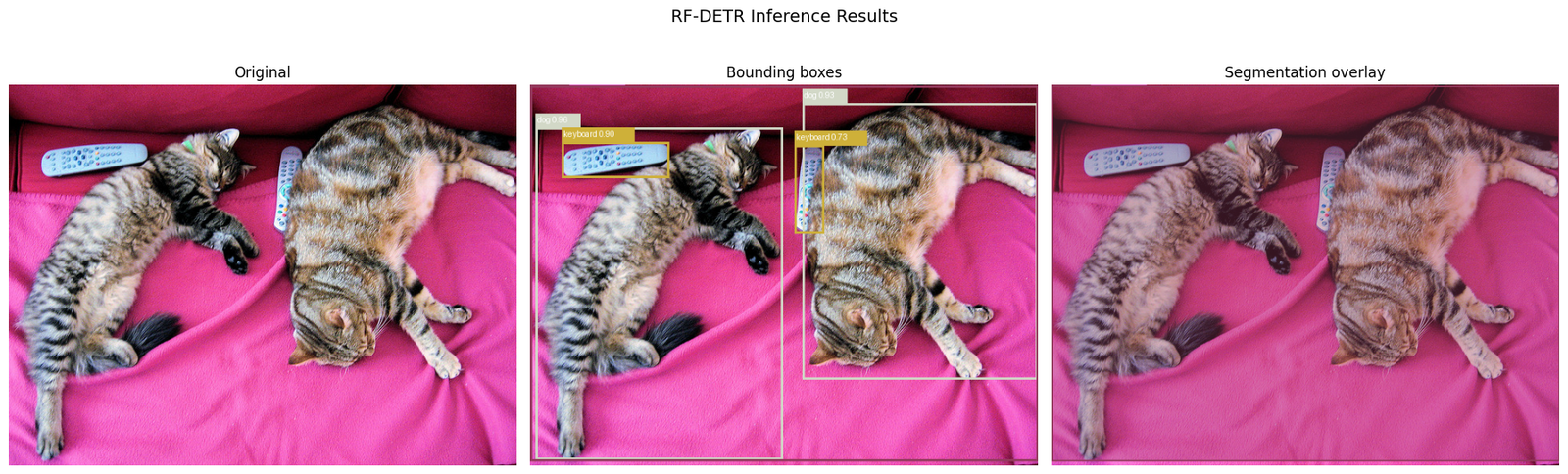
3. Single Image — Bounding Box Detection
We download a sample COCO val image to test on.
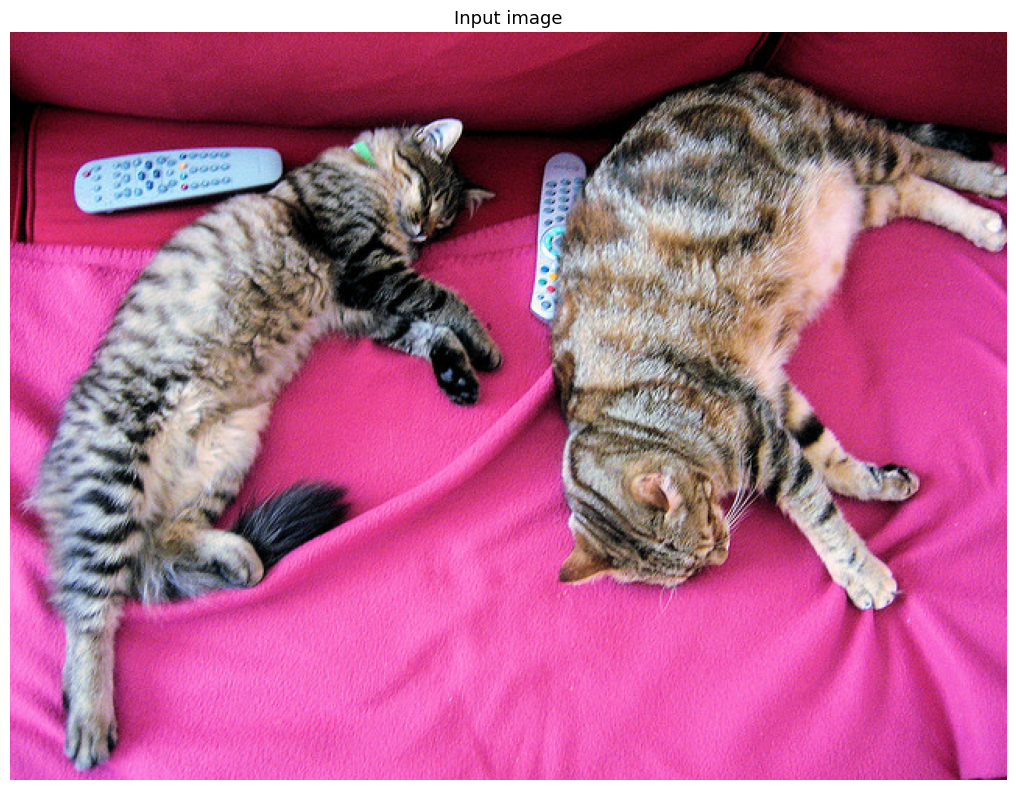
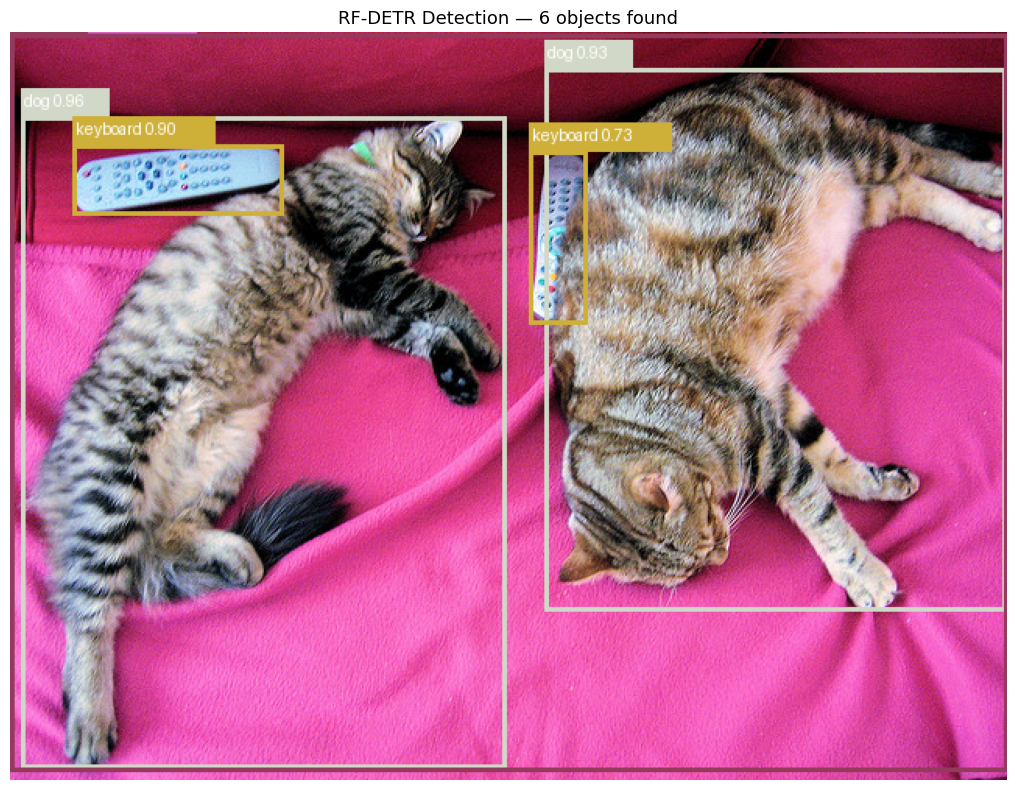
Inference time : 936.9 ms
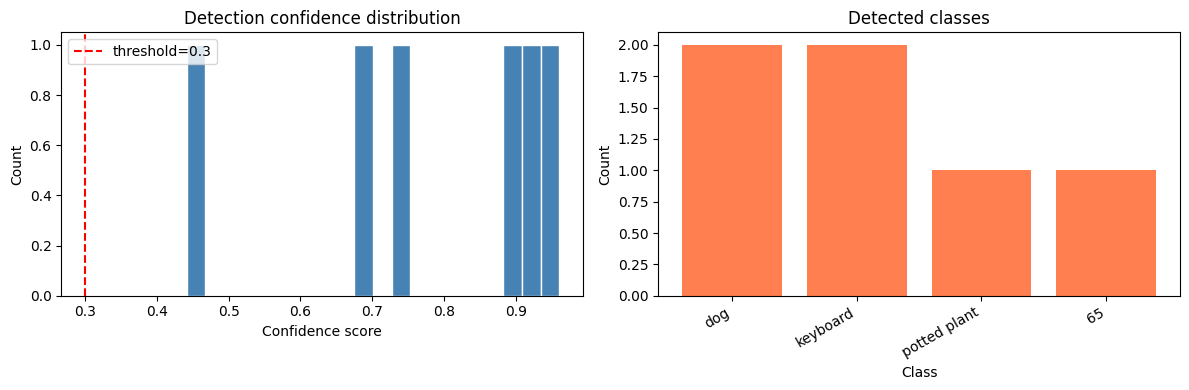
Detections     : 6
Classes found  : ['dog', 'dog', 'keyboard', 'keyboard', 'potted plant', '65']
Confidences    : [0.9610000252723694, 0.9340000152587891, 0.8970000147819519, 0.7279999852180481, 0.6779999732971191, 0.44200000166893005]
---
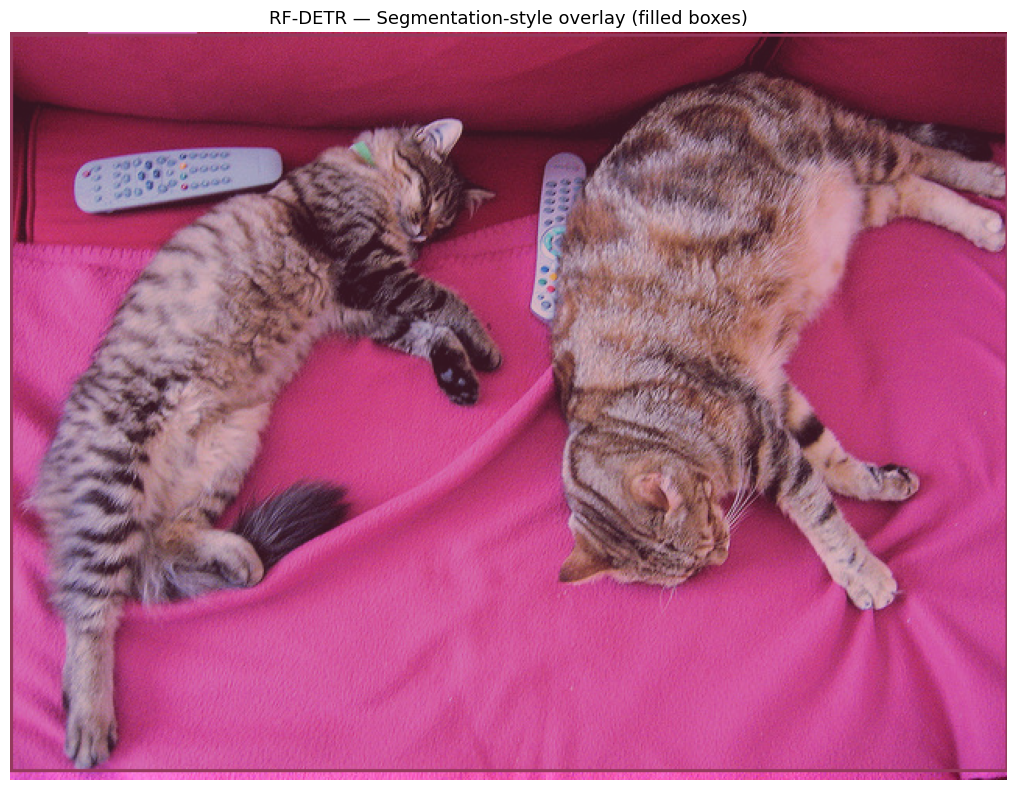
4. Instance Segmentation
RF-DETR-Seg models produce per-object masks. Here we show two approaches:
- A) Using the RF-DETR-Seg model (if available)
- B) Simulating mask overlay from bounding boxes (always works)
---
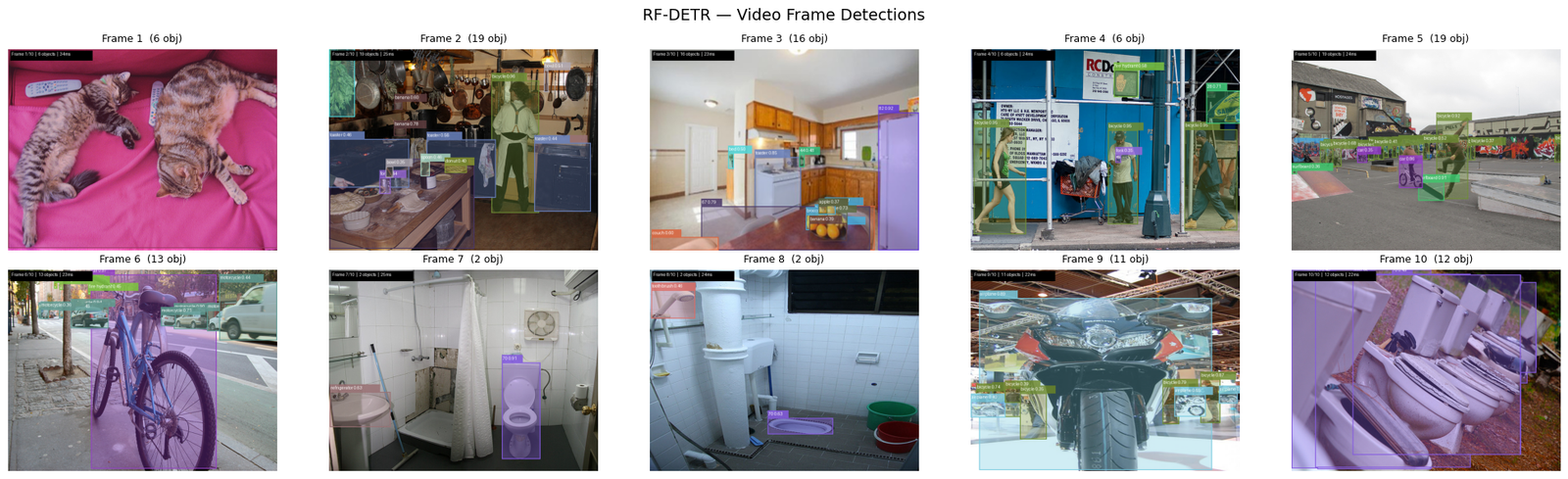
5. Video Inference — Frame-by-Frame
We simulate a video by:
- Downloading a short clip from a public URL (or using your own video)
- Running RF-DETR on each frame
- Saving the annotated frames as a GIF / MP4
To use your own video: replace VIDEO_PATH with your file path.
Loaded 10 frames
  Frame  1:  6 detections  34ms
  Frame  2: 19 detections  25ms
  Frame  3: 16 detections  23ms
  Frame  4:  6 detections  24ms
  Frame  5: 19 detections  24ms
  Frame  6: 13 detections  23ms
  Frame  7:  2 detections  25ms
  Frame  8:  2 detections  24ms
  Frame  9: 11 detections  22ms
  Frame 10: 12 detections  22ms
Done. Avg inference: 25ms/frame
---
6. Detection Count Over Time
Plot how many objects are detected per frame — useful for understanding scene complexity.
---
7. Save Annotated Frames as GIF
Creates an animated GIF you can view in any browser.
---
8. Using a Real Video File
Replace VIDEO_PATH with your own .mp4 / .avi file.
---
Summary
| Task | Code | Output |
|---|---|---|
| Single image detection | model.predict(image, threshold=0.3) | supervision.Detections |
| Draw bounding boxes | draw_detections(image, detections) | PIL Image |
| Segmentation overlay | draw_segmentation_style(image, detections) | PIL Image |
| Video frame loop | for frame in frames: model.predict(frame) | List of annotated frames |
| Save as GIF | frames[0].save(path, save_all=True, ...) | Animated GIF |
| Real video (OpenCV) | cv2.VideoCapture(path) + frame loop | MP4 / GIF |
For true instance segmentation masks, use RFDETRSegPreview or RFDETRSegNano — these models output detections.mask (N×H×W boolean arrays) that you can overlay directly on the image.
16h — RF-DETR Pixel-wise Instance Segmentation
This notebook demonstrates pixel-wise instance segmentation using RF-DETR-Seg, which outputs a binary mask for every detected object.
What you'll see
- Per-pixel coloured masks overlaid on the image
- Each object gets its own colour
- Bounding boxes + class labels on top
- Video frame processing with mask overlays
- Mask statistics (area, coverage per class)
RF-DETR Segmentation Models
| Model | Params | Resolution | COCO mask AP |
|---|---|---|---|
| RF-DETR-Seg-Nano | ~30M | 312×312 | ~28 |
| RF-DETR-Seg-Small | ~32M | 432×432 | ~32 |
| RF-DETR-Seg-Medium | ~34M | 480×480 | ~34 |
| RF-DETR-Seg-Large | ~34M | 560×560 | ~36 |
| RF-DETR-Seg-Preview | ~106M | 432×432 | preview |
RFDETRSegPreview uses the DINOv2-Base backbone (same as RF-DETR-Base) and adds a lightweight mask head on top of the decoder.---
1. Load RF-DETR Segmentation Model
---
2. Colour Palette & Mask Drawing Utilities
---
3. Single Image — Pixel-wise Segmentation
---
4. Visualise Individual Masks
---
5. Mask Statistics
---
6. Video — Pixel-wise Segmentation on Every Frame
---
7. Save as Animated GIF
---
8. Real Video with OpenCV
---
Summary
| Task | Code |
|---|---|
| Load seg model | seg_model = RFDETRSegPreview() |
| Run inference | dets = seg_model.predict(image, threshold=0.3) |
| Access masks | dets.mask → shape (N, H, W) bool |
| Draw pixel masks | draw_pixel_masks(image, dets) |
| Mask area | dets.mask[i].sum() pixels |
| Save GIF | frames[0].save(path, save_all=True, ...) |
| Real video | cv2.VideoCapture + frame loop |
Mask output format: ``python dets.mask # numpy bool array (N, H, W) dets.xyxy # bounding boxes (N, 4) dets.confidence # scores (N,) dets.class_id # class indices (N,) ``
16i — RF-DETR: Object Detection & Segmentation on a Video Sequence
Run RF-DETR on a sequence of images (or a real video file) and produce:
- Annotated frames with bounding boxes (detection model)
- Annotated frames with pixel-level instance segmentation masks (seg model)
- An animated GIF or MP4 of the results
- A CSV of every detection
Three input modes
| Mode | Argument | Example |
|---|---|---|
| Image directory | IMAGE_DIR | /data/robot_frames/ |
| Video file | VIDEO_PATH | /data/clip.mp4 |
| Webcam | WEBCAM_ID | 0 |
Two model modes
| Mode | Variable | Notes |
|---|---|---|
| Detection only | USE_SEG = False | RFDETRBase / RFDETRLarge |
| Instance segmentation | USE_SEG = True | RFDETRSegNano / RFDETRSegPreview |
rfdetr_video_sequence.py — run from the terminal for large datasets.---
0. Imports & configuration
---
1. Load RF-DETR model
---
2. Drawing helpers
---
3. Frame source helpers
---
4. Load frames
---
5. Preview first frame
---
6. Run RF-DETR on every frame
---
7. Visualise annotated frames (grid)
---
8. Detection statistics over time
---
9. Class distribution across all frames
---
10. Save outputs
---
11. Side-by-side comparison: original vs annotated
---
Summary
| Step | What happened |
|---|---|
| Model | RF-DETR Base/Large (detection) or RF-DETR Seg (instance segmentation) |
| Input | Image directory / video file / webcam |
| Per-frame output | Annotated JPEG saved to OUTPUT_DIR |
| GIF | Animated GIF of all annotated frames |
| MP4 | Video file of all annotated frames |
| CSV | One row per detection: frame, class, confidence, bbox |
Terminal script (for large datasets)
# Detection on image directory
python rfdetr_video_sequence.py \
    --image_dir /data/frames/ \
    --output_dir /tmp/out/ \
    --threshold 0.35 \
    --gif --csv

# Segmentation on a video file
python rfdetr_video_sequence.py \
    --video /data/clip.mp4 \
    --seg \
    --output_dir /tmp/out/ \
    --mp4 --csv

# Detection on every 5th frame of a long video
python rfdetr_video_sequence.py \
    --video /data/long_clip.mp4 \
    --step 5 \
    --output_dir /tmp/out/ \
    --mp4
Key RF-DETR API
from rfdetr import RFDETRBase
model = RFDETRBase()
detections = model.predict(pil_image, threshold=0.35)
# detections.xyxy        → (N, 4) bounding boxes
# detections.confidence  → (N,)   scores
# detections.class_id    → (N,)   class indices
# detections.mask        → (N, H, W) boolean masks  [seg model only]
Multi-Scale Deformable Attention in RF-DETR — A Hands-On Tutorial
Notebook 16j · companion to the RF-DETR series.
RF-DETR's transformer decoder cross-attention is a Multi-Scale Deformable Attention (MSDeformAttn) module — the same primitive introduced in Deformable DETR (Zhu et al., 2021) and inherited via LW-DETR. Source in the cloned repo:
src/rfdetr/models/ops/modules/ms_deform_attn.py— thenn.Modulesrc/rfdetr/models/ops/functions/ms_deform_attn_func.py— the pure-PyTorch coresrc/rfdetr/models/transformer.py— where it is wired into the decoder
Why deformable attention?
Vanilla DETR uses dense attention: every query attends to every spatial location of the feature map. For an image feature map of \(H\times W\) tokens this is \(O((HW)^2)\) — prohibitively expensive at high resolution and slow to converge.
Deformable attention instead lets each query attend to only a small, fixed number of sampled points (n_points, e.g. 4) around a learned reference point, across one or more feature-map scales (n_levels). Complexity drops to \(O(N_q \cdot n\_heads \cdot n\_levels \cdot n\_points)\) — independent of \(HW\).
| Property | Vanilla attention | Deformable attention |
|---|---|---|
| Keys per query | all \(HW\) tokens | n_levels * n_points (e.g. 4×4=16) |
| Complexity | \(O((HW)^2)\) | \(O(N_q \cdot n\_points)\) |
| Multi-scale | needs explicit fusion | native (n_levels) |
| Weights | from query·key dot-product | predicted directly from the query (a linear layer) |
n_levels * n_points sampled locations. The "keys" only supply values, sampled via bilinear interpolation at query-predicted offsets.RF-DETR configuration
RF-DETR base ships with:
num_feature_levels = 1(single-scale projector),num_queries = 300
but the MSDeformAttn module itself defaults to the multi-scale Deformable-DETR settings:
MSDeformAttn(d_model=256, n_levels=4, n_heads=8, n_points=4)
In transformer.py the decoder cross-attention is built as:
self.cross_attn = MSDeformAttn(
    d_model,
    n_levels=num_feature_levels,
    n_heads=ca_nhead,
    n_points=dec_n_points,
)
This tutorial demonstrates the general multi-scale case (n_levels=4) so the mechanics are fully visible; the single-level RF-DETR-base case is just L=1.
torch: 2.3.0+cu121 | device: cuda
1. The tensors and their shapes
Let's fix a concrete toy problem and name every dimension. These match the argument names in RF-DETR's MSDeformAttn.forward.
| Symbol | Meaning | Toy value |
|---|---|---|
N | batch size | 2 |
C = d_model | hidden dim | 256 |
M = n_heads | attention heads | 8 |
L = n_levels | feature-map scales | 4 |
P = n_points | sampled points / head / level | 4 |
Lq= len_query | number of queries (object slots) | 300 |
| \((H_l, W_l)\) | spatial size of level l | (32,32),(16,16),(8,8),(4,4) |
S = \(\sum_l H_l W_l\) | total flattened tokens | 1024+256+64+16 = 1360 |
Head dim d = C / M = 256 / 8 = 32.
head dim d      = 32
level sizes     = [1024, 256, 64, 16] -> S = 1360
level_start_index = [0, 1024, 1280, 1344]
The four inputs to MSDeformAttn.forward
query—(N, Lq, C): one vector per object query (from the decoder).
Drives where to sample (offsets) and how much each sample counts (attention weights).
reference_points—(N, Lq, L, 2)in[0,1](normalized x,y): the
anchor around which each query samples, per level. (Can be (...,4) for box refs — anchor + w/h.)
input_flatten(a.k.a.valuesource) —(N, S, C): all feature-map
tokens from all levels concatenated along the sequence axis. This is the only thing that supplies actual content ("values").
input_spatial_shapes(L,2)andinput_level_start_index(L,):
metadata to slice the flat S axis back into per-level 2-D grids.
query                    (2, 300, 256)  torch.float32
reference_points         (2, 300, 4, 2)  torch.float32
input_flatten            (2, 1360, 256)  torch.float32
input_spatial_shapes     (4, 2)  torch.int64
input_level_start_index  (4,)  torch.int64
2. Inside the module — step by step
The module owns four linear layers (from ms_deform_attn.py lines 62–65):
self.sampling_offsets  = nn.Linear(d_model, n_heads * n_levels * n_points * 2)  # WHERE to sample
self.attention_weights = nn.Linear(d_model, n_heads * n_levels * n_points)      # HOW MUCH each sample counts
self.value_proj        = nn.Linear(d_model, d_model)                            # project the value source
self.output_proj       = nn.Linear(d_model, d_model)                            # project the aggregated result
We'll instantiate them here and walk through the forward pass, printing shapes at every stage.
sampling_offsets : Linear(256 -> 256)  # = M*L*P*2 = 256
attention_weights: Linear(256 -> 128)  # = M*L*P   = 128
value_proj       : Linear(256 -> 256)
output_proj      : Linear(256 -> 256)
2a. Project the value source and reshape into heads
value = value_proj(input_flatten) then reshaped so each of the M heads owns a d-dim slice. Shape goes (N, S, C) -> (N, M, d, S).
value (per-head) : (2, 8, 32, 1360) # (N, M, d, S)
2b. Predict sampling offsets from the query
A single linear layer maps each query vector to MLP*2 numbers — an (x, y) offset for every (head, level, point). Reshaped to (N, Lq, M, L, P, 2).
sampling_offsets : (2, 300, 8, 4, 4, 2) # (N, Lq, M, L, P, 2)
2c. Predict attention weights from the query and softmax
Another linear layer produces MLP logits per query; softmax is applied over the **flattened L*P axis** so, per head, the weights over all sampled points (across all levels) sum to 1.
attention_weights        : (2, 300, 8, 4, 4)  # (N, Lq, M, L, P)
per-head weight sum (should be 1): 1.0
2d. Turn offsets into absolute sampling locations
For 2-D reference points we add the (normalized) offset to the reference point. Crucially the offset is divided by an offset_normalizer = (W_l, H_l) per level, so a "+1 pixel" offset means the same physical shift regardless of that level's resolution. From ms_deform_attn.py lines 228–233:
offset_normalizer = torch.stack([spatial_shapes[..., 1], spatial_shapes[..., 0]], -1)  # (L, 2) = (W, H)
sampling_locations = (
    reference_points[:, :, None, :, None, :]                       # (N,Lq,1,L,1,2)
    + sampling_offsets / offset_normalizer[None, None, None, :, None, :]
)
Result: (N, Lq, M, L, P, 2), values roughly in [0,1].
offset_normalizer (W,H)  : [[32, 32], [16, 16], [8, 8], [4, 4]]
sampling_locations       : (2, 300, 8, 4, 4, 2)  # (N, Lq, M, L, P, 2)
loc range ~[0,1]         : min=-0.524 max=1.528
3. The sampling core — bilinear grid_sample
This is the heart of the operation, mirroring ms_deform_attn_core_pytorch. For each level we:
- reshape that level's values back to a 2-D grid
(N*M, d, H_l, W_l), - convert sampling locations from
[0,1]to grid_sample's[-1,1]
convention (grid = 2*loc - 1),
- bilinearly sample the values at those locations,
- finally weight all
L*Psamples by the attention weights and sum.
The output per query is a C-dim vector: (N, Lq, C).
core output : (2, 300, 256) # (N, Lq, C)
3b. Final output projection
output = output_proj(sampled) — a linear map C -> C, giving the module's final result of shape (N, Lq, C), ready to be added back into the decoder query stream.
MSDeformAttn output : (2, 300, 256) # (N, Lq, C)
4. Full module — matching RF-DETR's source
Below is a compact, faithful re-implementation of RF-DETR's MSDeformAttn (eager path only, reference_points last-dim = 2). We reuse the ms_deform_attn_core above.
Full MSDeformAttn output : (2, 300, 256)  # (N, Lq, C)
param count              : 230,272
5. Sanity check against RF-DETR's own implementation
We compare our re-implementation to the real rfdetr.models.ops.modules.MSDeformAttn (CPU eager path) on identical inputs and weights — this proves the tutorial matches the source exactly.
The next cell tries two import strategies:
- Package import — works when
rfdetris pip-installed (the docker image
pins rfdetr and pyDeprecate).
- Direct file load (fallback) — loads only the two deformable-attention
files straight from the cloned rf-detr-src/ checkout, bypassing rfdetr/__init__.py and its heavier deps (deprecate, supervision, …). This lets the comparison run with just torch + the git clone.
Imported real RF-DETR MSDeformAttn (direct file load, no full package) ✔
output shapes  : (2, 300, 256) (2, 300, 256)
max |diff|     : 0.0
MATCH ✔
6. Visualizing where a query samples
Deformable attention's intuition: each query looks at only a handful of learned locations. Below we plot, for one query, the n_points sampling locations on the finest level, colored by their (softmax) attention weight. With freshly-init weights the offsets fan out radially (see _reset_parameters).

7. Complexity check — deformable vs dense
Deformable attention's cost is independent of \(HW\). Let's count the effective "key lookups" per query and compare against dense attention as resolution grows.
Deformable: 128 lookups/query (fixed)
Dense @ 32x 32:    1024 lookups/query (8x more)
Dense @ 64x 64:    4096 lookups/query (32x more)
Dense @ 128x128:   16384 lookups/query (128x more)
Dense @ 256x256:   65536 lookups/query (512x more)
Summary
- RF-DETR's decoder cross-attention is Multi-Scale Deformable Attention
(MSDeformAttn), inherited from Deformable DETR via LW-DETR.
- Inputs:
query (N,Lq,C),reference_points (N,Lq,L,2|4),
input_flatten (N,S,C), plus spatial_shapes (L,2) and level_start_index (L,).
- Output:
(N, Lq, C). - Two small linear layers predict, from the query alone:
- offsets →
(N,Lq,M,L,P,2)(where to sample), and - attention weights → softmax over
L*P(how much each sample counts). - Values come from
input_flatten, sampled via bilineargrid_sampleat
reference-point + offset locations, then weighted-summed.
- Cost is
O(N_q · M · L · P)— independent of feature-map resolution,
enabling high-res multi-scale detection with fast convergence.
Weights for inference/visualization with the real model live at /mnt/mydata/huggingface/rf-detr-base (already present, no download needed).
Source files (in this folder's cloned repo rf-detr-src/):
Custom Augmentations and Live Training Progress


RF-DETR is a real-time object detection model that combines the accuracy of transformer-based detectors with inference speeds suitable for production. 1.5.0 brings two headline additions:
- Custom training augmentations via Albumentations — a flexible system that
lets you control exactly how images are transformed during training, with bounding boxes and segmentation masks kept in sync automatically. Four ready-made presets cover the most common scenarios out of the box.
- Live progress bars and structured epoch logs — per-epoch rich / tqdm progress
so you can monitor batch-level metrics without parsing raw log output.
You will learn how to:
- Explore and compare the four built-in augmentation presets
- Visually inspect augmented samples before committing to a full training run
- Define a fully custom augmentation pipeline
- Train RF-DETR with your chosen augmentation config
- Run inference with the trained model
1. Install RF-DETR 1.5.0
rfdetr[train,augment] includes the training dependencies and optional Albumentations integration used in this cookbook. supervision handles visualization.
2. Check GPU availability
RF-DETR trains on GPU when one is available and falls back to CPU otherwise. The cell below detects your device and prints VRAM size — a useful sanity check before choosing batch size.
3. Download COCO 2017
We use the official train/val splits — no manual splitting needed.
| Split | Images | Size |
|---|---|---|
train2017 | ~118 000 | ~18 GB |
val2017 | 5 000 | ~1 GB |
| annotations | — | ~241 MB |
Set up the dataset directory structure
model.train() expects: `` dataset/ train/ _annotations.coco.json + images valid/ _annotations.coco.json + images ``
4. Explore the built-in augmentation presets
RF-DETR ships four ready-made presets tuned for common use cases. Each preset is a plain Python dict mapping Albumentations transform names to their constructor kwargs (including p, the probability of applying the transform). You can inspect, merge, or extend them like any other dict.
| Preset | When to use |
|---|---|
AUG_CONSERVATIVE | Small datasets (< 500 images) — gentle transforms to avoid overfitting |
AUG_AGGRESSIVE | Large datasets (2 000+ images) — stronger augmentations for better generalisation |
AUG_AERIAL | Satellite and overhead imagery — rotation-invariant transforms |
AUG_INDUSTRIAL | Manufacturing and inspection data — handles structured textures |
5. Inspect augmented samples before training
Setting save_dataset_grids=True writes 3×3 JPEG grids of augmented training and validation images to output_dir before any weight updates occur. Use this to visually sanity-check your pipeline in seconds — catching problems like flipped labels or extreme colour shifts before committing to a full training run.
Saved files: `` output/ train_batch0_grid.jpg train_batch1_grid.jpg train_batch2_grid.jpg val_batch0_grid.jpg val_batch1_grid.jpg val_batch2_grid.jpg ``
Display the saved grids inline
6. Choose your augmentation config
Pick one of the four options below. Option A (a built-in preset) is the fastest way to get started. Options B–D give increasing levels of control. The selected AUG_CONFIG is passed straight to model.train() in the next section.
7. Train with augmentations
Run a full training pass with the augmentation config chosen above. The progress_bar="rich" setting activates per-epoch live progress bars — a batch counter, loss, and learning rate are updated in real time. Structured metric tables are printed at the end of each epoch.
aug_config accepts any dict of Albumentations transforms, including the AUG_CONFIG defined above. Passing {} disables all augmentations.
8. Run inference
Load a sample image and run model.predict(). The method returns a supervision.Detections object, which makes it straightforward to draw bounding boxes and labels with the supervision annotators.
9. Next steps
You have seen the complete 1.5.0 augmentation workflow — from exploring presets through live inspection to a full training run. From here:
- Augmentation docs — full transform reference and custom pipeline guide
- Advanced training options — EMA, gradient accumulation, learning rate schedules
- Logger integrations (ClearML, MLflow, W&B) — experiment tracking
- Export your model — ONNX, TensorRT, CoreML
- RF-DETR 1.6.0 notebook — PyTorch Lightning building blocks
Custom optimizer and LR scheduler in RF-DETR
RF-DETR fine-tunes with a managed AdamW optimizer and a step LR schedule by default. Both are swappable through TrainConfig without touching the training loop — you can select any torch.optim optimizer, any torch.optim.lr_scheduler schedule, a third-party optimizer (e.g. pytorch-optimizer) by import path, or a functools.partial with your own hyperparameters baked in.
This cookbook fine-tunes RFDETRSmall on a small Roboflow Universe dataset while replacing both the optimizer and the scheduler, then verifies the swap actually took effect on the built LightningModule.
The three selection modes
TrainConfig.optimizer and TrainConfig.lr_scheduler each accept one of:
| Mode | optimizer example | lr_scheduler example | Who supplies hyperparameters |
|---|---|---|---|
| Managed short name | "adamw", "sgd" | "step", "cosine" | RF-DETR injects lr / weight_decay; presets own warmup + full-run sizing |
| Explicit import path | "torch.optim.AdamW", "pytorch_optimizer.Lion" | "torch.optim.lr_scheduler.CosineAnnealingLR" | You, via optimizer_kwargs / lr_scheduler_kwargs (RF-DETR injects nothing) |
Callable / functools.partial | functools.partial(torch.optim.AdamW, weight_decay=1e-4) | functools.partial(StepLR, step_size=30) | Baked into the callable; the *_kwargs field is ignored (with a warning) |
See Training customization → Custom optimizer / LR scheduler and Training parameters for the full reference.
Setup
Install rfdetr with the train extra (PyTorch Lightning, COCO eval) plus roboflow for the dataset download. A GPU is recommended; this small dataset also runs on CPU for a quick smoke test.
1 - Download the dataset
Get a free Roboflow API key at app.roboflow.com/settings/api and expose it as ROBOFLOW_API_KEY (an environment variable locally, or a Colab secret with the same name). The download is idempotent — re-running skips the transfer if the target directory already exists.
2 - Infer class names
RF-DETR uses 0-based class indices; sort the COCO categories by their original id and read names in order.
3 - Configure a custom optimizer and LR scheduler
This run replaces both defaults using explicit import paths:
- Optimizer —
"torch.optim.AdamW". In explicit-path mode RF-DETR builds the class from its own
parameter groups (which already carry the per-group lr / lr_encoder) plus optimizer_kwargs only; it injects no lr or weight_decay, so anything the optimizer needs goes in optimizer_kwargs.
- Scheduler —
"torch.optim.lr_scheduler.CosineAnnealingLR"withT_max=EPOCHS, stepped once per
epoch (lr_scheduler_interval="epoch"). RF-DETR injects no T_max, so it is passed explicitly.
- Warmup — with
warmup_epochs > 0, an explicit scheduler is automatically prepended with a linear
warmup ramp via SequentialLR (managed presets bake warmup into their own schedule instead).
Two alternative ways to express the same intent (uncomment to try):
# Managed short name — RF-DETR injects lr / weight_decay for you:
optimizer="sgd", optimizer_kwargs={"momentum": 0.9, "nesterov": True}

# Callable / functools.partial — bake args in; optimizer_kwargs is ignored:
import functools
optimizer=functools.partial(torch.optim.AdamW, weight_decay=1e-4)
lr_scheduler=functools.partial(torch.optim.lr_scheduler.StepLR, step_size=10, gamma=0.1)
4 - Fine-tune
trainer.fit runs the loop with the custom optimizer + scheduler. RFDETRModelModule.configure_optimizers() builds them from the config during setup — it needs the connected trainer to size the schedule, so it runs inside fit, not standalone. On this small dataset 20 epochs is enough to see the cosine LR decay take effect; scale EPOCHS up for a real run.
5 - Verify the swap took effect
After fit, PyTorch Lightning exposes the objects it actually trained with. Confirm the custom optimizer and scheduler were selected: an AdamW optimizer and a SequentialLR (the outer wrapper is the automatic linear-warmup prepended because warmup_epochs > 0; its second phase is the CosineAnnealingLR).
Where to go next
- Swap
optimizer="torch.optim.AdamW"for a third-party optimizer by import path, e.g.
optimizer="pytorch_optimizer.Lion" (install pytorch-optimizer first).
- Try a different schedule —
"torch.optim.lr_scheduler.OneCycleLR"(needstotal_stepsin
lr_scheduler_kwargs) or the managed "cosine" preset (lr_scheduler_kwargs={"min_factor": 0.1}).
- Wrapper optimizers (SAM, Lookahead) need a custom
configure_optimizers— see the
customization guide for the caveats.
RF-DETR → Native CoreML Export & Inference
Export an RF-DETR detector directly to a native CoreML .mlpackage you can drag straight into Xcode — no ONNX intermediary and no ExecuTorch runtime involved.
format="coreml" (this notebook) exports via torch.export + coremltools straight to a native .mlpackage. format="executorch", backend="coreml" is a different path — it produces a .pte file for the ExecuTorch runtime instead. See the ExecuTorch cookbook for that path.1. Install
The [coreml] extra provides coremltools, the exporter's only dependency beyond torch.
2. Setup
CoreML export itself runs on CPU — no GPU is needed.
3. Export to a .mlpackage
The COCO-pretrained RFDETRSmall is exported directly — pass pretrain_weights="<path/to/checkpoint.pth>" to export a fine-tuned model instead.
The file is named after the model variant (rfdetr-small.mlpackage). dynamic_batch=True is not supported — fixed shapes are required for reliable ANE / GPU scheduling, so export one .mlpackage per batch size.
Export leaves coreml_precision at its default None, which selects FP32 for tight CPU parity with eager PyTorch. Pass coreml_precision="float16" instead for a smaller, ANE-oriented bundle (expect larger numeric drift).
4. Sample image
A single street scene with several COCO classes (dog, person, backpack, car) is enough to verify detections. The image is downloaded once and reused.
5. Run the .mlpackage with coremltools
coremltools infers its own input/output names for the .mlpackage spec — they are not renamed to input / dets / labels. Read the input name and output order from mlmodel.get_spec().description instead of hardcoding them, then match outputs by position in the same order as the ONNX output_names contract (dets, labels for detection; dets, labels, masks for segmentation).
Preprocessing is the same NCHW, ImageNet-normalized pipeline the ONNX and ExecuTorch exports expect — infer_transforms builds it directly.
6. Visualize with supervision
post_process returns boxes in absolute xyxy pixel coordinates along with scores and COCO class ids. Filter by confidence, wrap the result in a supervision.Detections, and annotate the original image.
Annotate the PIL image rather than np.array(image). supervision's annotators accept either, but a numpy scene is assumed to be OpenCV-style BGR — handing them an RGB array swaps the red and blue channels of the annotations, and sv.plot_image then swaps the photo itself. Passing PIL lets supervision convert in both directions and keeps the colours right.
Next steps
- Deploy in Xcode — drag
rfdetr-small.mlpackageinto your Xcode project and load it with the
Vision or CoreML framework for on-device iOS / macOS inference.
- Fine-tuned weights — pass
pretrain_weights="<path/to/checkpoint.pth>"when constructing the model. - Smaller bundle — pass
coreml_precision="float16"toexport()for an ANE-oriented build (expect
larger numeric drift from the fp32 PyTorch baseline).
- On-device via ExecuTorch instead — see the ExecuTorch cookbook for the
format="executorch", backend="coreml" path, which produces a .pte for the ExecuTorch runtime rather than a native .mlpackage.
- See the Export documentation for all formats and options.
RF-DETR → ExecuTorch Export & Inference
Export an RF-DETR detector to a portable ExecuTorch program (.pte) for on-device deployment on mobile and edge hardware, then run it on the CPU and visualize the detections. Unlike ONNX or TFLite, the model is captured directly via torch.export (no intermediate conversion) and lowered to a hardware backend:
| Backend | Target | Precision |
|---|---|---|
xnnpack (this notebook) | portable CPU (Android / iOS / Linux / macOS) | fp32 |
coreml | Apple Neural Engine | fp16 |
qnn | Qualcomm Snapdragon HTP | fp16 |
!!! warning "The input tensor must be contiguous"
The ExecuTorch runtime reads the input buffer as contiguous NCHW and ignores tensor strides. Any preprocessing that permutes axes — np.transpose, Tensor.permute, torchvision's ToImage — returns a strided view rather than a copy, and the runtime misreads such a view as a scrambled image. Nothing errors: the model runs without error and returns plausible-shaped output, but every detection's score collapses below threshold. This cookbook is safe because infer_transforms already materializes a contiguous tensor (its final _ensure_contiguous step); Step 6 also calls .contiguous() defensively so the requirement stays visible for anyone adapting the preprocessing.
1. Install
The [executorch] extra provides the exporter and the XNNPACK backend.
Colab ships mutually inconsistent preinstalled packages that otherwise crash import rfdetr, so two are aligned: torchaudio is uninstalled (RF-DETR never uses it, but transformers imports it when present and a torch/torchaudio CUDA-version mismatch then errors), and pillow is force-reinstalled to a clean version (a half-upgraded PIL breaks torchvision's import with cannot import name '_Ink').
flatc — ExecuTorch serializes the .pte with the FlatBuffers compiler. It ships in the Linux executorch wheel (so Colab works out of the box); on macOS install it separately with brew install flatbuffers.2. Setup
ExecuTorch export is CPU-only — no GPU is needed.
3. Export to a .pte program
format="executorch" requires an explicit backend. The COCO-pretrained RFDETRSmall is exported directly — pass pretrain_weights="<path/to/checkpoint.pth>" to export a fine-tuned model instead.
The file is named after the model variant (rfdetr-small.pte). torch.export bakes a fixed input shape into the graph (square at the model's resolution), so dynamic_batch is not supported — export one .pte per batch size.
4. Other backends
Swap the backend argument to target a different on-device runtime.
Apple (CoreML, fp16)
Install coremltools, then rerun the export cell with:
model.export(format="executorch", backend="coreml", output_dir="export_executorch")
Qualcomm Snapdragon (QNN, fp16)
Build ExecuTorch from source against the QAIRT SDK (the QNN backend is not pip-installable), then rerun the export cell with:
model.export(format="executorch", backend="qnn", soc="SM8650", output_dir="export_executorch")
CoreML runs fp16 on the Apple Neural Engine; QNN targets the Snapdragon HTP and bakes in the target SoC.
5. Sample image
A single street scene with several COCO classes (dog, person, backpack, car) is enough to verify detections. The image is downloaded once and reused.
6. Run the .pte on the CPU
Runtime.load_program(...).load_method("forward") gives a callable graph whose two outputs are dets (boxes, cxcywh, normalized) and labels (class logits). The .pte expects the same input the model was trained on: NCHW, ImageNet-normalized, at the traced resolution — infer_transforms builds exactly that pipeline.
The trailing .contiguous() is defensive. infer_transforms already returns a contiguous tensor (its final _ensure_contiguous step), so the call is a no-op here — it documents the runtime's requirement explicitly. If you swap in your own preprocessing that permutes axes without copying, the ExecuTorch runtime would ignore the strides, misread the buffer as a scrambled image, and every detection would collapse below threshold.
7. Visualize with supervision
post_process returns boxes in absolute xyxy pixel coordinates along with scores and COCO class ids. Filter by confidence, wrap the result in a supervision.Detections, and annotate the original image.
Annotate the PIL image rather than np.array(image). supervision's annotators accept either, but a numpy scene is assumed to be OpenCV-style BGR — handing them an RGB array swaps the red and blue channels of the annotations, and sv.plot_image then swaps the photo itself. Passing PIL lets supervision convert in both directions and keeps the colours right.
Next steps
- Deploy on-device — copy the
.pteto your Android / iOS / edge app and run it with the ExecuTorch
runtime for that platform. See the ExecuTorch docs.
- Fine-tuned weights — pass
pretrain_weights="<path/to/checkpoint.pth>"when constructing the model. - Other runtimes — see the TensorRT cookbook (NVIDIA GPU) or
inference-models (PyTorch / ONNX / TensorRT).
- See the Export documentation for all formats and options.
RF-DETR → TensorRT Export & Inference
Export an RF-DETR detector to a TensorRT engine (.trt), then run inference with inference-models — the recommended multi-backend runtime — using its TensorRT backend.
| Step | What |
|---|---|
| Export | RFDETRSmall → rfdetr-small.trt (FP16) — raw-TensorRT deployment artifact |
| Infer | inference-models AutoModel(backend=TRT) → supervision detections |
.trt from the export step is a standalone artifact for raw TensorRT deployment, locked to this GPU + TensorRT version. inference-models builds and manages its own engine internally, so it does not load that file — it is the easier, portable path and handles preprocessing, postprocessing, and class names for you.1. Install
rfdetr[tensorrt] provides the exporter; inference-models[trt10] provides the TensorRT inference runtime.
Colab ships mutually inconsistent preinstalled packages that otherwise crash import rfdetr, so two are aligned: torchaudio is uninstalled (RF-DETR never uses it, but transformers imports it when present and a torch/torchaudio CUDA-version mismatch then errors), and pillow is force-reinstalled to a clean version (a half-upgraded PIL breaks torchvision's import with cannot import name '_Ink').
2. Setup and GPU check
TensorRT export and inference both require CUDA — fail fast with a clear message if no GPU is visible.
3. Sample image
A single street scene with several COCO classes (dog, bicycle, car) is enough to verify detections. The image is downloaded once and reused.
4. Export a TensorRT engine
format="trt" (alias of "tensorrt") compiles the engine from the COCO-pretrained RFDETRSmall — pass pretrain_weights="<path/to/checkpoint.pth>" to export your own fine-tuned model instead. Compilation is the slow step (tens of seconds to a few minutes); it writes the .trt file to output_dir.
The engine is FP16 by default (lowest latency); it automatically falls back to FP32 (with a warning) if your TensorRT build doesn't expose the FP16 builder flag. Pass fp16=False to force FP32 explicitly.
This .trt is the raw-deployment artifact. The inference step below uses inference-models, which builds its own engine — it does not load this file (see the intro note).
5. Run inference with inference-models
AutoModel.from_pretrained("rfdetr-small", backend=BackendType.TRT) loads the model and builds a TensorRT engine for inference. Calling it on an image returns per-image predictions; .to_supervision() converts them to a supervision.Detections with class names already attached — no manual preprocessing, box decoding, or COCO-id mapping.
6. Visualize with supervision
to_supervision() attaches class names under detections.data["class_name"]; fall back to the raw class_id if absent. Annotate the original image with boxes and labels.
Next steps
- Backend selection —
AutoModel.from_pretrainedalso acceptsbackend="onnx"orbackend="torch";
drop the backend= argument to let it pick the best available automatically.
- Local checkpoint —
AutoModel.from_pretrained("<path/to/checkpoint.pth>", model_type="rfdetr-small")
loads your own fine-tuned weights.
- Raw
.trtdeployment — use the engine exported in step 4 directly with the TensorRT runtime when you
need a standalone artifact (no inference-models dependency).
- See the Export documentation for all formats and options.
RF-DETR object detection fine-tuning on Roboflow Universe datasets
Select one dataset with DATASET_KEY, then run the same fine-tuning, plotting, checkpoint loading, and inference cells.
What is object detection?
Object detection answers two questions simultaneously: what objects are in an image and where they are. Each detected object gets a bounding box (four coordinates) and a class label (e.g. "car", "person"). This is the most common computer vision task — it powers traffic monitoring, safety compliance, retail analytics, medical imaging, environmental surveys, and virtually every real-time vision application.
Why fine-tune instead of train from scratch?
RF-DETR ships pre-trained on the COCO dataset (80 common object classes). Fine-tuning reuses the backbone's rich visual representations — edges, textures, object parts — learned from millions of images. Starting from these weights instead of random initialisation typically:
- Reduces training time from days to minutes or hours
- Requires far fewer labelled images (hundreds instead of tens of thousands)
- Achieves higher accuracy than training from scratch on small datasets
The process is straightforward: swap out the final classification head for your number of classes, then continue training with a small learning rate so the pre-trained features are preserved.
Dataset overview
Five datasets covering different domains are pre-configured. Set DATASET_KEY to one of:
| Key | Dataset | Domain | Classes |
|---|---|---|---|
"hard_hat_ppes" | Hard Hat Worker Safety | Construction / PPE | hat, person, vest |
"road_damage" | Pavement Distress Detection | Infrastructure Inspection | pot_hole, cracking, ravelling, ... |
"traffic" | Traffic Detection | Autonomous Driving | car, bus, truck, motorbike, bike, traffic lights |
"football" | Football Player Detection | Sports Analytics | player, ball, goalkeeper, referee |
"brackish_underwater" | Brackish Underwater | Marine Wildlife | fish, crab, jellyfish, shrimp, starfish, small_fish |
Every subsequent cell (fine-tuning, plotting, checkpoint loading, inference) adapts automatically. By the end you will have a fine-tuned model, training curves, and annotated inference images with bounding boxes.
Setup
Install rfdetr with the train and visual extras. The train extra pulls in the training loop dependencies (PyTorch Lightning, COCO evaluation tools, and data augmentation libraries), while visual adds the visualisation helpers used later in the notebook. The roboflow package handles dataset download; pandas and seaborn are needed for the metrics table and optional plot styling. If you hit an ImportError after running this cell, the most likely cause is a stale in-memory import — restart the Python runtime once and re-run from the top.
GPU recommended. Fine-tuning 50 epochs on a ~1,500-image dataset takes roughly 10–25 minutes on a modern GPU (RTX 3090, A10, T4). CPU-only is possible for a quick test but will be much slower.
Notebook display
This helper registers the %matplotlib inline magic so figures render directly beneath each cell when you run the notebook in Jupyter or Google Colab. If you are running this file as a plain Python script the function detects the absence of an IPython kernel and exits silently, so it is always safe to call.
1 - Download dataset
Roboflow exports object detection datasets in COCO format: a JSON file containing image metadata and per-image annotations, each with a bbox field (x, y, width, height in pixels) and a category_id referencing the class. The download cell fetches the exact dataset version listed in DATASETS and places it under datasets/<DATASET_KEY>/. You need a Roboflow API key — get one for free at app.roboflow.com/settings/api and set it as the ROBOFLOW_API_KEY environment variable (or as a Colab secret with the same name).
The download is idempotent: if the target directory already exists Roboflow skips the network transfer, so re-running this cell after a successful download is fast.
2 - Infer class names
The COCO annotation file defines a categories list mapping integer IDs to human-readable names. RF-DETR uses 0-based class indices internally, so we sort the categories by their original id field and read names in order. The resulting CLASS_NAMES list maps each index back to a label, which is used during inference visualisation.
If your own dataset has a single category, this list will have one element — that is expected and valid.
_save_final_checkpoint writes a self-contained .pth file that bundles model weights with the full training and model config. This is separate from the PTL checkpoint because it can be loaded with a single from_checkpoint call on any machine, without reconstructing the original config.
_detection_grid_figure arranges multiple annotated images into a fixed-column matplotlib grid. Bounding boxes are drawn with sv.BoxAnnotator and labels with sv.LabelAnnotator, showing the class name and confidence score for each detection. Using a grid keeps the visual summary compact and makes it easy to compare predictions across images at a glance.
3 - Configure training
TrainConfig centralises every hyperparameter the training loop needs. The most important fields to understand before customising them for your own dataset:
Learning rates — lr and lr_encoder are both set to 1e-4 for fine-tuning. The lr controls the detection head and decoder; lr_encoder controls the vision backbone (DINOv2). For fine-tuning, both are usually equal. If you notice the backbone overfitting early — validation loss rising while training loss keeps falling — halve lr_encoder to protect the pre-trained features while the head continues to adapt.
Batch size and gradient accumulation — batch_size=8 with grad_accum_steps=2 gives an effective batch size of 16 without requiring extra GPU memory. Effective batch size affects how smoothly gradients are estimated each update; too small (< 8) leads to noisy updates; too large (> 64) may over-smooth and slow convergence.
EMA — use_ema=False keeps this demo fast. For a production run you can enable EMA (use_ema=True) to maintain an exponential moving average of the weights, which typically adds 0.5–1.0 mAP points on small datasets by reducing the impact of noisy late-epoch updates.
Multi-scale training — multi_scale=False and expanded_scales=False disable the multi-resolution augmentation used during pre-training. Turning them off shortens epoch time by up to 40 % and is fine for most fine-tuning runs on small custom datasets. Re-enable if your validation mAP plateaus early.
Notes dict — stored verbatim in the checkpoint file alongside the weights, giving you a lightweight experiment log that travels with the model file.
4 - Preview dataset inputs
Always look at your data before starting a long training run. This cell renders a grid of annotated training images drawn from the augmented pipeline — the same view the model will see during training.
What to check here:
- Box alignment — do bounding boxes tightly surround the objects, or are they shifted or too large?
- Class correctness — are labels correct for each box? Mixed-up classes are one of the most common
annotation errors and are hard to recover from after training.
- Augmentation sanity — horizontal flips, colour jitter, and random crops should look plausible;
cropped boxes at image edges are normal.
- Class imbalance — if one class dominates the preview, the model will likely be biased toward it;
rebalancing or oversampling rare classes can help.
Catching label noise here costs a few seconds; catching it after 50 epochs of training costs much more.
5 - Fine-tune
trainer.fit hands control to PyTorch Lightning, which drives the full training loop: forward pass, bipartite matching loss (classification + bounding-box L1 + GIoU), gradient accumulation, weight updates, learning-rate scheduling, and periodic validation with COCO bounding-box mAP.
After each epoch the trainer appends a row to metrics.csv and, if validation mAP improves, saves a new best checkpoint via BestModelCallback.
Typical training times on a single GPU (RTX 3090 or similar):
- PPE / hard hat dataset (~2,600 images): ~20–30 min for 50 epochs
- Traffic dataset (~1,400 images): ~15–20 min for 50 epochs
- Underwater dataset (~12,000 images): ~60–90 min for 50 epochs
To resume an interrupted run, set train_config.resume to the path of the last PTL checkpoint (e.g. OUTPUT_DIR / "last.ckpt") before calling this cell again.
6 - Save checkpoint/model
PTL saves its own checkpoints during training (optimizer state, scheduler state, epoch counter), but those files are not directly portable — they require the same class hierarchy to load. The .pth file written here is a self-contained RF-DETR checkpoint: it bundles the model weights together with the full training and model configs, including the class names. You can share the file with a colleague and they can run inference with a single RFDETRSmall.from_checkpoint(path) call, with no need to reconstruct the original config.
For full reproducibility, keep this checkpoint alongside the dataset version number printed in section 1.
7 - Validate metrics
This cell runs a clean post-training validation: no augmentation, the best checkpoint loaded from checkpoint_best_total.pth written by BestModelCallback, and results serialised to JSON for downstream comparison or reporting.
Key metrics to inspect:
bbox/map— the primary metric: standard COCO bounding-box mAP averaged across IoU thresholds 0.50–0.95
in steps of 0.05. A value of 0.50 means the model correctly localises and classifies 50 % of objects at strict IoU thresholds. This is the most commonly reported number in object detection benchmarks.
bbox/map_50— mAP at IoU ≥ 0.50 (a box is "correct" if it overlaps the ground-truth box by at least 50 %).
Rises fastest and is the clearest early signal of whether the model is learning at all.
bbox/map_75— mAP at the stricter IoU ≥ 0.75 threshold. Reflects how precisely the model localises
objects, not just whether it finds them.
A model with high bbox/map_50 but low bbox/map_75 finds objects reliably but draws imprecise boxes. This usually improves with more training epochs or by increasing RESOLUTION.
checkpoint_best_total.pth is written after the first completed validation epoch. If training was interrupted before any epoch finished, this file will not exist and the cell below will raise FileNotFoundError.8 - Plot CSVLogger metrics
Reading loss and mAP curves is the fastest way to diagnose training problems.
Loss curves (first plot):
- A healthy run shows both training loss and validation loss decreasing together.
- A growing gap between train and val loss is a classic overfitting signal — the model is memorising the
training set. Add augmentation (multi_scale=True, or custom Albumentations), reduce learning rate, or collect more data.
- A flat or rising loss from epoch 1 usually means the learning rate is too high. Try reducing
LRto5e-5.
mAP curves (second plot):
bbox_map_50(solid line) rises fastest and is the clearest signal of learning.- On small datasets (a few hundred images) you typically see rapid improvement in epochs 1–20 followed by
a plateau around epoch 30–50.
- If mAP is still rising at epoch 50, extend
EPOCHSto 75 or 100. - If mAP never rises above 0.05, check class names, annotation quality, and whether
RESOLUTION is appropriate for the objects' scale in your dataset.
Set PLOT_LOSS_LOG_SCALE = True if the loss drops by an order of magnitude in the first few epochs and the later, more meaningful portion of the curve gets compressed into a flat line.
9 - Load checkpoint/model
from_checkpoint is the standard entry point for loading a saved RF-DETR model. It reads both the weights and the stored config from the .pth file, so the reconstructed model has the correct number of classes and resolution without you having to pass them explicitly.
This cell also confirms that the save–load round trip works before you proceed to inference, so any file corruption or version mismatch surfaces here rather than silently producing wrong predictions later.
To deploy this model in a production pipeline, you only need to ship the .pth file and call from_checkpoint.
10 - Select inference images
This cell implements a fallback chain — test split first, then validation, then train — so the notebook always finds images to run inference on even when the dataset has no dedicated test split.
Using test images gives an unbiased view of model performance because those images were never seen during training or used to select the best checkpoint. If your deployment images look different from the training set (different lighting, camera angle, resolution), replace inference_image_paths with a list of Path objects pointing to your own files to assess real-world performance before shipping the model.
11 - Visualize inference
INFERENCE_THRESHOLD is a detection confidence threshold: only detections whose bounding-box score exceeds this value are shown. The default 0.3 is a reasonable starting point; adjust it based on what you see:
- Too many false positives (boxes on background or wrong objects) → raise the threshold towards
0.5–0.7. - Missing true objects (objects in the image not detected) → lower the threshold towards
0.1–0.2. - Zero detections on most images → lower the threshold; the model may be well-calibrated to lower confidence
scores on a custom dataset than the COCO-pretrained default.
The confidence score reflects how certain the model is about each box. On a well-fine-tuned model you will typically see scores above 0.7 for clear, unoccluded objects of the target classes.
12 - Detection summary
Print per-image detection counts and confidence scores as a quick sanity check. This table is useful for:
- Spotting images with zero detections — if many images produce no detections at your chosen threshold,
the model may be under-confident; try lowering INFERENCE_THRESHOLD first.
- Checking average confidence — a well-calibrated fine-tuned model typically reports average confidence
between 0.5 and 0.9 on in-distribution images. Scores consistently below 0.3 suggest the model is uncertain and may benefit from more training epochs or additional labelled data.
- Class distribution — if certain classes never appear in inference results but were present in training data,
they may be under-represented in the training set. Consider adding more examples for those classes.
RF-DETR keypoint training demo on multiple Roboflow Universe datasets
Select one dataset with DATASET_KEY, then run the same fine-tuning, plotting, checkpoint loading, and inference cells.
RF-DETR extends bounding-box detection to predict structured keypoint skeletons — useful for human pose estimation, sports field calibration, product inspection, and any task where where matters as much as what.
Datasets — set DATASET_KEY to one of:
| Key | Dataset |
|---|---|
"dart" | Darts Detection |
"human_pose" | Human Body Pose |
"basketball_court" | Basketball Court Detection |
"football_field" | Football Field Detection |
"tennis_court" | Tennis Court Keypoint |
Every subsequent cell (fine-tuning, plotting, checkpoint loading, inference) adapts automatically. By the end you will have a fine-tuned model, training curves, and annotated inference images with optional uncertainty ellipses.
Setup
Install rfdetr with the train and visual extras. The train extra pulls in the training loop dependencies (PyTorch Lightning and COCO evaluation tools); default augmentations use torchvision, so no extra augmentation package is required. The visual extra adds the visualisation helpers used later in the notebook. The roboflow package handles dataset download; pandas and seaborn are needed for the metrics table and optional plot styling. If you hit an ImportError after running this cell, the most likely cause is a stale in-memory import — restart the Python runtime once and re-run from the top.
Notebook display
This helper registers the %matplotlib inline magic so figures render directly beneath each cell when you run the notebook in Jupyter or Google Colab. If you are running this file as a plain Python script the function detects the absence of an IPython kernel and exits silently, so it is always safe to call.
1 - Download dataset
Roboflow exports datasets in COCO keypoint format: a JSON file where each annotation contains a flat keypoints array of [x, y, visibility, x, y, visibility, ...] triplets, one per defined skeleton joint. The download cell fetches the exact dataset version listed in DATASETS and places it under datasets/<DATASET_KEY>/. You need a Roboflow API key — get one for free at app.roboflow.com/settings/api and set it as the ROBOFLOW_API_KEY environment variable (or as a Colab secret with the same name). The download is idempotent: if the target directory already exists Roboflow skips the network transfer, so re-running this cell after a successful download is fast.
2 - Infer keypoint schema
infer_coco_keypoint_schema reads the training annotation JSON and extracts three things the model needs: the class names, the number of keypoints per class, and the OKS sigmas. OKS stands for Object Keypoint Similarity — it is the keypoint analogue of IoU and ranges from 0 to 1. Each sigma is a per-keypoint scale factor that controls how strictly localisation is penalised during evaluation: a smaller sigma (e.g. 0.025 for a wrist) means the model must predict that joint more precisely to score well, while a larger sigma (e.g. 0.107 for a hip) is more forgiving. VALIDATE_KEYPOINT_METRICS will be False when your dataset has categories with different keypoint counts, because the standard COCO OKS evaluator assumes a uniform skeleton across all instances; bounding-box mAP is always computed regardless.
_save_final_checkpoint writes a self-contained .pth file that bundles model weights with the full training and model config. This is separate from the PTL checkpoint because it can be loaded with a single from_checkpoint call on any machine, without reconstructing the original config.
_annotated_keypoint_scene renders keypoint dots and, when covariance data is available, uncertainty ellipses on top of an image. Drawing ellipses here rather than in the grid helper keeps the annotation logic in one place and makes it easy to toggle DRAW_UNCERTAINTY_ELLIPSES without touching the layout code.
_keypoint_grid_figure arranges multiple annotated images into a fixed-column matplotlib grid. Using a grid rather than individual figures keeps the visual summary compact and makes it easy to compare predictions across images at a glance.
_display_keypoint_records prints per-image keypoint predictions as a pandas table. Fields that are constant across all keypoints in an image (such as the filename or detection score) are printed once as a header line rather than repeated in every row, keeping the output readable for images with many joints.
3 - Configure training
KeypointTrainConfig centralises every hyperparameter the training loop needs. A few fields are worth understanding before you customise them for your own dataset. lr and lr_encoder are usually set to the same value for fine-tuning; if you notice the backbone overfitting early you can halve lr_encoder to protect the pre-trained features while the detection head continues to adapt. grad_accum_steps=2 means gradients are accumulated over two mini-batches before a weight update, which effectively doubles the batch size without requiring extra GPU memory — useful on smaller GPUs. use_ema=False keeps the demo fast; for a production run you can set this to True to maintain an exponential moving average of weights, which often improves final accuracy by a few tenths of a mAP point. multi_scale=False and expanded_scales=False disable the multi-resolution augmentation that RF-DETR uses during pre-training; turning them off shortens epoch time significantly and is fine for most fine-tuning runs. The notes dict is stored in the checkpoint alongside the weights, giving you a lightweight experiment log that travels with the model file.
4 - Preview dataset inputs
Always look at your data before you start a long training run. This cell renders a grid of annotated training images so you can confirm that keypoint skeletons are aligned with objects, that flips and colour jitter look reasonable, and that there are no systematic labelling errors such as swapped left/right joints or keypoints sitting outside their bounding box. Catching label noise here costs a few seconds; catching it after 50 epochs of training costs much more. If the preview shows empty images or missing annotations, the most common cause is a mismatch between the image filenames in the COCO JSON and the files on disk — check that the download completed fully.
5 - Fine-tune
trainer.fit hands control to PyTorch Lightning, which drives the full training loop: forward pass, loss computation, gradient accumulation, weight updates, learning-rate scheduling, and periodic validation. After each epoch the trainer appends a row to metrics.csv and, if validation mAP improves, saves a new best checkpoint via BestModelCallback. On a single consumer GPU (RTX 3090 or similar) 50 epochs on the dart dataset takes roughly 15–30 minutes depending on BATCH_SIZE and NUM_WORKERS. If you need to resume an interrupted run, set train_config.resume to the path of the last PTL checkpoint before calling this cell again.
6 - Save checkpoint/model
PTL saves its own checkpoints during training (optimizer state, scheduler state, epoch counter), but those files are not directly portable — they require the same class hierarchy to load. The .pth file written here is a self-contained RF-DETR checkpoint: it bundles the model weights together with the full training and model configs, including the keypoint schema and class names. This means you can share the file with a colleague and they can run inference with a single RFDETRKeypointPreview.from_checkpoint(path) call, with no need to reconstruct the original config. For full reproducibility, keep this checkpoint alongside the dataset version number printed in section 1.
7 - Validate metrics
The validation pass that runs at the end of every training epoch uses the best weights seen so far and applies augmentation. This cell runs a clean post-training validation: no augmentation, the best checkpoint loaded from checkpoint_best_total.pth written by BestModelCallback, and results serialised to JSON for downstream comparison. Two metrics are most important to inspect here. bbox/map is the standard COCO bounding-box mAP at IoU 0.50:0.95 — it tells you how reliably the detector finds and bounds each object. keypoint/oks is the OKS-based mAP — it measures how precisely the model places each joint within the detected bounding boxes. A model can have a high bbox/map but a low keypoint/oks if it finds objects well but struggles to localise their joints; addressing that usually means more labelled data or tighter OKS sigmas.
Note: checkpoint_best_total.pth is written after the first completed validation epoch. If training was interrupted before any epoch finished, this file will not exist and the cell below will raise FileNotFoundError.
8 - Plot CSVLogger metrics
Reading loss curves is one of the fastest ways to diagnose training problems. Healthy runs show both training loss and validation loss decreasing together; a large and growing gap between the two is a classic overfitting signal — the model is memorising the training set rather than generalising. For the mAP curves, on small datasets (a few hundred images) you typically see rapid improvement in the first 10–20 epochs followed by a plateau around epoch 30–50; if mAP is still climbing at epoch 50, consider extending EPOCHS. Set PLOT_LOSS_LOG_SCALE = True if the loss drops by an order of magnitude in the first few epochs and the later, more meaningful portion of the curve gets compressed into a flat line at the bottom of the plot.
9 - Load checkpoint/model
from_checkpoint is the standard entry point for loading a saved RF-DETR model. It reads both the weights and the stored config from the .pth file, so the reconstructed model has the correct number of classes and keypoints without you having to pass them explicitly. You can share this checkpoint file with teammates and they can run inference immediately — the keypoint schema, class names, and OKS sigmas are all embedded in the file alongside the weights. This cell also confirms that the save-load round trip works before you proceed to inference, so any corruption or version mismatch surfaces here rather than silently producing wrong predictions later.
10 - Select inference images
This cell implements a fallback chain — test split first, then validation, then train — so the notebook always finds images to run inference on even when the dataset has no dedicated test split. Using images from the test set gives you an unbiased view of model performance because those images were never seen during training or used to pick the best checkpoint. If you want to run inference on your own images, replace inference_image_paths with a list of Path objects pointing to your files before running the next cell.
11 - Visualize inference
Two thresholds control what you see here. INFERENCE_THRESHOLD is a detection confidence threshold: only detections whose bounding-box score exceeds this value are shown. Raise it to suppress false positives; lower it to surface low-confidence detections. KEYPOINT_THRESHOLD operates within each accepted detection: individual keypoints whose confidence falls below this value are treated as not visible and omitted from the overlay. The uncertainty ellipses (drawn when DRAW_UNCERTAINTY_ELLIPSES = True) visualise the predicted covariance for each keypoint — a larger ellipse means the model is less certain about that joint's exact location.
12 - Keypoint prediction table
The table below gives you the raw coordinates and per-keypoint confidence scores for every detection in the grid above. Fields that are constant across all keypoints in an image (filename, detection score) are printed once as a header line rather than repeated in every row. This format is easy to copy into a spreadsheet or feed into downstream analysis.
RF-DETR instance segmentation fine-tuning on Roboflow Universe datasets
Select one dataset with DATASET_KEY, then run the same fine-tuning, plotting, checkpoint loading, and inference cells.
RF-DETR extends bounding-box detection with a sparse segmentation head that predicts per-object binary masks — useful for facade analysis, infrastructure damage inspection, vehicle part assessment, dental imaging, litter mapping, and any task where what shape matters as much as what class.
Datasets — set DATASET_KEY to one of:
| Key | Dataset | Classes |
|---|---|---|
"building_facade" | Building Facade Segmentation | facade, window, street, vegetation, car, fence, ... |
"spalling_rebar" | Spalling and Exposed Rebar | exposed_rebar, spalling |
"car_damage_parts" | Car Part Damage Segmentation | bumper, wheel, door, headlight, dent, scratch, ... |
"teeth_numbering" | Teeth Numbering Segmentation | tooth IDs 11-48 |
"taco_trash" | TACO Trash | bottle, can, carton, cup, lid, straw, wrapper, ... |
Every subsequent cell (fine-tuning, plotting, checkpoint loading, inference) adapts automatically. By the end you will have a fine-tuned model, training curves, and annotated inference images with segmentation masks.
Setup
Install rfdetr with the train and visual extras. The train extra pulls in the training loop dependencies (PyTorch Lightning, COCO evaluation tools, and data augmentation libraries), while visual adds the visualisation helpers used later in the notebook. The roboflow package handles dataset download; pandas and seaborn are needed for the metrics table and optional plot styling. If you hit an ImportError after running this cell, the most likely cause is a stale in-memory import — restart the Python runtime once and re-run from the top.
Notebook display
This helper registers the %matplotlib inline magic so figures render directly beneath each cell when you run the notebook in Jupyter or Google Colab. If you are running this file as a plain Python script the function detects the absence of an IPython kernel and exits silently, so it is always safe to call.
1 - Download dataset
Roboflow exports instance segmentation datasets in COCO format: a JSON file where each annotation contains a segmentation field with polygon coordinates that trace the precise object boundary. The download cell fetches the exact dataset version listed in DATASETS and places it under datasets/<DATASET_KEY>/. You need a Roboflow API key — get one for free at app.roboflow.com/settings/api and set it as the ROBOFLOW_API_KEY environment variable (or as a Colab secret with the same name). The download is idempotent: if the target directory already exists Roboflow skips the network transfer, so re-running this cell after a successful download is fast.
2 - Infer class names
Read the class names directly from the COCO annotation file. RF-DETR uses 0-based class indices internally; the class_names list maps each index to a human-readable label so the inference visualisation shows category names rather than numbers. If your dataset has a single category the list will have one element — that is expected.
_save_final_checkpoint writes a self-contained .pth file that bundles model weights with the full training and model config. This is separate from the PTL checkpoint because it can be loaded with a single from_checkpoint call on any machine, without reconstructing the original config.
_segmentation_grid_figure arranges multiple annotated images into a fixed-column matplotlib grid. Masks are drawn with sv.MaskAnnotator (translucent colour fill) and bounding boxes with sv.BoxAnnotator. Labels show the class name and confidence score.
3 - Configure training
SegmentationTrainConfig centralises every hyperparameter the training loop needs, including mask-specific loss coefficients (mask_ce_loss_coef and mask_dice_loss_coef). The defaults (5.0 each) work well for most datasets; if the segmentation head overfits early you can reduce them towards 2.0 while keeping cls_loss_coef=5.0.
lr and lr_encoder control the head and backbone learning rates respectively. For fine-tuning both are usually set to the same value; if you notice the backbone overfitting early, halve lr_encoder to protect the pre-trained features. grad_accum_steps=2 doubles the effective batch size without extra GPU memory.
multi_scale=False and expanded_scales=False disable multi-resolution augmentation to shorten epoch time during fine-tuning — they rarely help on small custom datasets. The notes dict is stored alongside the weights in the checkpoint, giving you a lightweight experiment log that travels with the model file.
4 - Preview dataset inputs
Always look at your data before you start a long training run. This cell renders a grid of annotated training images so you can confirm that segmentation masks align with objects, colour jitter and flips look reasonable, and there are no systematic labelling errors such as masks placed on the wrong object or masks that bleed outside the object boundary. Catching label noise here costs a few seconds; catching it after 50 epochs costs much more.
5 - Fine-tune
trainer.fit hands control to PyTorch Lightning, which drives the full training loop: forward pass, loss computation (cross-entropy + Dice on sampled mask points), gradient accumulation, weight updates, learning-rate scheduling, and periodic validation with COCO mask mAP. After each epoch the trainer appends a row to metrics.csv and, if validation mAP improves, saves a new best checkpoint via BestModelCallback. On a single consumer GPU (RTX 3090 or similar) 50 epochs on the crack dataset takes roughly 20–35 minutes depending on BATCH_SIZE and NUM_WORKERS.
6 - Save checkpoint/model
PTL saves its own checkpoints during training (optimizer state, scheduler state, epoch counter), but those files are not directly portable — they require the same class hierarchy to load. The .pth file written here is a self-contained RF-DETR checkpoint: it bundles the model weights together with the full training and model configs, including the class names. You can share the file with a colleague and they can run inference with a single RFDETRSegSmall.from_checkpoint(path) call. For full reproducibility, keep this checkpoint alongside the dataset version number printed in section 1.
7 - Validate metrics
This cell runs a clean post-training validation with no augmentation, using the best checkpoint loaded from checkpoint_best_total.pth written by BestModelCallback, and serialises results to JSON. Two metrics are most important to inspect. bbox/map is the standard COCO bounding-box mAP at IoU 0.50:0.95. segm/map (when logged) is the mask mAP — it measures how precisely the predicted binary masks overlap with the annotated polygons. A model can have high bbox/map but low segm/map if the detector locates objects well but the mask boundaries are coarse; this usually improves with more training epochs or by increasing resolution.
Note: checkpoint_best_total.pth is written after the first completed validation epoch. If training was interrupted before any epoch finished, this file will not exist and the cell below will raise FileNotFoundError.
8 - Plot CSVLogger metrics
Reading loss curves is one of the fastest ways to diagnose training problems. Healthy segmentation runs show the combined detection + mask loss decreasing together for train and val. A loss that rises or plateaus from epoch 1 is usually a sign that the learning rate is too high or the dataset is too small for the chosen BATCH_SIZE. For the mAP curves, segm mAP 50 (mask IoU ≥ 0.50) rises fastest and is the clearest signal of whether the model is learning to segment objects; segm mAP 50:95 (averaged across stricter thresholds) follows more slowly. Set PLOT_LOSS_LOG_SCALE = True if the loss drops by an order of magnitude in the first few epochs and the later, more meaningful portion of the curve gets compressed into a flat line.
9 - Load checkpoint/model
from_checkpoint is the standard entry point for loading a saved RF-DETR model. It reads both the weights and the stored config from the .pth file, so the reconstructed model has the correct number of classes and resolution without you having to pass them explicitly. You can share this file with teammates and they can run inference immediately — the class names and architecture are all embedded alongside the weights.
10 - Select inference images
This cell implements a fallback chain — test split first, then validation, then train — so the notebook always finds images to run inference on even when the dataset has no dedicated test split. Using images from the test set gives you an unbiased view of model performance because those images were never seen during training or used to pick the best checkpoint. Replace inference_image_paths with a list of Path objects pointing to your own files to run inference on custom images.
11 - Visualize inference
INFERENCE_THRESHOLD is a detection confidence threshold: only detections whose bounding-box score exceeds this value are shown. Raise it to suppress false positives; lower it to surface low-confidence detections. Each accepted detection includes a binary mask resized to the original image dimensions — sv.MaskAnnotator renders it as a translucent colour overlay so you can see both the mask shape and the image beneath it.
If the mask boundaries look jagged, consider increasing RESOLUTION (in multiples of 24) and retraining; higher resolution gives the segmentation head more spatial detail to work with.
12 - Detection summary
Print per-image detection counts and confidence scores as a quick sanity check. If you see zero detections on most images, try lowering INFERENCE_THRESHOLD (towards 0.1) — the model may be calibrated to lower confidence scores on a custom dataset than the COCO-pretrained default. If you see too many false positives, raise the threshold or add more negative examples to your training set.
RF-DETR Inference Latency Benchmark
Measures inference latency for three RF-DETR families across three configs:
| Config | Description |
|---|---|
| FP32 | predict() — unoptimized baseline |
| FP16+JIT | inference(dtype=torch.float16) |
| ONNX | exported .onnx via onnxruntime-gpu |
1. Install
We need onnxruntime-gpu built against CUDA 12 — the default PyPI wheel targets CUDA 11.8 and silently falls back to CPU on modern GPUs. The Microsoft CUDA-12 package index ships the correct build.
2. Config
WARMUP_RUNS discards the first N inferences — GPU kernels are JIT-compiled on first use, so early timings are outliers. MEASURE_RUNS then collects the steady-state distribution. 20 + 100 is a reasonable balance between statistical stability and total wall-clock time per model.
3. Sample images
Latency depends on resolution, not pixel content, so synthetic noise images are equivalent to real photos for benchmarking purposes. Using a fixed seed makes results reproducible across runs.
4. Latency helpers
GPU kernels execute asynchronously — time.perf_counter() returns before the GPU finishes, giving misleadingly low numbers. CUDA events are inserted directly into the GPU command stream and timestamped on the device, so elapsed_time() measures actual kernel execution. torch.cuda.synchronize() after each run flushes the stream and ensures the event fires before we read it.
5. Per-config benchmark functions
Three inference paths are compared:
- FP32 —
predict()as shipped. Full 32-bit arithmetic on GPU. Baseline. - FP16+JIT —
inference(dtype=torch.float16)fuses layers withtorch.jit.scriptand
halves the arithmetic precision. Typically 1.5–2× faster than FP32 with negligible accuracy loss on modern tensor cores.
- ONNX — the model is exported to the Open Neural Network Exchange format and run through ONNX Runtime,
bypassing PyTorch entirely. ORT applies its own graph optimisations and can use the TensorRT execution provider for additional speedup. Benchmarked separately on CPU and GPU to show the provider impact.
6. Model benchmark runner
Each model is loaded fresh, exported once, and then each inference config is timed independently. The ONNX path reuses the same exported file for both CPU and CUDA providers so export cost is not counted in latency. CUDA ONNX is skipped gracefully when no GPU is available; missing onnxruntime-gpu raises immediately so misconfigured environments are caught early.
7. Benchmark loop — detection · segmentation · keypoint
Three model families are benchmarked to show how task complexity affects latency. Detection (RFDETRMedium) outputs boxes only; segmentation (RFDETRSegSmall) additionally predicts per-object masks, which adds decoder cost; keypoint (RFDETRKeypointPreview) predicts skeleton joints and is typically the lightest of the three at smaller resolutions.
8. Summary
The table shows FPS (frames per second) for each model × config combination. Higher is better. Compare columns to see which model fits your latency budget; compare rows to choose the right inference backend for your deployment target (Python server, edge CPU, or ONNX Runtime service).
Training with PyTorch Lightning

RF-DETR is a real-time object detection model that combines the accuracy of transformer-based detectors with inference speeds suitable for production. The training stack is built on PyTorch Lightning — giving you composable building blocks you can adopt incrementally, without changing your existing code.
| Building block | Role |
|---|---|
RFDETRModelModule | LightningModule — model, loss, optimizer, scheduler |
RFDETRDataModule | LightningDataModule — datasets and dataloaders |
build_trainer() | Factory that assembles a Trainer with all RF-DETR callbacks |
Key design principle: start simple, then pick up building blocks without losing your trained weights.
- Phase 1 —
model.train()one-liner (EPOCHS_PHASE_1epochs) - Phase 2 — swap in the PTL components and continue for
EPOCHS_PHASE_2more
epochs from the same checkpoint, same output folder — no conversion required
- End — full training curve, single-image inference, and batch inference with
trainer.predict()
1. Install RF-DETR 1.6.0
rfdetr[train,loggers] pulls in PyTorch Lightning, torchmetrics, and the full callback stack. roboflow downloads the demo dataset.
2. Config
All notebook-level knobs in one place. Adjust EPOCHS_PHASE_* and BATCH_SIZE to match your hardware — every downstream cell reads from these variables.
num_workers is set to os.cpu_count() inside a Jupyter/Colab kernel where process forking is safe, and to 0 when running as a plain Python script. On macOS and Windows, spawn-based multiprocessing would otherwise re-import this module as __main__ and retrigger training.
3. Dataset
Aquarium Combined — 638 images across 7 classes (fish, jellyfish, penguin, puffin, shark, starfish, stingray). It is small enough to complete a demo run in a few minutes yet diverse enough to produce meaningful detection results.
Set ROBOFLOW_API_KEY as a Colab secret (Secrets panel, key icon) or as an environment variable before running this cell. The dataset is downloaded in COCO format, which RF-DETR reads natively.
4. Phase 1 — model.train() one-liner
The same high-level API that has been in RF-DETR since v1.0 — nothing here changes from previous releases. If you have existing training scripts, they keep working without modification.
pretrain_weights="rf-detr-medium.pth" downloads COCO-pretrained backbone weights automatically on first run and caches them locally. use_ema=True maintains an exponential moving average of the weights to stabilise validation metrics. run_test=False skips the final test-set evaluation to keep Phase 1 fast; Phase 2 turns it back on.
After this cell completes, OUTPUT_DIR/checkpoint_best_total.pth holds the best weights seen so far — the starting point for Phase 2.
5. Phase 2 — PTL building blocks
Pick up the three PTL components and call trainer.fit() pointing at the Phase 1 checkpoint. No weight conversion is needed — RFDETRModelModule.on_load_checkpoint detects the .pth format and remaps keys automatically.
A lower learning rate (5e-5) is used because the model is already partially converged. epochs=EPOCHS_PHASE_1 + EPOCHS_PHASE_2 sets the absolute epoch ceiling; because the loaded checkpoint records the last completed epoch, PTL runs exactly EPOCHS_PHASE_2 additional epochs before stopping. The same OUTPUT_DIR is reused so checkpoints and metrics all land in one place.
6. Training curve
Phase 1 and Phase 2 each emit their own metrics.csv (Phase 2 overwrites Phase 1's file when it starts). We captured the Phase 1 copy before fitting so we can concatenate both DataFrames and plot a single continuous curve across all epochs.
7. Single-image inference — model.predict()
RFDETRMedium can be instantiated directly from a checkpoint path for inference — no training config needed. model.predict() accepts a PIL Image, runs preprocessing, the forward pass, and postprocessing internally, and returns a supervision.Detections object that is ready to annotate and display.
8. Batch inference — trainer.predict()
Instead of calling model.predict() one image at a time, trainer.predict() streams the entire validation set through the model in batches and collects all results — useful for dataset-level evaluation or offline export pipelines.
What happens under the hood:
- PTL calls
datamodule.setup("predict")— this builds_dataset_valif it
does not exist yet. Because trainer.fit() already ran above, the dataset is already in memory and setup is a no-op.
- PTL calls
datamodule.predict_dataloader()— this returns the validation
dataset wrapped in a SequentialSampler (no shuffle, no augmentation), identical to val_dataloader.
- For each batch,
RFDETRModelModule.predict_step()runs a forward pass under
torch.no_grad() and returns a list of {"scores", "labels", "boxes"} dicts — one dict per image in the batch.
trainer.predict()collects all batch results into a
List[List[dict]] (outer = batches, inner = images).
Flatten, apply a confidence threshold, and wrap in sv.Detections.
9. Next steps
You have now seen the complete 1.6.0 stack — from a one-liner model.train() through composable PTL components to batch inference. From here:
- PyTorch Lightning training docs — custom callbacks, multi-GPU, mixed precision
- Advanced training options — augmentations, EMA, learning rate schedules
- Logger integrations (ClearML, MLflow, W&B) — experiment tracking
- Export your model — ONNX, TensorRT, CoreML