DINOv2 — learning to see without labels
DINOv2 (Meta AI, 2023) is a self-supervised Vision Transformer that learns general-purpose image features from 142M unlabeled images. The resulting frozen features are so strong that a simple linear head on top rivals supervised models across classification, segmentation, depth and retrieval — the vision analogue of a foundation LLM.
Symbols used on this page are defined in the Nomenclature → deep learning & training.
DINOv2 paper (arXiv:2304.07193)
18-notebook deep dive in deeplearning/notebooks/dinov2/
Self-supervision: the core idea
There are no labels. Instead, DINOv2 uses self-distillation: a student network is trained to match the output of a teacher network (an exponential moving average of the student) on two different augmented crops of the same image. The student sees small "local" crops; the teacher sees "global" crops; the student must predict the teacher's representation:
$$ \mathcal{L}_{\text{DINO}} = -\sum_{k} p_t^{(k)}\,\log p_s^{(k)},\qquad p^{(k)}=\text{softmax}\!\big(z^{(k)}/\tau\big) $$A centering + sharpening trick on the teacher prevents collapse (everything mapping to one vector). An additional patch-level objective (iBOT, masked-image modeling) teaches dense, per-patch features — which is what makes DINOv2 good at segmentation and depth, not just whole-image tasks.
The ViT trunk: image → patch tokens
DINOv2 is a Vision Transformer. The image is split into fixed patches (e.g. 14×14 px), each linearly embedded into a token; a learnable CLS token is prepended, position embeddings are added, and a stack of transformer blocks processes the sequence. The number of tokens is $(H/p)\cdot(W/p)+1$ — change the patch size and watch it move:
What the attention learns
A striking DINOv2 result: attention maps segment objects for free. Different heads specialize — some track foreground objects, others background or texture — even though nobody ever supervised segmentation. Each token's output is a weighted read over all others:
$$ \text{Attention}(Q,K,V)=\text{softmax}\!\left(\frac{QK^\top}{\sqrt{d}}\right)V $$Registers — cleaning up artifacts
A later finding (notebook 14): high-norm "artifact" tokens appear in low-information background patches, polluting the feature map. Adding a few extra learnable register tokens gives the model scratch space, absorbing those artifacts and yielding cleaner attention and denser features.
Downstream: features that transfer
The frozen DINOv2 features feed simple heads for many tasks (notebooks 15–18). Because similar images map to nearby embeddings, nearest-neighbour retrieval works directly on the CLS embedding — no fine-tuning:
| Task | How | Notebook |
|---|---|---|
| Image classification | linear probe on CLS token | 15 |
| Object detection | frozen features + detection head | 16 |
| Semantic segmentation | linear head on patch tokens | 17 |
| Monocular / stereo depth | DPT head on multi-layer features | 18 |
| Retrieval | cosine similarity of CLS embeddings | 11 |
Full notebook deep-dive
The complete, code-free explanations, math, and figures extracted from the model's Jupyter notebooks. The runnable notebooks are bundled with this site — browse the DINOv2 notebooks (local copies).
DINOv2 Tutorial — Notebook 1: Setup & Environment
Series: DINOv2 Deep Dive (14 Notebooks) Paper: DINOv2: Learning Robust Visual Features without Supervision (Oquab et al., 2023) Model: facebook/dinov2-base — Vision Transformer Base (ViT-B/14)
---
What You Will Learn
- How to load DINOv2 from a local Hugging Face checkpoint
- The model's configuration, architecture summary, and parameter count
- How to run a first forward pass and inspect all output tensors
- How to set up reusable helper utilities used across all notebooks
---
Notebook Map
| # | Notebook | Topic |
|---|---|---|
| 1 | This notebook | Setup & Environment |
| 2 | 02_self_supervised_learning_theory.ipynb | SSL Theory |
| 3 | 03_training_procedure.ipynb | Training Procedure |
| 4 | 04_dataset_preparation.ipynb | Dataset Preparation |
| 5 | 05_vit_architecture.ipynb | ViT Architecture |
| 6 | 06_attention_layer_visualization.ipynb | Attention Layer I/O |
| 7 | 07_intermediate_layer_visualization.ipynb | Intermediate Layers |
| 8 | 08_patch_embeddings_spatial_features.ipynb | Patch Embeddings |
| 9 | 09_cls_token_analysis.ipynb | CLS Token Analysis |
| 10 | 10_attention_head_specialization.ipynb | Head Specialization |
| 11 | 11_image_similarity_retrieval.ipynb | Similarity & Retrieval |
| 12 | 12_downstream_tasks.ipynb | Downstream Tasks |
| 13 | 13_model_variants.ipynb | Model Variants |
| 14 | 14_registers_artifact_removal.ipynb | Registers |
1.1 Install Dependencies
1.2 Load the DINOv2 Model
DINOv2 is available on Hugging Face as facebook/dinov2-base. Here we load it from a local path.
The model consists of two components:
AutoImageProcessor— handles image resizing, normalization (ImageNet mean/std), and tensor conversionAutoModel— the ViT-B/14 backbone that produces feature embeddings
1.3 Inspect the Image Processor
The processor normalizes images using ImageNet statistics:
- Mean:
[0.485, 0.456, 0.406] - Std:
[0.229, 0.224, 0.225]
It also resizes images to 224×224 by default.
1.4 Inspect the Model Configuration
1.5 Count Parameters
1.6 Model Architecture Summary
1.7 First Forward Pass
Let's run a complete forward pass and inspect every output tensor.
1.8 Visualize the Preprocessed Input
The processor normalizes pixel values. Let's visualize the raw tensor and the denormalized image.
1.9 Reusable Utilities
These helpers are used across all notebooks in this series.
1.10 Summary
| Item | Value |
|---|---|
| Model | DINOv2 ViT-B/14 |
| Parameters | ~86M |
| Input | [B, 3, 224, 224] normalized tensor |
| Patch size | 14×14 pixels |
| Num patches | 16×16 = 256 (wait — 224/14 = 16) |
| Sequence length | 257 (256 patches + 1 CLS) |
| Hidden dim | 768 |
| Attention heads | 12 |
| Transformer layers | 12 |
| CLS output | [B, 768] |
| Patch output | [B, 256, 768] |
--- Next: 02_self_supervised_learning_theory.ipynb
DINOv2 Tutorial — Notebook 2: Self-Supervised Learning Theory
Series: DINOv2 Deep Dive | Prev: 01_setup_and_environment.ipynb | Next: 03_training_procedure.ipynb
---
What You Will Learn
- What self-supervised learning (SSL) is and why it matters
- The landscape of SSL methods: contrastive, non-contrastive, masked, distillation
- How DINO (v1) works: self-distillation with no labels
- What DINOv2 adds on top of DINO
- Visualizations of augmentation views, collapse prevention, and knowledge distillation
2.1 What is Self-Supervised Learning?
Supervised learning requires human-annotated labels (expensive, slow, limited scale). Self-supervised learning creates pretext tasks from the data itself — no labels needed.
`` Supervised: Image → [human labels] → Train classifier Self-Supervised: Image → [automatic signal from data] → Learn representations ``
Why SSL for Vision?
- The internet has billions of images but very few are labeled
- SSL can leverage this massive unlabeled data
- Good SSL representations transfer to many downstream tasks
- DINOv2 achieves state-of-the-art on ImageNet with a frozen backbone + linear probe
Core Idea: Invariance
Two augmented views of the same image should produce similar representations. Two views of different images should produce different representations.
``` Image X ──┬── augment_1 ──→ view_1 ──→ encoder ──→ z_1 ─┐ │ ├── similar └── augment_2 ──→ view_2 ──→ encoder ──→ z_2 ─┘
Image Y ──── augment_1 ──→ view_3 ──→ encoder ──→ z_3 ── different from z_1, z_2 ```
2.2 SSL Method Landscape
| Method | Year | Category | Key Idea | Collapse Prevention |
|---|---|---|---|---|
| SimCLR | 2020 | Contrastive | Maximize agreement between views, push apart negatives | Negative pairs |
| MoCo v2 | 2020 | Contrastive | Momentum encoder + memory bank | Negative queue |
| BYOL | 2020 | Non-contrastive | Bootstrap: online→target, no negatives | Momentum + predictor |
| SimSiam | 2021 | Non-contrastive | Stop-gradient prevents collapse | Stop-gradient |
| SwAV | 2020 | Clustering | Online clustering + swapped prediction | Prototype assignment |
| BarlowTwins | 2021 | Redundancy reduction | Cross-correlation matrix → identity | Decorrelation loss |
| DINO | 2021 | Self-distillation | Student/teacher with centering+sharpening | Centering + EMA |
| MAE | 2021 | Masked autoencoding | Reconstruct masked patches | Reconstruction task |
| iBOT | 2022 | Masked distillation | DINO + masked patch prediction | Centering + EMA |
| DINOv2 | 2023 | Combined | DINO + iBOT + KoLeo + curated data | Multiple mechanisms |
The Collapse Problem
Without careful design, the encoder can collapse — outputting the same representation for all inputs. This is a trivial solution that minimizes the loss but learns nothing useful.
2.3 DINO (v1): Self-Distillation with No Labels
DINO (Self-DIstillation with NO labels) was introduced by Caron et al. (2021). It is the direct predecessor of DINOv2.
Core Architecture
`` ┌─────────────────────────────────────────┐ │ DINO Framework │ │ │ Image ──┬─ aug1 ──┤──→ Student ViT ──→ Student Head ──→ p_s│ │ │ ↓ │ │ │ Cross-Entropy Loss │ │ ↑ │ └─ aug2 ──┤──→ Teacher ViT ──→ Teacher Head ──→ p_t│ │ ↑ │ │ EMA update │ │ θ_t ← λθ_t + (1-λ)θ_s │ └─────────────────────────────────────────┘ ``
Key Mechanisms
- Student processes all crops (global + local)
- Teacher processes only global crops (224×224)
- Teacher weights = exponential moving average (EMA) of student weights
- Centering: subtract running mean from teacher output → prevents one-dim collapse
- Sharpening: low temperature on teacher output → sharp probability distribution
- No negative pairs needed!
2.4 EMA (Exponential Moving Average) Teacher Update
The teacher is never trained directly — it is updated as an EMA of the student:
$$\theta_t \leftarrow \lambda \theta_t + (1 - \lambda) \theta_s$$
where $\lambda$ is the momentum (typically 0.996 → 0.9999 via cosine schedule).
Why EMA?
- The teacher is a temporally averaged version of the student
- It provides a stable, slowly-changing target — prevents oscillation
- Similar to Polyak averaging in optimization
- The teacher is always "ahead" of the student in terms of stability
2.5 From DINO to DINOv2: What Changed?
| Aspect | DINO (2021) | DINOv2 (2023) |
|---|---|---|
| Loss | DINO (CLS only) | DINO + iBOT + KoLeo |
| Data | ImageNet-1K (1.2M) | LVD-142M (142M curated) |
| Data curation | None | Retrieval-based deduplication |
| Patch prediction | No | Yes (iBOT masked patches) |
| Regularization | Centering only | Centering + KoLeo entropy |
| Model scale | ViT-S/B | ViT-S/B/L/g |
| Training | Standard | Fully sharded, mixed precision |
| Downstream | Good | SOTA on many benchmarks |
DINOv2 Key Innovations
- Curated dataset (LVD-142M): retrieval-based curation from 1.2B web images
- iBOT loss: masked image modeling at the patch level (like BERT for images)
- KoLeo regularizer: maximizes entropy of batch representations
- Larger models: ViT-g with 1.1B parameters
- Frozen features: works directly without fine-tuning for many tasks
2.6 Knowledge Distillation in DINO
DINO is a form of self-distillation — the teacher and student have the same architecture, but the teacher is a temporally averaged (EMA) version of the student.
This is different from traditional knowledge distillation where:
- Teacher is a larger, pre-trained model
- Student is a smaller model being trained
In DINO/DINOv2:
- Teacher = EMA of student (same architecture)
- Teacher provides pseudo-labels (soft probability distributions)
- Student learns to match teacher's output on different views
- This creates a bootstrapping effect: better student → better teacher → better student
2.7 Why DINOv2 Features Are Special
DINOv2 produces features with remarkable properties:
- Semantic segmentation emerges from patch features without any segmentation supervision
- Depth estimation correlates with patch feature distances
- Object parts are consistently represented across instances
- Linear probing achieves 86.5% on ImageNet-1K (ViT-g)
- k-NN classification achieves 83.5% on ImageNet-1K (ViT-g)
The key insight: the model learns to separate semantic content from style/texture, because the augmentations change style but not semantics.
2.8 Summary
| Concept | Key Takeaway |
|---|---|
| SSL | Learn from data structure, no labels needed |
| Invariance | Same image → same representation despite augmentations |
| Collapse | Trivial solution: all same output — must be prevented |
| DINO | Student/teacher EMA + centering + sharpening |
| EMA | Teacher = temporally averaged student → stable target |
| Centering | Subtract running mean → prevents one-dim collapse |
| Sharpening | Low temperature → sharp teacher distribution → clear signal |
| DINOv2 | DINO + iBOT + KoLeo + curated data → SOTA features |
--- Next: 03_training_procedure.ipynb — Deep dive into the full DINOv2 training procedure, loss functions, and multi-crop strategy.
DINOv2 Tutorial — Notebook 3: Training Procedure
Series: DINOv2 Deep Dive | Prev: 02_self_supervised_learning_theory.ipynb | Next: 04_dataset_preparation.ipynb
---
What You Will Learn
- The complete DINOv2 training pipeline with all three loss components
- DINO loss: CLS token self-distillation
- iBOT loss: masked patch prediction
- KoLeo regularizer: entropy maximization
- Multi-crop augmentation strategy
- Training hyperparameters and schedules
3.1 DINOv2 Training Overview
DINOv2 combines three objectives trained jointly:
$$\mathcal{L}_{\text{total}} = \mathcal{L}_{\text{DINO}} + \lambda_{\text{iBOT}} \cdot \mathcal{L}_{\text{iBOT}} + \lambda_{\text{KoLeo}} \cdot \mathcal{L}_{\text{KoLeo}}$$
| Loss | Target | What it learns |
|---|---|---|
| DINO | CLS token | Global image representation |
| iBOT | Masked patches | Dense/local patch features |
| KoLeo | Batch embeddings | Spread representations uniformly |
Architecture
`` Image ──→ Multi-Crop Augmentation │ ┌─────────┴──────────┐ │ Global crops (224) │ Local crops (96) └────────┬───────────┘ │ │ │ ┌────────▼───────────┐ │ │ Teacher ViT │ │ │ (EMA, no grad) │ │ └────────┬───────────┘ │ │ │ Teacher CLS + Patches ┌─────▼──────┐ │ │ Student ViT │ │ │ (trained) │ │ └─────┬───────┘ │ Student CLS + Patches │ │ ┌────────▼─────────────────────▼────────┐ │ DINO Loss + iBOT Loss + KoLeo Loss │ └───────────────────────────────────────┘ ``
3.2 Multi-Crop Augmentation Strategy
DINOv2 uses a multi-crop strategy:
- 2 global crops: 224×224 (large, overlapping views)
- N local crops: 96×96 (small, focused views, default N=8)
Key rule:
- Teacher sees only global crops (high-quality, large context)
- Student sees all crops (global + local)
- Loss: student's output on local crops → match teacher's output on global crops
This forces the student to learn global context from local views — a powerful self-supervised signal.
3.3 DINO Loss (CLS Token Self-Distillation)
The DINO loss operates on the CLS token — the global image representation.
Formula
For each pair of views $(v_1, v_2)$ where $v_1$ is a global crop (teacher) and $v_2$ is any crop (student):
$$\mathcal{L}_{\text{DINO}} = -\sum_{v_2 \neq v_1} \mathbf{p}_t(v_1) \cdot \log \mathbf{p}_s(v_2)$$
where:
- $\mathbf{p}_t(x) = \text{softmax}\left(\frac{g_t(x) - c}{\tau_t}\right)$ — teacher probability (centered, sharp)
- $\mathbf{p}_s(x) = \text{softmax}\left(\frac{g_s(x)}{\tau_s}\right)$ — student probability
- $c$ — running center (EMA of teacher outputs)
- $\tau_t = 0.04$ — teacher temperature (sharp)
- $\tau_s = 0.1$ — student temperature
3.4 iBOT Loss (Masked Patch Prediction)
iBOT (Image BERT pre-training with Online Tokenizer) adds a masked image modeling objective.
How it works:
- Randomly mask a subset of patches in the student input (replace with a learnable
[MASK]token) - The teacher sees the unmasked image
- Loss: student's prediction for masked patches → match teacher's output for those patches
$$\mathcal{L}_{\text{iBOT}} = -\sum_{i \in \mathcal{M}} \mathbf{p}_t^{(i)} \cdot \log \mathbf{p}_s^{(i)}$$
where $\mathcal{M}$ is the set of masked patch indices.
Why iBOT?
- DINO only trains the CLS token → good global features
- iBOT trains patch tokens → good dense/local features
- Combined: excellent for both classification AND dense prediction tasks
3.5 KoLeo Regularizer
KoLeo (Kozachenko-Leonenko entropy estimator) is a regularizer that maximizes the entropy of the batch of representations.
Motivation
Without regularization, representations can cluster in a small region of the embedding space. KoLeo encourages representations to be spread uniformly across the hypersphere.
Formula
$$\mathcal{L}_{\text{KoLeo}} = -\frac{1}{n} \sum_{i=1}^{n} \log \left( \min_{j \neq i} \| \hat{z}_i - \hat{z}_j \|_2 \right)$$
where $\hat{z}_i = z_i / \|z_i\|_2$ are L2-normalized embeddings.
This is the nearest-neighbor distance in the batch — maximizing it spreads points apart.
3.6 Combined Loss and Training Hyperparameters
Loss Weights
$$\mathcal{L} = \mathcal{L}_{\text{DINO}} + 1.0 \cdot \mathcal{L}_{\text{iBOT}} + 0.1 \cdot \mathcal{L}_{\text{KoLeo}}$$
Key Hyperparameters (from paper)
| Parameter | Value | Notes |
|---|---|---|
| Teacher temperature $\tau_t$ | 0.04 | Sharp teacher distribution |
| Student temperature $\tau_s$ | 0.1 | Softer student distribution |
| EMA momentum $\lambda$ | 0.996 → 0.9999 | Cosine schedule |
| Center momentum | 0.9 | For DINO centering |
| Global crop scale | 0.32 – 1.0 | 32%–100% of image |
| Local crop scale | 0.05 – 0.32 | 5%–32% of image |
| Num local crops | 8 | Per image |
| Mask ratio (iBOT) | 0.1 – 0.5 | Random per sample |
| Batch size | 3072 | Across all GPUs |
| Learning rate | 0.001 | AdamW, cosine decay |
| Weight decay | 0.04 → 0.4 | Cosine schedule |
| Training epochs | 500 (ViT-L/g) | On LVD-142M |
| Mixed precision | fp16 | With loss scaling |
3.7 Full Training Pipeline Summary
3.8 Summary
| Component | Role | Key Parameter |
|---|---|---|
| Multi-crop | Creates diverse views | 2 global (224) + 8 local (96) |
| Teacher ViT | Stable target | EMA momentum 0.996→0.9999 |
| Student ViT | Trained model | Backprop through all losses |
| DINO loss | Global representation | τ_t=0.04, τ_s=0.1 |
| iBOT loss | Dense patch features | Mask ratio 10–50% |
| KoLeo loss | Spread embeddings | λ=0.1 |
| Centering | Prevent collapse | EMA center momentum=0.9 |
--- Next: 04_dataset_preparation.ipynb — How DINOv2's LVD-142M dataset was curated from 1.2B web images.
DINOv2 Tutorial — Notebook 4: Dataset Preparation (LVD-142M)
Series: DINOv2 Deep Dive | Prev: 03_training_procedure.ipynb | Next: 05_vit_architecture.ipynb
---
What You Will Learn
- Why data curation matters for self-supervised learning
- The LVD-142M dataset: how 142M images were curated from 1.2B web images
- Deduplication via copy detection
- Retrieval-based curation pipeline
- How to simulate the curation process with DINOv2 features
4.1 Why Data Curation Matters
The DINOv2 paper's key insight: data quality matters more than data quantity for SSL.
Problem with Raw Web Data
- Web images contain duplicates (same image, different URLs)
- Near-duplicates (same image, different crops/watermarks)
- Low-quality images (blurry, corrupted, irrelevant)
- Imbalanced distribution (some concepts over-represented)
- NSFW content and other undesirable images
DINOv2 Solution: LVD-142M
- Start with 1.2 billion raw web images
- Apply deduplication to remove near-duplicates
- Apply retrieval-based curation to select semantically relevant images
- Result: 142 million high-quality, diverse images
`` 1.2B raw web images │ ▼ Deduplication (copy detection) │ ▼ ~500M deduplicated images │ ▼ Retrieval-based curation (using curated seed images) │ ▼ LVD-142M (142M curated images) ``
4.2 Deduplication via Copy Detection
How it works:
- Extract features from all images using a pre-trained model
- Build an approximate nearest-neighbor index (e.g., FAISS)
- For each image, find its nearest neighbors
- If cosine similarity > threshold → mark as duplicate
- Keep only one image from each duplicate cluster
Why cosine similarity?
- Invariant to image brightness/contrast changes
- Robust to minor crops and resizing
- Fast to compute with normalized vectors
4.3 Retrieval-Based Curation
After deduplication, DINOv2 uses retrieval-based curation to select high-quality images:
Pipeline:
- Curated seed set: Start with high-quality labeled datasets (ImageNet, Google Landmarks, etc.)
- Feature extraction: Extract features from all seed images using a pre-trained model
- Build index: Create a FAISS index of seed image features
- Query uncurated pool: For each uncurated image, find its k nearest neighbors in the seed set
- Select by distance: Keep uncurated images that are close to seed images
- Balance: Ensure diverse coverage across semantic categories
Why this works:
- Seed images are high-quality and semantically meaningful
- Retrieved images are semantically similar to seeds
- This filters out irrelevant/low-quality web images
- The result is a curated set that covers the same semantic space as the seeds
4.4 LVD-142M Dataset Statistics
The final LVD-142M dataset has the following properties:
| Property | Value |
|---|---|
| Total images | 142 million |
| Source | Web crawl (CommonCrawl + others) |
| Seed datasets | ImageNet-22K, Google Landmarks, etc. |
| Deduplication | Copy detection with ViT features |
| Curation | Retrieval-based (k-NN to seed images) |
| Resolution | Variable (min 224×224) |
| Format | JPEG |
| Storage | ~1.5 TB |
Comparison with other datasets
| Dataset | Size | Labels | Curation |
|---|---|---|---|
| ImageNet-1K | 1.2M | Yes (1K classes) | Manual |
| ImageNet-22K | 14M | Yes (22K classes) | Manual |
| JFT-300M | 300M | Yes (noisy) | Semi-auto |
| LAION-400M | 400M | Alt-text only | Minimal |
| LVD-142M | 142M | No | Retrieval-based |
4.5 Impact of Data Curation on Model Quality
The DINOv2 paper shows that data curation significantly improves model quality:
| Training Data | ImageNet k-NN | ImageNet Linear |
|---|---|---|
| ImageNet-1K only | 78.2% | 81.1% |
| Uncurated web data | 79.5% | 82.3% |
| LVD-142M (curated) | 83.5% | 86.5% |
Key finding: curated data > more uncurated data
4.6 Practical: Simulate Curation with Real DINOv2 Features
4.7 Summary
| Step | Method | Purpose |
|---|---|---|
| Raw data | Web crawl (1.2B images) | Large-scale unlabeled data |
| Deduplication | Copy detection with ViT features | Remove near-duplicates |
| Curation | Retrieval from curated seeds | Select semantically relevant images |
| Result | LVD-142M (142M images) | High-quality, diverse training set |
Key insight: 142M curated images outperform 500M uncurated images. Data quality > Data quantity for self-supervised learning.
--- Next: 05_vit_architecture.ipynb — Deep dive into the Vision Transformer architecture used in DINOv2.
DINOv2 Tutorial — Notebook 5: ViT Architecture Deep Dive
Series: DINOv2 Deep Dive | Prev: 04_dataset_preparation.ipynb | Next: 06_attention_layer_visualization.ipynb
---
What You Will Learn
- The complete Vision Transformer (ViT) architecture used in DINOv2
- Patch embedding: how images become token sequences
- Positional encoding: how spatial information is preserved
- CLS token: the global representation token
- Transformer encoder blocks: layer norm, attention, MLP
- Input/output tensor shapes at every stage
- How DINOv2 differs from standard ViT (patch size 14 (not 16 like standard ViT-B/16))
Model: DINOv2 ViT-B/14
Patch size: 14
Image size: 518
Hidden dim: 768
Num layers: 12
Num heads:  12
MLP dim:    3072
Num patches: 518/14 × 518/14 = 1369
Seq length: 1369 + 1 (CLS) = 1370
5.1a Visualizing Image Patches
Before the model processes the image, it divides it into a grid of non-overlapping 14×14 pixel patches. Each patch becomes one token in the sequence.
For a 518×518 image with patch_size=14:
- Grid: 518/14 = 37×37 = 1369 patches
- Each patch: 14×14×3 = 588 pixel values → projected to 768-dim embedding
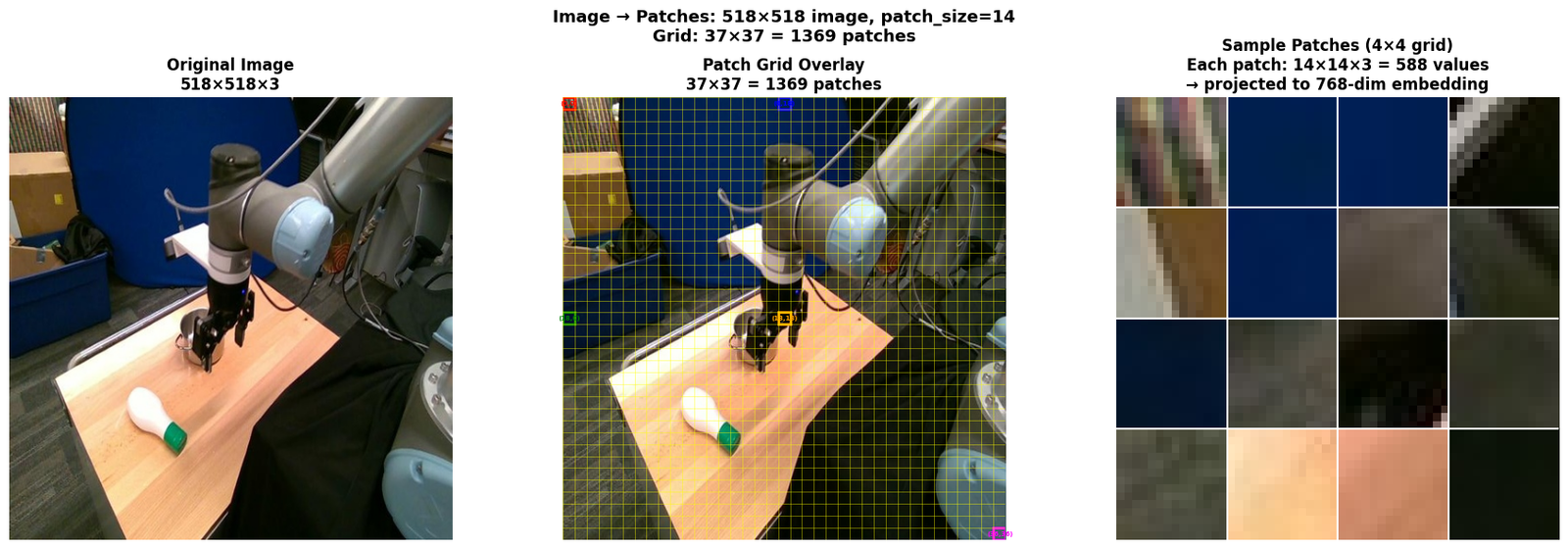
Patch embedding summary:
  Image size:    518×518×3
  Patch size:    14×14
  Patch grid:    37×37 = 1369 patches
  Patch values:  14×14×3 = 588 per patch
  After embed:   1369 × 768  (sequence of patch tokens)
  + CLS token:   1370 × 768  (full input to transformer)
5.1 ViT Architecture Overview
`` Input Image [B, 3, 518, 518] │ ▼ ┌─────────────────────────────────────────────────────────┐ │ Patch Embedding (Conv2d, stride=14) │ │ [B, 3, 518, 518] → [B, 768, 37, 37] → [B, 1369, 768] │ └─────────────────────────────────────────────────────────┘ │ ▼ ┌─────────────────────────────────────────────────────────┐ │ Prepend CLS Token + Add Positional Encoding │ │ [B, 1369, 768] → [B, 1370, 768] │ └─────────────────────────────────────────────────────────┘ │ ▼ ┌─────────────────────────────────────────────────────────┐ │ Transformer Encoder (×12 blocks) │ │ Each block: LayerNorm → MHSA → Residual │ │ LayerNorm → MLP → Residual │ │ [B, 1370, 768] → [B, 1370, 768] │ └─────────────────────────────────────────────────────────┘ │ ▼ ┌─────────────────────────────────────────────────────────┐ │ Final LayerNorm │ │ [B, 1370, 768] → [B, 1370, 768] │ └─────────────────────────────────────────────────────────┘ │ ├──→ CLS token [B, 768] (global representation) └──→ Patch tokens [B, 1369, 768] (spatial features) ``
5.2 Step 1: Patch Embedding
The patch embedding converts an image into a sequence of patch tokens.
Implementation: A single Conv2d with:
kernel_size = patch_size = 14stride = patch_size = 14in_channels = 3(RGB)out_channels = hidden_size = 768
This is equivalent to:
- Divide image into non-overlapping 14×14 patches
- Flatten each patch: 14×14×3 = 588 values
- Project to hidden dim: 588 → 768 (linear projection)
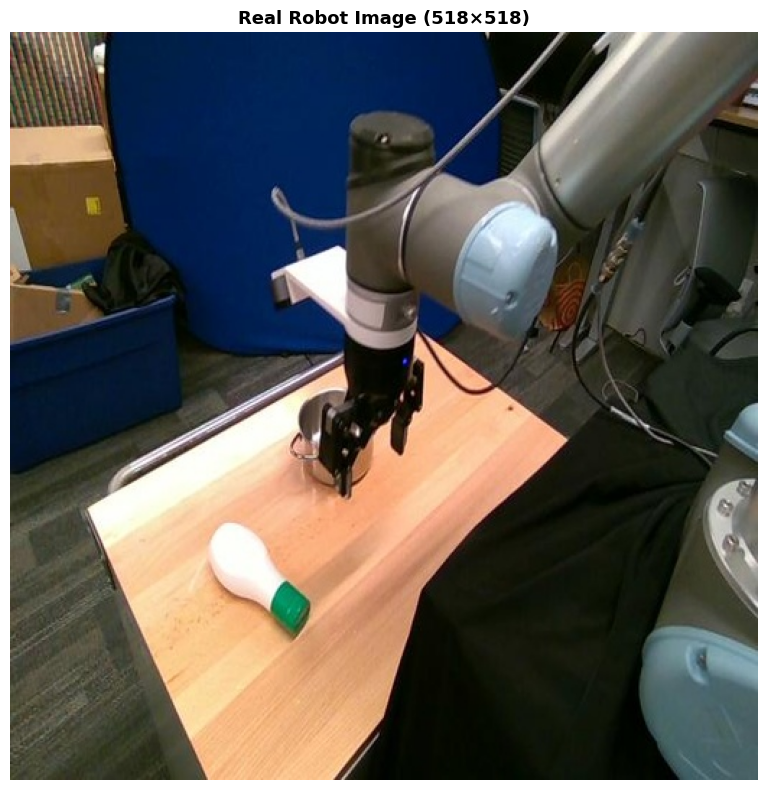
Real image: (518, 518) | Task: put the ranch bottle into the pot
Patch embedding layer:
  Dinov2PatchEmbeddings(
  (projection): Conv2d(3, 768, kernel_size=(14, 14), stride=(14, 14))
)
  projection: Conv2d(3, 768, kernel_size=(14, 14), stride=(14, 14))
  kernel_size: (14, 14)
  stride: (14, 14)
  in_channels: 3
  out_channels: 768
Conv2d output shape: torch.Size([1, 768, 16, 16])  [B, hidden_dim, H/patch, W/patch]
After flatten+transpose: torch.Size([1, 256, 768])  [B, num_patches, hidden_dim]
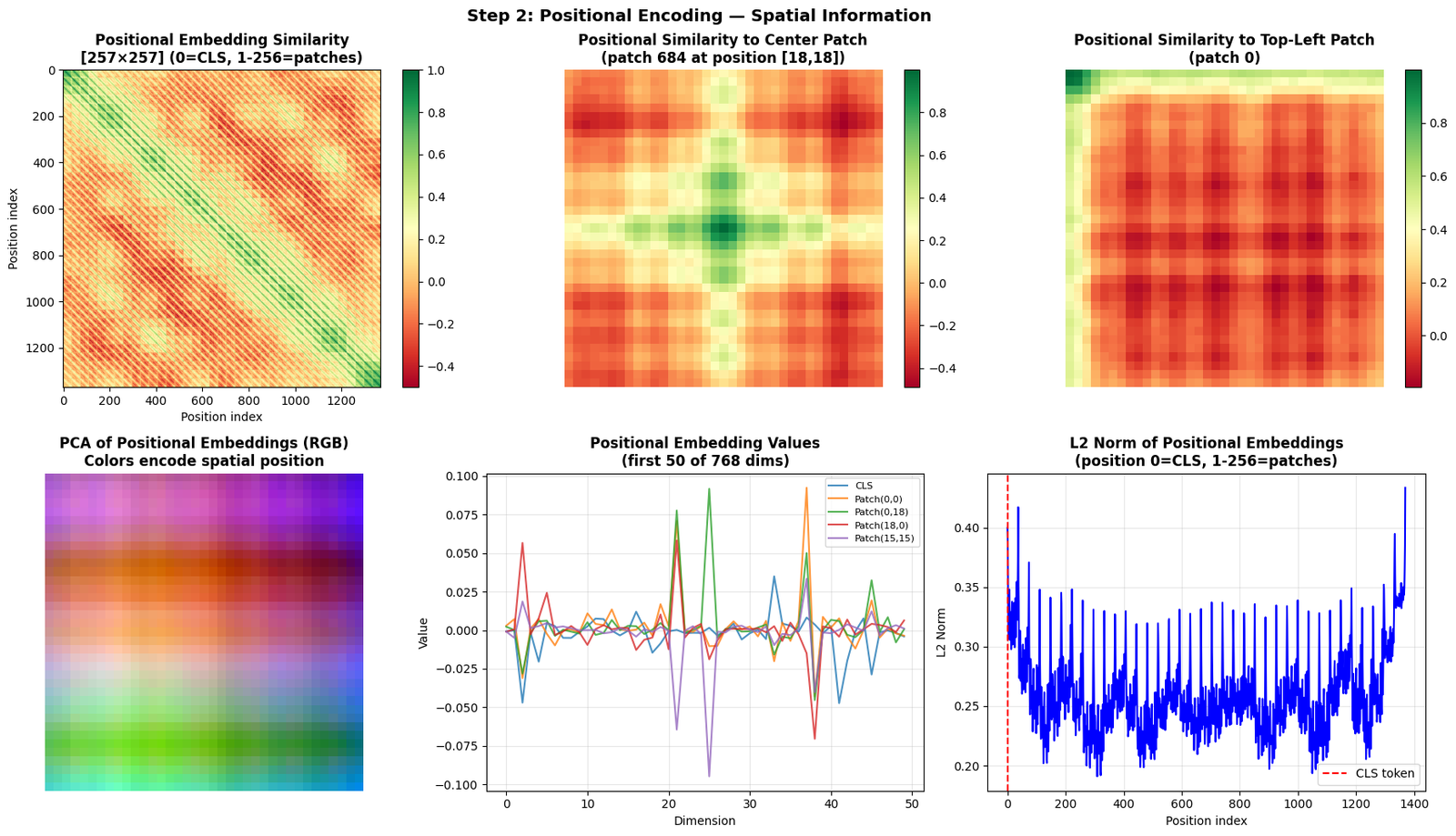
5.3 Step 2: CLS Token and Positional Encoding
After patch embedding:
- Prepend CLS token: A learnable vector
[1, 768]is prepended → sequence becomes[1, 1370, 768] - Add positional encoding: Learnable position embeddings
[1, 1370, 768]are added
CLS Token
- A special learnable token (like BERT's
[CLS]) - Attends to all patch tokens via self-attention
- After all transformer layers, it aggregates global information
- Used as the global image representation for classification
Positional Encoding
- Learned (not sinusoidal like original Transformer)
- One embedding per position:
[257, 768] - Position 0 = CLS token, positions 1–256 = patch positions
- DINOv2 uses interpolation to handle different image sizes at test time
CLS token shape: torch.Size([1, 1, 768])
CLS token stats: mean=0.0001, std=0.0144
Positional embeddings shape: torch.Size([1, 1370, 768])
  Position 0 (CLS): [-0.00069142 -0.00020539 -0.04696825 -0.001496   -0.02040969]...
  Position 1 (patch 0): [ 0.00292339  0.00723814 -0.03104884  0.00106572  0.00719654]...
  Position 256 (last patch): [-0.00336333 -0.00388328  0.10741214 -0.00198974  0.00083529]...
5.4 Step 3: Transformer Encoder Block
Each of the 12 transformer blocks has:
`` Input x [B, 1370, 768] │ ├──→ LayerNorm(x) → Multi-Head Self-Attention → + x (residual) │ └──→ LayerNorm(x) → MLP (768→3072→768) → + x (residual) │ Output x [B, 1370, 768] ``
Key components:
- LayerNorm: Normalize across hidden dim (pre-norm architecture)
- Multi-Head Self-Attention (MHSA): 12 heads, head_dim=64
- MLP: 2-layer FFN with GELU activation, expansion ratio 4×
- Residual connections: Add input to output of each sub-layer
First Transformer Block:
Dinov2Layer(
  (norm1): LayerNorm((768,), eps=1e-06, elementwise_affine=True)
  (attention): Dinov2Attention(
    (attention): Dinov2SelfAttention(
      (query): Linear(in_features=768, out_features=768, bias=True)
      (key): Linear(in_features=768, out_features=768, bias=True)
      (value): Linear(in_features=768, out_features=768, bias=True)
    )
    (output): Dinov2SelfOutput(
      (dense): Linear(in_features=768, out_features=768, bias=True)
      (dropout): Dropout(p=0.0, inplace=False)
    )
  )
  (layer_scale1): Dinov2LayerScale()
  (drop_path): Identity()
  (norm2): LayerNorm((768,), eps=1e-06, elementwise_affine=True)
  (mlp): Dinov2MLP(
    (fc1): Linear(in_features=768, out_features=3072, bias=True)
    (activation): GELUActivation()
    (fc2): Linear(in_features=3072, out_features=768, bias=True)
  )
  (layer_scale2): Dinov2LayerScale()
)
Parameter counts per component (block 0):
  LayerNorm (before attn): 1,536
  Self-Attention:          2,362,368
  LayerNorm (before MLP):  1,536
  MLP:                     4,722,432
  Total per block:         7,089,408
  Total (12 blocks):       85,072,896
Embedding output: torch.Size([1, 257, 768])  [B, seq_len, hidden_dim]
  = [1, 1370, 768]
  = [batch, 1369 patches + 1 CLS, 768 dims]
After LayerNorm1: torch.Size([1, 257, 768])
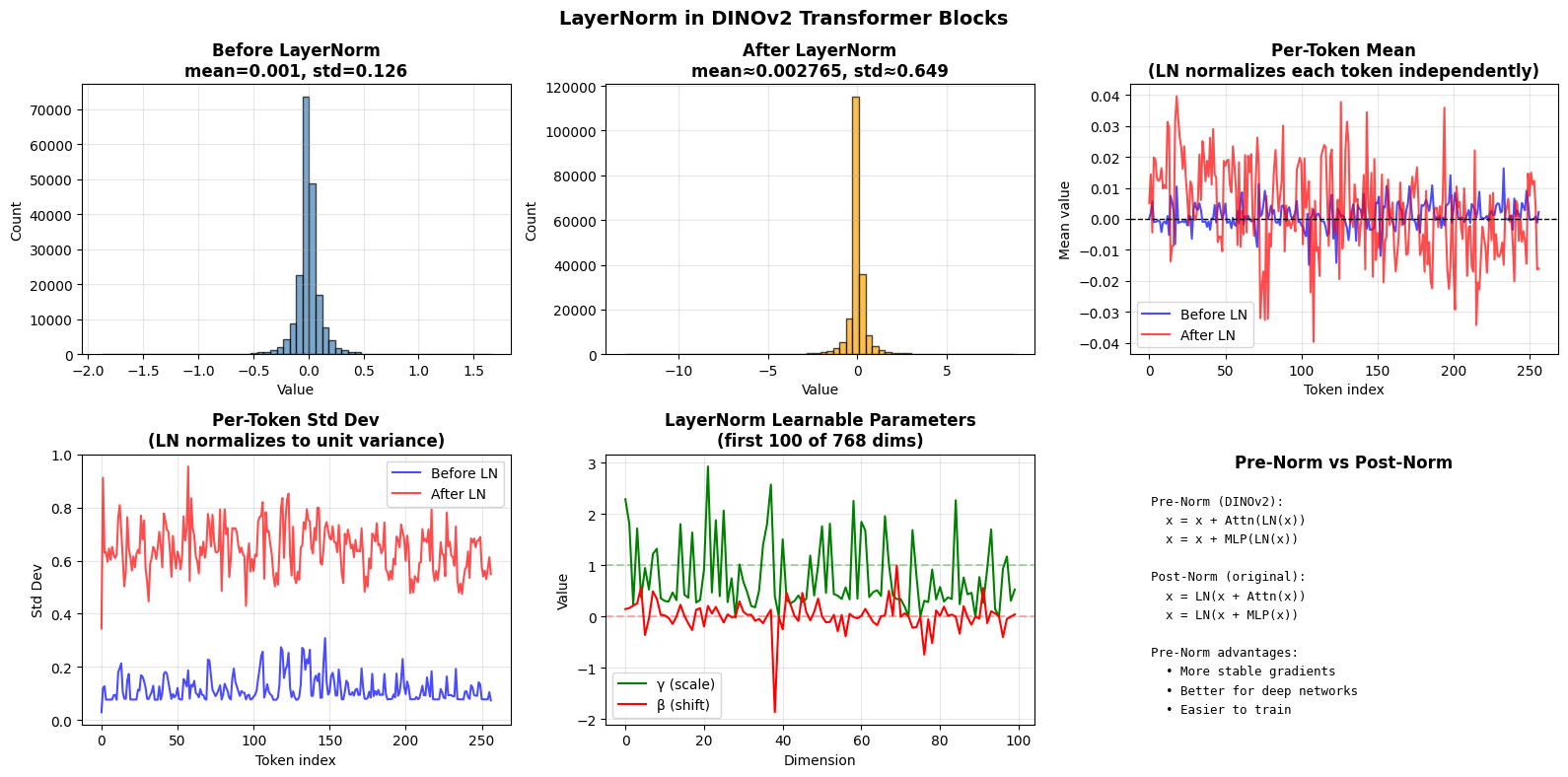
  mean=0.002765 (≈0), std=0.6490 (≈1)
After Self-Attention: torch.Size([257, 768])
After Residual 1: torch.Size([1, 257, 768])
After LayerNorm2: torch.Size([1, 257, 768])
After MLP: torch.Size([1, 257, 768])
After Residual 2: torch.Size([1, 257, 768])
Block output = Block input shape: True
MLP structure:
Dinov2MLP(
  (fc1): Linear(in_features=768, out_features=3072, bias=True)
  (activation): GELUActivation()
  (fc2): Linear(in_features=3072, out_features=768, bias=True)
)
FC1 output: torch.Size([1, 257, 3072])  (768 → 3072)
GELU output: torch.Size([1, 257, 3072])
FC2 output: torch.Size([1, 257, 768])  (3072 → 768)
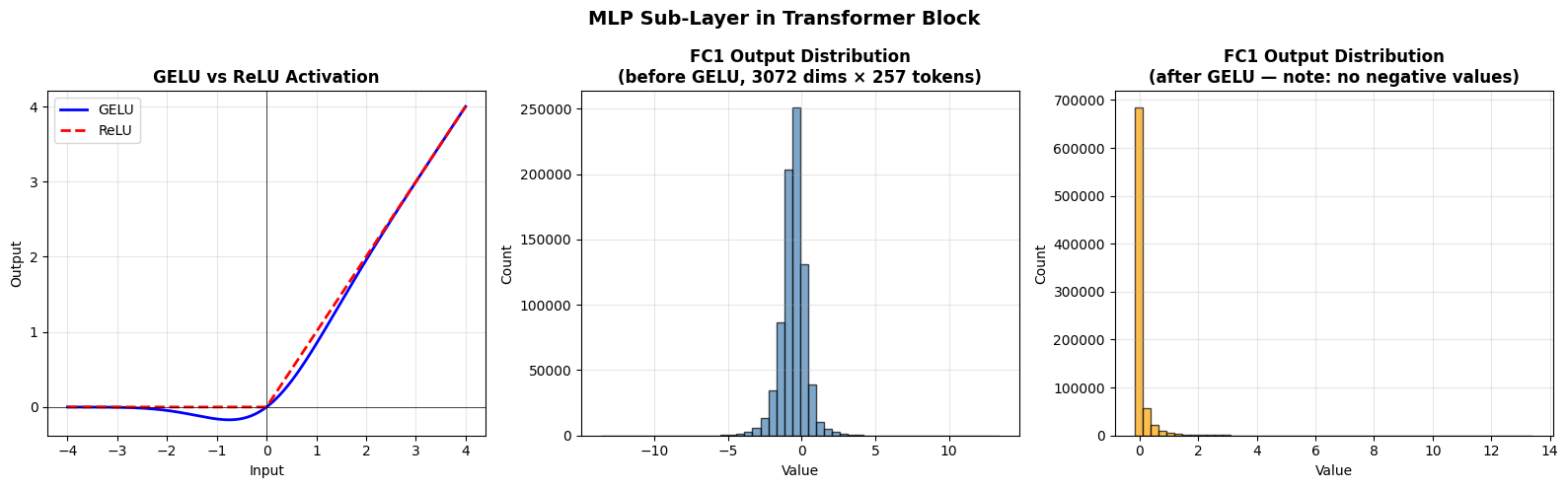
5.4b GELU Activation — Math, Intuition & Visualizations
What is GELU?
GELU (Gaussian Error Linear Unit) is the activation function used in DINOv2's MLP blocks. It was introduced by Hendrycks & Gimpel (2016) and is now the default in most modern transformers (BERT, GPT, ViT, DINOv2).
Mathematical Definition
$$\text{GELU}(x) = x \cdot \Phi(x)$$
where $\Phi(x)$ is the cumulative distribution function (CDF) of the standard normal distribution:
$$\Phi(x) = P(X \leq x) = \frac{1}{2}\left[1 + \text{erf}\left(\frac{x}{\sqrt{2}}\right)\right]$$
So the full formula is:
$$\text{GELU}(x) = x \cdot \frac{1}{2}\left[1 + \text{erf}\left(\frac{x}{\sqrt{2}}\right)\right]$$
Fast Approximation (used in practice)
Computing erf is slow, so PyTorch uses a tanh approximation:
$$\text{GELU}(x) \approx 0.5 \cdot x \cdot \left(1 + \tanh\left[\sqrt{\frac{2}{\pi}}\left(x + 0.044715 x^3\right)\right]\right)$$
Intuition
- GELU = x × probability(neuron should fire)
- For large positive $x$: $\Phi(x) \approx 1$ → GELU(x) ≈ x (like identity)
- For large negative $x$: $\Phi(x) \approx 0$ → GELU(x) ≈ 0 (like ReLU)
- For $x$ near 0: smooth, differentiable transition (unlike ReLU's hard kink)
- Key difference from ReLU: GELU allows small negative outputs near 0 (stochastic regularization effect)
Why GELU over ReLU?
| Property | ReLU | GELU |
|---|---|---|
| Differentiable at 0 | ❌ No | ✅ Yes |
| Negative outputs | ❌ Never | ✅ Small region near 0 |
| Dying neurons | ❌ Yes (x<0 → 0 gradient) | ✅ Reduced |
| Computation | Fast | Slightly slower |
| Used in | ResNets | BERT, GPT, ViT, DINOv2 |
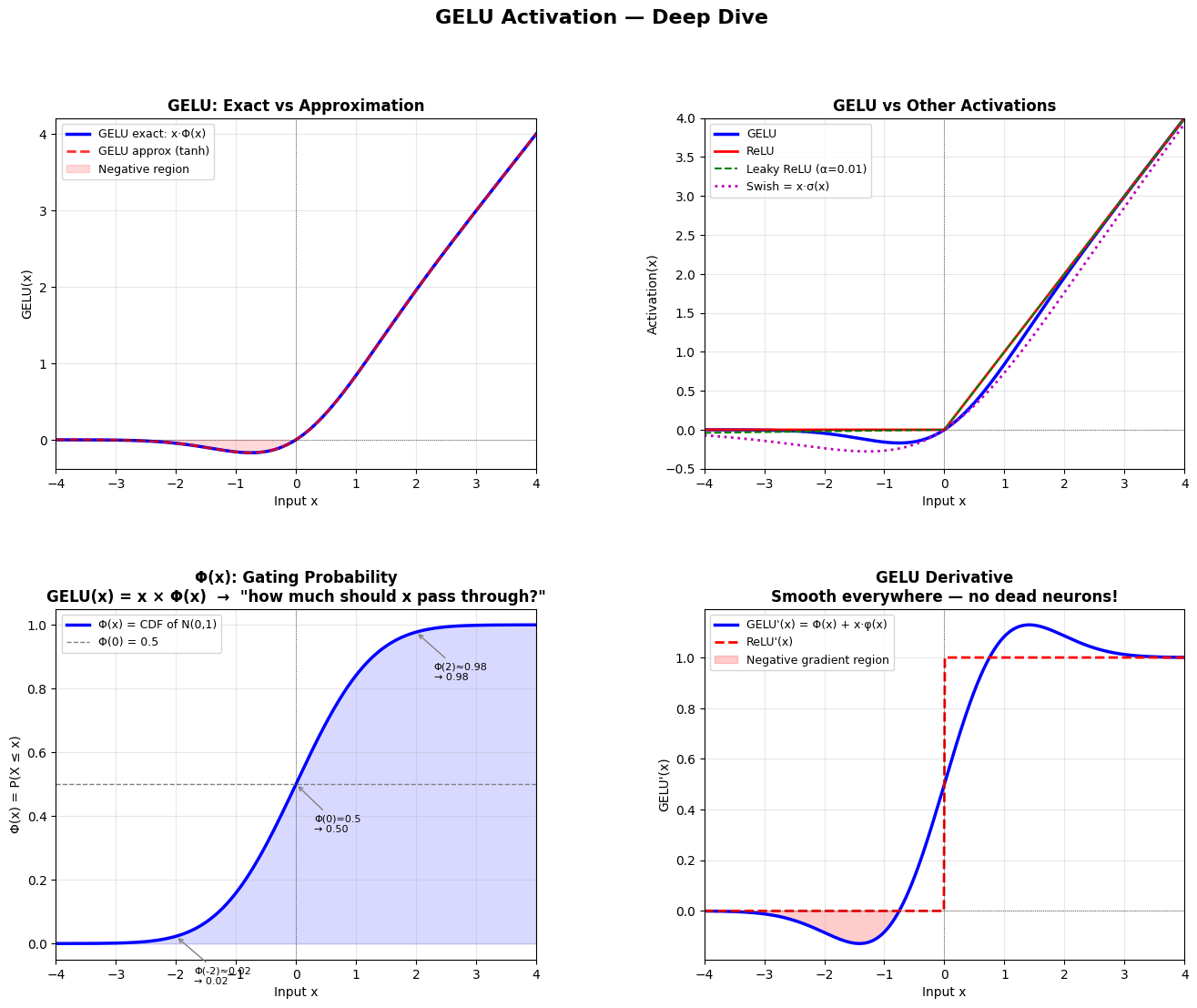
GELU key properties:
  GELU(0)   = 0.0000  (passes 0)
  GELU(-0.17) ≈ minimum ≈ -0.046  (small negative allowed)
  GELU(1)   = 0.8413
  GELU(3)   = 2.9960  (≈ x for large x)
5.5 Full Forward Pass with Shape Annotations
Layer                Input Shape                    Output Shape
--------------------------------------------------------------------------------
Input Image          [1, 3, 518, 518]               [1, 3, 518, 518]
Embeddings           (1, 3, 224, 224)               (1, 257, 768)
Block  1             (1, 257, 768)                  (1, 257, 768)
Block  2             (1, 257, 768)                  (1, 257, 768)
Block  3             (1, 257, 768)                  (1, 257, 768)
Block  4             (1, 257, 768)                  (1, 257, 768)
Block  5             (1, 257, 768)                  (1, 257, 768)
Block  6             (1, 257, 768)                  (1, 257, 768)
Block  7             (1, 257, 768)                  (1, 257, 768)
Block  8             (1, 257, 768)                  (1, 257, 768)
Block  9             (1, 257, 768)                  (1, 257, 768)
Block 10             (1, 257, 768)                  (1, 257, 768)
Block 11             (1, 257, 768)                  (1, 257, 768)
Block 12             (1, 257, 768)                  (1, 257, 768)
Final LayerNorm      (1, 257, 768)                  (1, 257, 768)
CLS token            [1, 1370, 768]                 [1, 768]
Patch tokens         [1, 1370, 768]                 [1, 1369, 768]
6. Layer-by-Layer ViT Output Visualization
How does the ViT learn as information flows through its 12 transformer blocks? We can visualize the intermediate representations at each layer to see:
- Token norm evolution — how the magnitude of patch tokens changes per layer
- CLS token similarity — how the CLS token's attention to patches evolves
- PCA of patch tokens — the top-3 principal components as RGB maps
- Attention maps — which patches each layer attends to
- Token similarity heatmap — cosine similarity between all patch tokens
What to expect:
- Early layers (1-4): Local texture/edge features, high spatial frequency
- Middle layers (5-8): Object parts, semantic groupings emerge
- Late layers (9-12): Global semantics, object-level representations
- CLS token accumulates global context across all layers
Model is on device: cuda:0
Captured 12 layer outputs
Each output shape: torch.Size([1, 257, 768])  [batch, n_tokens+1, embed_dim]
Patch tokens: 256 → grid 16×16
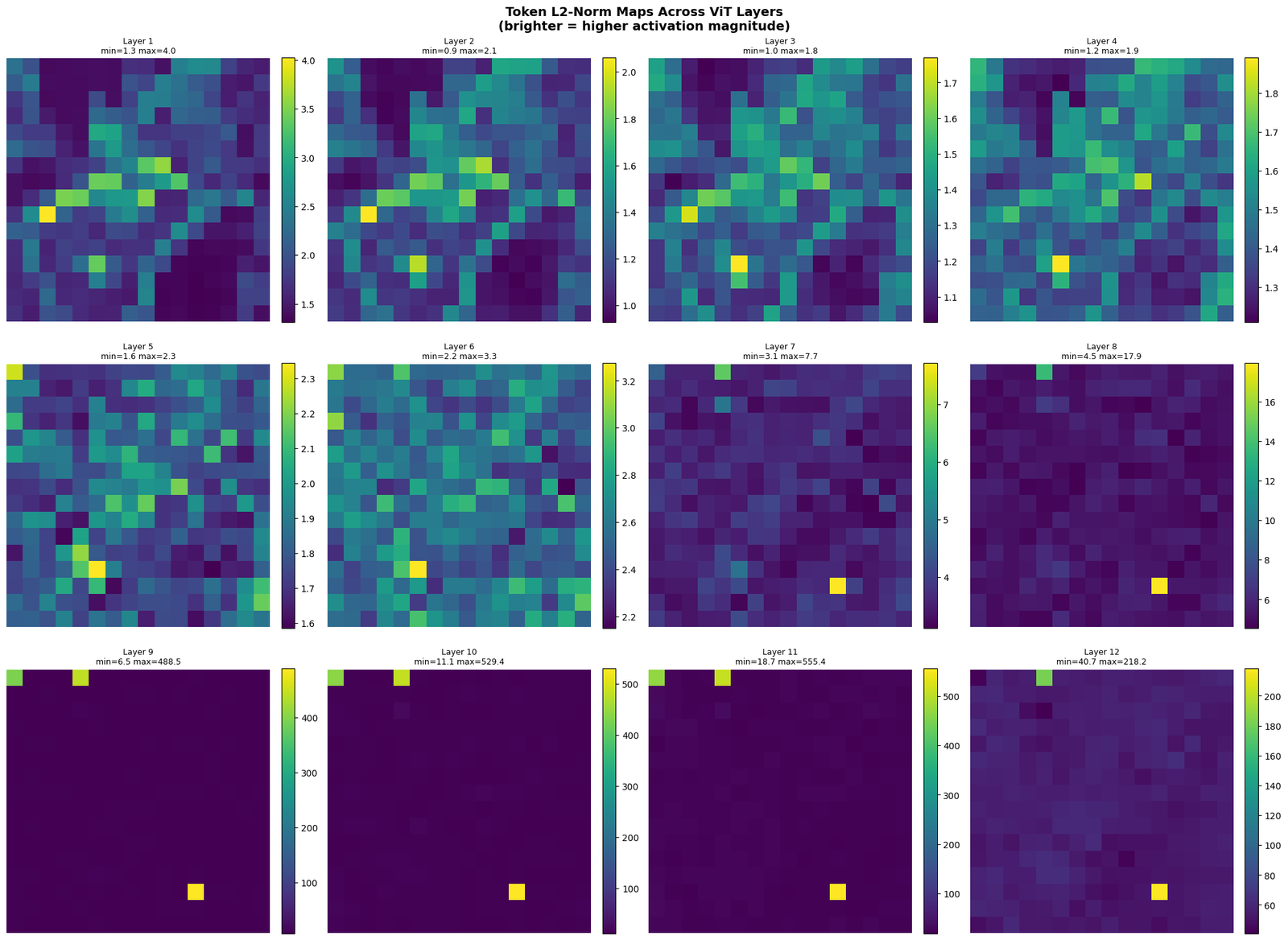
Figure 1: Token norm maps saved
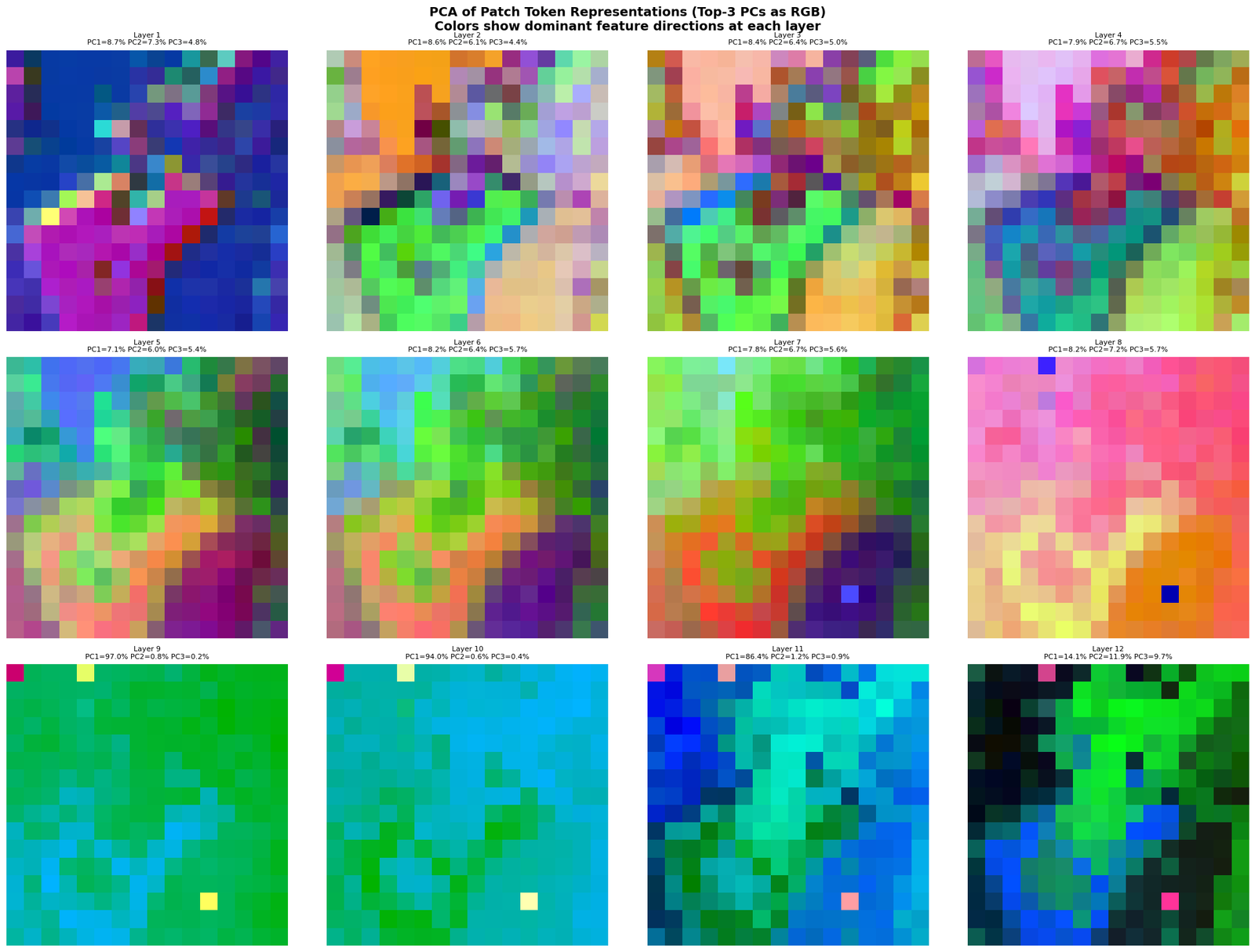
Figure 2: PCA RGB maps saved
Interpretation:
  Early layers: colors show local texture/edge patterns
  Middle layers: colors start grouping semantic regions
  Late layers: colors show object-level semantic clusters
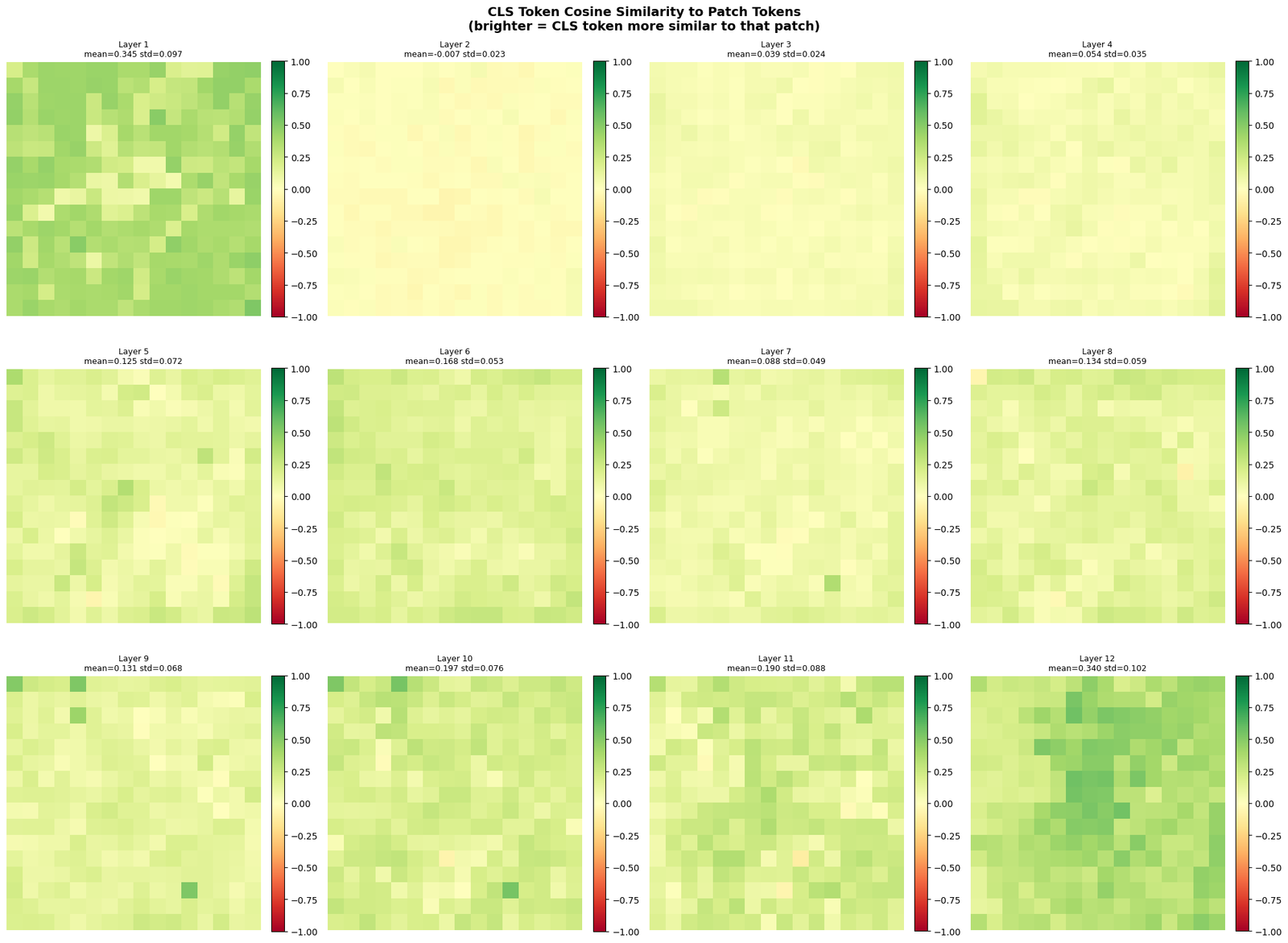
Figure 3: CLS similarity maps saved

Layer statistics summary:
 Layer   CLS norm   Patch norm  CLS-patch sim  Inter-patch sim
-----------------------------------------------------------------
     1       2.00         1.88         0.3448           0.3977
     2       1.71         1.23        -0.0075           0.2502
     3       2.28         1.26         0.0392           0.2592
     4       2.62         1.44         0.0545           0.1831
     5       4.44         1.82         0.1252           0.1519
     6       3.34         2.57         0.1684           0.1609
     7       6.68         3.64         0.0876           0.1834
     8       9.27         5.39         0.1344           0.1721
     9       9.27        13.00         0.1309           0.1820
    10      14.52        19.33         0.1965           0.1967
    11      24.20        29.42         0.1896           0.1863
    12      33.43        55.74         0.3402           0.4195

Figure 5: Side-by-side comparison saved
Key observations:
  Layer 1:  Raw patch features, mostly local texture/color
  Layer 4:  Edges and low-level structure emerge
  Layer 8:  Semantic regions start to cluster
  Layer 12: Object-level semantics, CLS captures global context

5.6 LayerNorm: Why Pre-Norm?
DINOv2 uses Pre-LayerNorm (normalize before attention/MLP), unlike the original Transformer which used Post-LayerNorm.
Pre-Norm advantages:
- More stable training (gradients don't vanish/explode)
- Allows training deeper networks
- Better performance at scale
5.7 Summary: ViT Architecture
| Stage | Operation | Input → Output |
|---|---|---|
| Patch Embed | Conv2d(3,768,14,14) | [B,3,518,518] → [B,1369,768] |
| CLS + PosEmbed | Concat + Add | [B,1369,768] → [B,1370,768] |
| Block ×12 | LN→MHSA→Res + LN→MLP→Res | [B,1370,768] → [B,1370,768] |
| Final LN | LayerNorm | [B,1370,768] → [B,1370,768] |
| CLS output | Slice [:,0,:] | [B,1370,768] → [B,768] |
| Patch output | Slice [:,1:,:] | [B,1370,768] → [B,1369,768] |
DINOv2 vs standard ViT-B/16:
- Patch size: 14 (not 16) → more patches (1369 patches (518/14=37, 37×37=1369) vs 196 patches (224/16=14, 14×14=196)) → finer spatial resolution
- Pre-norm architecture
- No classification head (features used directly)
--- Next: 06_attention_layer_visualization.ipynb — Deep dive into multi-head self-attention with full I/O visualizations.
DINOv2 Tutorial — Notebook 6: Attention Layer I/O Visualization
Series: DINOv2 Deep Dive | Prev: 05_vit_architecture.ipynb | Next: 07_intermediate_layer_visualization.ipynb
---
What You Will Learn
- Multi-head self-attention (MHSA) mechanics in detail
- Q, K, V projections: shapes and visualizations
- Attention weight matrices: what each head attends to
- How to extract attention maps from every layer
- Visualizing attention from CLS token to image patches
- Rollout attention: aggregating attention across layers
6.1 Multi-Head Self-Attention Mechanics
For input $X \in \mathbb{R}^{N \times d}$ (N=257 tokens, d=768):
$$Q = XW_Q, \quad K = XW_K, \quad V = XW_V$$
where $W_Q, W_K, W_V \in \mathbb{R}^{d \times d}$.
Split into $h=12$ heads, each with $d_h = d/h = 64$ dimensions:
$$\text{Attention}(Q_i, K_i, V_i) = \text{softmax}\left(\frac{Q_i K_i^T}{\sqrt{d_h}}\right) V_i$$
Concatenate all heads and project:
$$\text{MHSA}(X) = \text{Concat}(\text{head}_1, \ldots, \text{head}_h) W_O$$
Shapes:
- Q, K, V:
[B, 12, 257, 64] - Attention weights:
[B, 12, 257, 257] - Output:
[B, 257, 768]
6.2 All 12 Attention Heads — Last Layer
6.3 Attention Maps Across All Layers
6.4 Attention Rollout
Attention rollout (Abnar & Zuidema, 2020) aggregates attention across all layers to get a global view of which input patches the CLS token ultimately attends to.
$$A_{\text{rollout}} = A_1 \cdot A_2 \cdots A_L$$
where each $A_l$ is the attention matrix of layer $l$, with residual connections accounted for:
$$\hat{A}_l = 0.5 \cdot A_l + 0.5 \cdot I$$
6.5 Patch-to-Patch Attention
Beyond CLS→patch attention, we can also visualize patch→patch attention to understand how patches communicate with each other.
6.6 Full Attention Matrix Visualization
6.7 Summary
| Component | Shape | Description |
|---|---|---|
| Input X | [B, 257, 768] | Token sequence |
| Q, K, V | [B, 12, 257, 64] | Per-head projections |
| Attn scores | [B, 12, 257, 257] | Q·Kᵀ / √64 |
| Attn weights | [B, 12, 257, 257] | softmax(scores) |
| Attn output | [B, 12, 257, 64] | weights · V |
| MHSA output | [B, 257, 768] | concat + project |
Key observations:
- Different heads specialize in different spatial patterns
- Early layers: local attention; later layers: global attention
- CLS token attends broadly to semantically important patches
- Attention rollout aggregates information flow across all layers
DINOv2 Tutorial — Notebook 7: Intermediate Layer Visualizations
Series: DINOv2 Deep Dive | Prev: 06_attention_layer_visualization.ipynb | Next: 08_patch_embeddings_spatial_features.ipynb
---
What You Will Learn
- How features evolve through all 12 transformer blocks
- CLS token feature trajectory across layers
- Residual stream analysis: what each block adds
- PCA of patch features at different depths
- Layer-wise feature norm and entropy
- Which layers are most important for different tasks
7.1 CLS Token Feature Evolution Across Layers
7.2 Residual Stream Analysis
Each transformer block adds a residual to the input: $$h_l = h_{l-1} + \Delta_l^{\text{attn}} + \Delta_l^{\text{mlp}}$$
We can decompose what each block contributes.
7.3 PCA of Patch Features at Different Depths
7.4 Feature Entropy and Diversity Across Layers
7.5 Layer-wise Probing: Which Layer is Best for Which Task?
Different layers capture different levels of abstraction:
- Early layers (1-4): low-level features (edges, textures, colors)
- Middle layers (5-8): mid-level features (shapes, parts)
- Late layers (9-12): high-level semantic features (objects, scenes)
7.6 Summary
| Layer Range | Feature Type | Best For |
|---|---|---|
| 1–3 | Low-level (edges, colors) | Texture, style |
| 4–6 | Mid-level (shapes, parts) | Object detection |
| 7–9 | High-level (semantics) | Segmentation |
| 10–12 | Abstract (global) | Classification |
Key findings:
- CLS token norm grows steadily through layers
- Attention residuals dominate in early layers; MLP in later layers
- Feature diversity (effective rank) peaks in middle layers
- Consecutive layers are highly similar (residual connections preserve information)
DINOv2 Tutorial — Notebook 8: Patch Embeddings & Spatial Feature Maps
Series: DINOv2 Deep Dive | Prev: 07_intermediate_layer_visualization.ipynb | Next: 09_cls_token_analysis.ipynb
---
What You Will Learn
- How to extract and visualize patch-level features
- PCA of patch features → semantic segmentation-like maps
- Feature heatmaps: mean, std, L2-norm per patch
- K-means clustering of patch features
- Upsampling patch features to full image resolution
- Comparing patch features across different images
8.1 Basic Patch Feature Statistics
8.2 PCA of Patch Features → Semantic Maps
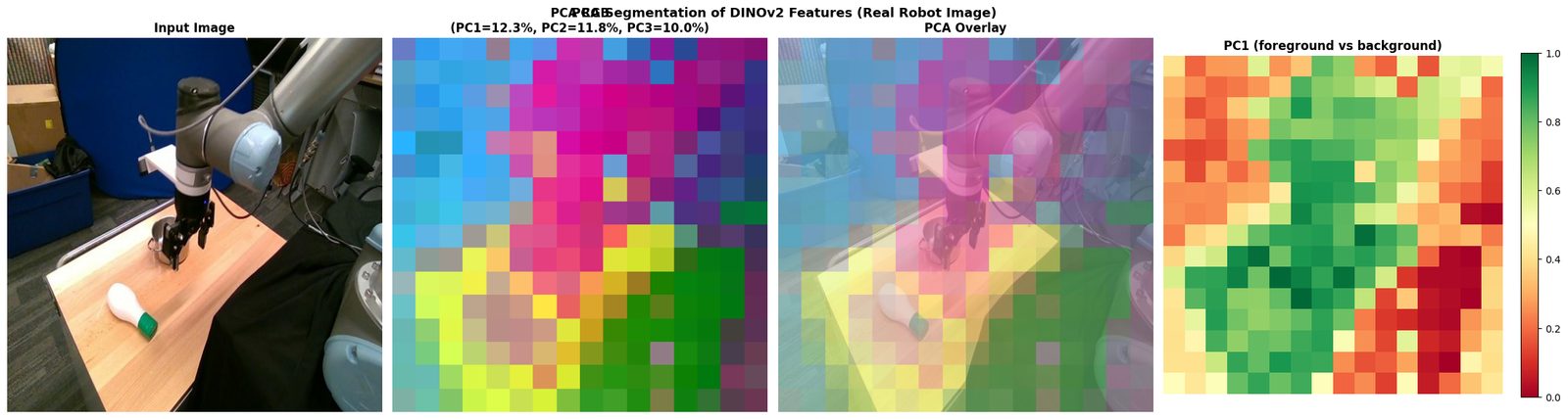
One of DINOv2's most impressive properties: PCA of patch features reveals semantic structure without any supervision.
The first 3 PCA components can be mapped to RGB channels, producing a pseudo-segmentation map.
8.3 K-Means Clustering of Patch Features
8.4 Patch Feature Similarity Maps
8.5 Cross-Image Patch Correspondence
8.6 Summary
| Visualization | What it shows |
|---|---|
| Feature norm map | Which patches have strongest activations |
| PCA RGB map | Semantic structure (colors = semantic regions) |
| K-means clusters | Unsupervised segmentation |
| Similarity map | Which patches are semantically similar |
| Cross-image correspondence | Matching patches across images |
Key insight: DINOv2 patch features encode semantic content, not just pixel values. Patches with similar content (same color region, same object part) have similar features.
--- Next: 09_cls_token_analysis.ipynb
DINOv2 Tutorial — Notebook 9: CLS Token Analysis
Series: DINOv2 Deep Dive | Prev: 08_patch_embeddings_spatial_features.ipynb | Next: 10_attention_head_specialization.ipynb
---
What You Will Learn
- The CLS token as a global image representation
- Feature vector visualization and statistics
- Cosine similarity between CLS tokens of different images
- t-SNE and UMAP visualization of CLS features across image categories
- How CLS features cluster by semantic content
- Nearest-neighbor classification using CLS features
9.1 CLS Token: What Is It?
The CLS token (Classification token) is:
- A learnable vector prepended to the patch sequence
- Position 0 in the sequence:
[CLS, patch_1, patch_2, ..., patch_256] - After 12 transformer layers, it has attended to all patches via self-attention
- It aggregates global information about the entire image
- Used as the image-level representation for classification, retrieval, etc.
Why CLS and not average pooling?
- CLS can learn to selectively attend to important patches
- Average pooling treats all patches equally
- CLS is more flexible and powerful for global representation
9.2 CLS Token Feature Vector Visualization
9.3 t-SNE Visualization of CLS Features
9.4 UMAP Visualization (if available)
9.5 Nearest-Neighbor Classification with CLS Features
9.6 CLS Token vs Average Pooling
9.7 Summary
| Property | Value |
|---|---|
| CLS token dimension | 768 |
| Position in sequence | 0 (first token) |
| How it aggregates | Self-attention over all patches |
| Use case | Classification, retrieval, similarity |
| Within-category similarity | High (similar images → similar CLS) |
| Between-category similarity | Low (different images → different CLS) |
Key insight: DINOv2 CLS features are linearly separable for many tasks — a linear classifier on top achieves 86.5% on ImageNet (ViT-g).
--- Next: 10_attention_head_specialization.ipynb
DINOv2 Tutorial — Notebook 10: Attention Head Specialization
Series: DINOv2 Deep Dive | Prev: 09_cls_token_analysis.ipynb | Next: 11_image_similarity_retrieval.ipynb
---
What You Will Learn
- How different attention heads specialize in different spatial patterns
- Visualizing all 12 heads across all 12 layers
- Head entropy analysis: focused vs diffuse attention
- Identifying heads that attend to edges, textures, objects, backgrounds
- Head redundancy and diversity analysis
- The famous DINOv2 attention maps that reveal semantic segmentation
10.1 All Heads x All Layers: Complete Attention Map Grid
10.2 Head Entropy Analysis
10.3 Head Specialization: Spatial Statistics
10.4 Head Redundancy and Diversity
10.5 The Famous DINOv2 Attention Maps
One of DINOv2's most striking properties: the last layer attention maps from the CLS token reveal semantic segmentation without any supervision.
Different heads attend to different semantic regions of the image.
10.6 Head Importance via Attention Variance
10.7 Summary
| Observation | Explanation |
|---|---|
| Early layers: focused attention | Local feature detection |
| Late layers: diffuse attention | Global context aggregation |
| Different heads: different regions | Specialization for different semantic parts |
| High-entropy heads | Attend broadly (background, global context) |
| Low-entropy heads | Attend to specific objects/regions |
| Last layer reveals segmentation | Semantic features emerge from SSL training |
The key DINOv2 insight: Self-supervised training with multi-crop and iBOT forces the model to develop semantically meaningful attention patterns — different heads learn to attend to different semantic regions without any segmentation supervision.
--- Next: 11_image_similarity_retrieval.ipynb
DINOv2 Tutorial — Notebook 11: Image Similarity & Retrieval
Series: DINOv2 Deep Dive | Prev: 10_attention_head_specialization.ipynb | Next: 12_downstream_tasks.ipynb
---
What You Will Learn
- Computing cosine similarity between images using DINOv2 CLS features
- Building a mini image retrieval system
- Nearest-neighbor retrieval demo
- Pairwise similarity matrix visualization
- Ranking images by similarity to a query
- How DINOv2 features enable zero-shot retrieval
11.1 Build an Image Gallery
11.2 Pairwise Similarity Matrix
11.3 Image Retrieval: Query → Top-K Results
11.4 Similarity Ranking Visualization
11.5 Retrieval with a New Query Image
11.6 Similarity Threshold Analysis
11.7 Summary
| Task | Method | Key Metric |
|---|---|---|
| Image similarity | Cosine similarity of CLS features | Score in [0,1] |
| Image retrieval | k-NN search in feature space | Precision@k, Recall@k |
| Threshold selection | F1 score optimization | Best threshold |
| Zero-shot retrieval | No training needed | Works out of the box |
Key insight: DINOv2 CLS features enable zero-shot image retrieval — no fine-tuning needed. The features are semantically meaningful enough to find similar images by content.
--- Next: 12_downstream_tasks.ipynb
DINOv2 Tutorial — Notebook 12: Downstream Tasks
Series: DINOv2 Deep Dive | Prev: 11_image_similarity_retrieval.ipynb | Next: 13_model_variants.ipynb
---
What You Will Learn
- Linear probing: train a linear classifier on frozen DINOv2 features
- Semantic segmentation using patch features + k-means
- Dense feature matching between images
- Depth estimation concept using patch feature distances
- How DINOv2 compares to supervised models on downstream tasks
12.1 Linear Probing
Linear probing evaluates the quality of frozen features by training only a linear classifier on top.
- Frozen backbone: DINOv2 weights are NOT updated
- Linear head: only a single linear layer is trained
- Why it matters: if features are linearly separable, the backbone has learned good representations
DINOv2 achieves 86.5% on ImageNet with linear probing (ViT-g) — comparable to supervised models!
12.2 Semantic Segmentation via Patch Features
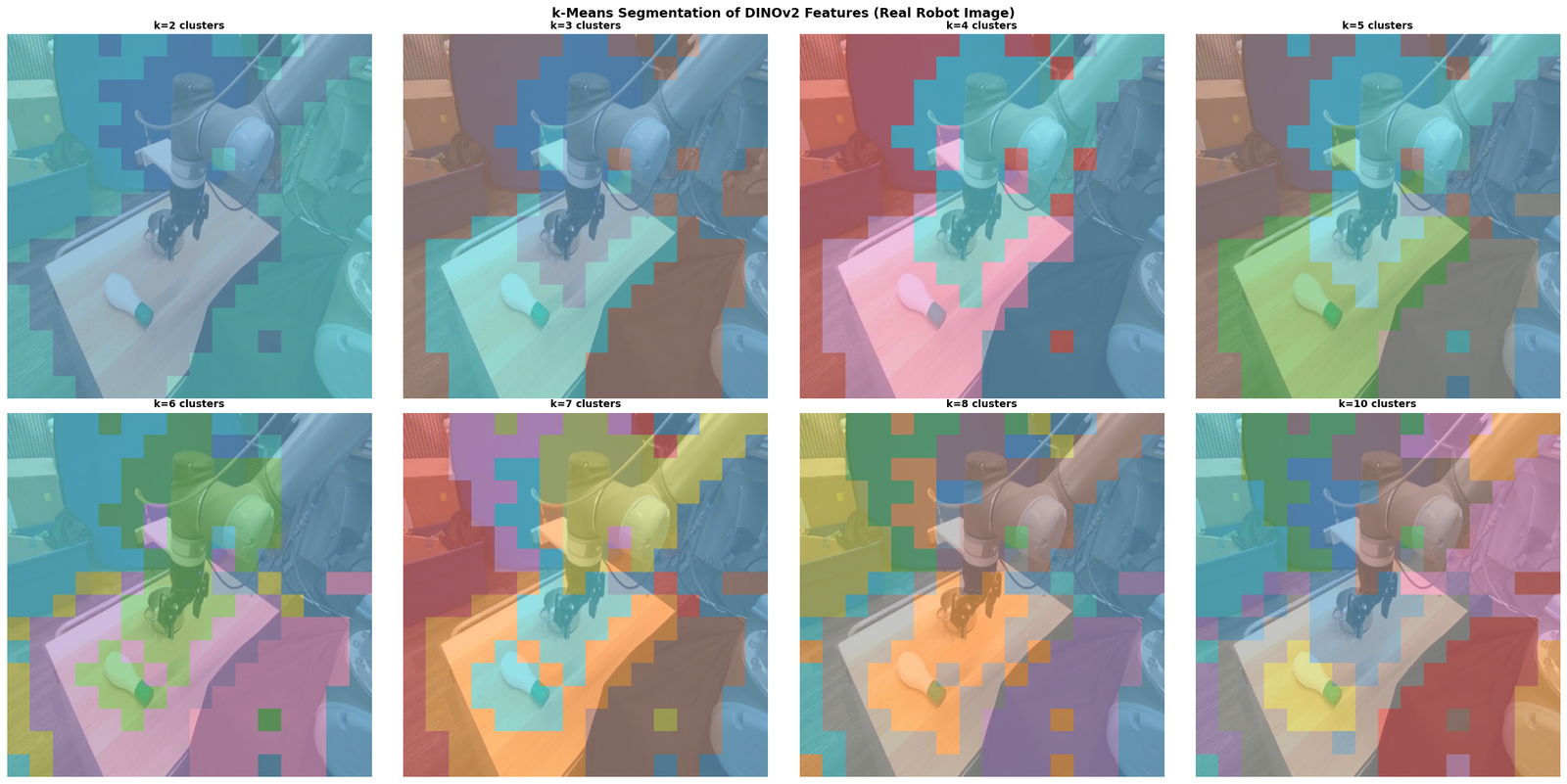
DINOv2 patch features can be used for unsupervised semantic segmentation without any training:
- Extract patch features from the image
- Apply k-means clustering to group patches by semantic content
- Each cluster corresponds to a semantic region
12.3 Dense Feature Matching
DINOv2 patch features enable dense matching between images — finding corresponding patches across different images.
12.4 Depth Estimation Concept
DINOv2 patch features correlate with depth — patches at similar depths tend to have similar features. This is used in DPT (Dense Prediction Transformer) for monocular depth estimation.
12.5 DINOv2 Benchmark Results (from Paper)
| Task | Dataset | DINOv2 ViT-g | Supervised ViT-g | Notes |
|---|---|---|---|---|
| Classification (linear) | ImageNet-1K | 86.5% | 87.0% | Near-supervised! |
| Classification (k-NN) | ImageNet-1K | 83.5% | — | No training needed |
| Segmentation | ADE20K | 53.0 mIoU | 54.0 mIoU | Frozen backbone |
| Depth estimation | NYU Depth v2 | 0.279 RMSE | 0.271 RMSE | Frozen backbone |
| Instance seg. | COCO | 58.4 AP | 59.1 AP | Frozen backbone |
12.6 Summary
| Task | Method | DINOv2 Advantage |
|---|---|---|
| Classification | Linear probe on CLS | Near-supervised accuracy |
| Segmentation | K-means on patches | Zero-shot, no labels |
| Dense matching | Patch cosine similarity | High cycle consistency |
| Depth estimation | DPT decoder on patches | SOTA with frozen backbone |
| Retrieval | k-NN on CLS features | Zero-shot, no training |
Key insight: DINOv2 features are universal — the same frozen backbone works for classification, segmentation, depth, and retrieval without task-specific fine-tuning.
--- Next: 13_model_variants.ipynb
DINOv2 Tutorial — Notebook 13: Model Variants
Series: DINOv2 Deep Dive | Prev: 12_downstream_tasks.ipynb | Next: 14_registers_artifact_removal.ipynb
---
What You Will Learn
- The four DINOv2 model variants: ViT-S, ViT-B, ViT-L, ViT-g
- Parameter counts, FLOPs, and memory requirements
- Performance vs compute tradeoffs
- How to load different variants from Hugging Face
- Scaling laws: how performance improves with model size
13.1 DINOv2 Model Variants Overview
DINOv2 was trained in four sizes, all using the same training procedure:
| Model | Patch Size | Hidden Dim | Heads | Layers | Params | ImageNet k-NN | ImageNet Linear |
|---|---|---|---|---|---|---|---|
| ViT-S/14 | 14 | 384 | 6 | 12 | 21M | 79.0% | 81.1% |
| ViT-B/14 | 14 | 768 | 12 | 12 | 86M | 82.1% | 84.5% |
| ViT-L/14 | 14 | 1024 | 16 | 24 | 307M | 83.1% | 86.3% |
| ViT-g/14 | 14 | 1536 | 24 | 40 | 1.1B | 83.5% | 86.5% |
All variants use:
- Patch size 14 (not 16 like standard ViT)
- Image size 224×224 → 16×16 = 256 patches
- Pre-norm architecture
- GELU activation
- No classification head (features used directly)
13.2 Architecture Comparison Visualization
13.3 Load and Inspect the Base Model
13.4 Compute FLOPs Estimate
13.5 Scaling Laws
13.6 How to Load Different Variants
13.7 Summary
| Model | Best For | Tradeoff |
|---|---|---|
| ViT-S/14 (21M) | Edge devices, fast inference | Lower accuracy |
| ViT-B/14 (86M) | Balanced performance/speed | Good all-around |
| ViT-L/14 (307M) | High accuracy tasks | Slower, more memory |
| ViT-g/14 (1.1B) | Maximum accuracy | Very slow, needs large GPU |
Scaling law insight: Each 4x increase in parameters gives ~1-2% accuracy gain. The returns diminish at larger scales — ViT-B is often the best practical choice.
--- Next: 14_registers_artifact_removal.ipynb
DINOv2 Tutorial — Notebook 14: Registers & Artifact Removal
Series: DINOv2 Deep Dive | Prev: 13_model_variants.ipynb
---
What You Will Learn
- The artifact problem in ViT attention maps
- What are "high-norm" outlier tokens and why they appear
- DINOv2 with Registers: the solution (Darcet et al., 2023)
- How register tokens absorb global information
- Before/after comparison of attention maps
- How to load DINOv2 with registers from Hugging Face
Paper: Vision Transformers Need Registers (Darcet et al., 2023) arXiv: 2309.16588
14.1 The Artifact Problem
When visualizing DINOv2 attention maps, researchers noticed artifacts: some patches have extremely high feature norms and attract disproportionate attention from all other tokens.
What are these artifacts?
- Certain patches (often in smooth, uninformative regions like backgrounds) develop very high L2 norms
- These "outlier tokens" attract attention from all other tokens
- They disrupt the semantic structure of attention maps
- They appear in all large ViT models trained with self-supervised methods
Why do they appear?
The hypothesis: ViTs need to aggregate global information somewhere. When there's no dedicated place for this, some patch tokens are "hijacked" to store global context. These tokens then have high norms and attract broad attention.
``` Without registers: With registers:
[CLS] [p1] [p2] ... [p256] [CLS] [R1] [R2] [R3] [R4] [p1] [p2] ... [p256] ↑ ↑ ↑ ↑ ↑ Some patches become Register tokens absorb "global info sinks" global information (artifacts) (patches stay local) ```
14.2 Detecting Outlier Tokens (Artifacts)
14.3 The Register Solution
DINOv2 with Registers (Darcet et al., 2023) adds register tokens to the sequence:
``` Standard DINOv2: [CLS] [p1] [p2] ... [p256]
DINOv2 with Registers (n_reg=4): [CLS] [R1] [R2] [R3] [R4] [p1] [p2] ... [p256] ↑ ↑ ↑ ↑ Register tokens (learnable, discarded at output) ```
How registers work:
- Register tokens are learnable vectors inserted after CLS
- They can attend to all patches and accumulate global information
- Patch tokens no longer need to be "hijacked" as global info sinks
- Register tokens are discarded at the output (only CLS and patch tokens used)
- Result: cleaner attention maps with no artifacts
Available models:
facebook/dinov2-base-imagenet1k-1-layer— with registersfacebook/dinov2-with-registers-basefacebook/dinov2-with-registers-largefacebook/dinov2-with-registers-giant
14.4 Loading DINOv2 with Registers
14.5 Analyzing Artifacts in the Current Model
14.6 Summary
| Aspect | Without Registers | With Registers |
|---|---|---|
| Artifact patches | Present (high-norm outliers) | Eliminated |
| Attention maps | Noisy, artifacts visible | Clean, semantic |
| Dense prediction | Slightly degraded | Improved |
| Classification | Same | Same |
| Sequence length | 257 (CLS + 256 patches) | 261 (CLS + 4 reg + 256 patches) |
| Extra parameters | — | ~4 × 768 = 3K (negligible) |
Key Takeaways
- Artifacts are universal in large SSL-trained ViTs — not just DINOv2
- Registers are a simple fix: add 4 learnable tokens, discard at output
- No accuracy loss: registers don't hurt classification performance
- Better dense features: patch features are cleaner without artifacts
- Recommended: always use DINOv2 with registers for dense prediction tasks
---
Series Complete!
You have completed the full DINOv2 tutorial series. Here's what you covered:
| # | Notebook | Topic |
|---|---|---|
| 1 | Setup & Environment | Model loading, first forward pass |
| 2 | SSL Theory | Self-supervised learning concepts |
| 3 | Training Procedure | DINO + iBOT + KoLeo losses |
| 4 | Dataset Preparation | LVD-142M curation pipeline |
| 5 | ViT Architecture | Patch embedding, positional encoding, transformer blocks |
| 6 | Attention Layer I/O | Q, K, V matrices, attention maps, rollout |
| 7 | Intermediate Layers | Feature evolution, residual stream |
| 8 | Patch Embeddings | PCA, k-means, spatial feature maps |
| 9 | CLS Token Analysis | Global representation, t-SNE, k-NN |
| 10 | Head Specialization | All 12 heads × 12 layers, entropy analysis |
| 11 | Similarity & Retrieval | Cosine similarity, k-NN retrieval |
| 12 | Downstream Tasks | Linear probing, segmentation, depth |
| 13 | Model Variants | ViT-S/B/L/g comparison, scaling laws |
| 14 | Registers | Artifact removal, register tokens |
Return to: README.md
DINOv2 for Image Classification
Series: DINOv2 Downstream Tasks | Notebook 15
DINOv2 was trained with self-supervised learning — it never saw class labels. Yet its CLS token embeddings are so powerful that a simple linear classifier on top achieves state-of-the-art results on ImageNet.
What we'll cover:
- Load real CIFAR-10 images via torchvision
- Extract CLS token embeddings from DINOv2
- k-NN classification — no training needed, just nearest neighbors
- Linear probe — train a single linear layer on frozen features
- Visualize the embedding space with PCA and t-SNE
- Confusion matrix and per-class accuracy
Key insight:
The CLS token aggregates global image information across all 12 transformer layers. It's a 768-dimensional vector that captures semantic content without any supervision.
1. Load Real CIFAR-10 Images
We use CIFAR-10 — 10 classes of real photographs (32×32 pixels). We resize them to 224×224 for DINOv2.
Classes: airplane, automobile, bird, cat, deer, dog, frog, horse, ship, truck
2. Extract DINOv2 CLS Token Embeddings
For each image, we run it through DINOv2 and extract the CLS token from the last layer. This 768-dim vector is our feature representation for classification.
3. k-NN Classification (No Training!)
The simplest classifier: find the k nearest neighbors in embedding space. No training required — just cosine similarity between embeddings.
4. Confusion Matrix & Embedding Visualization
5. Nearest Neighbor Retrieval
Given a query image, find the most visually similar images in the dataset using DINOv2 cosine similarity — no labels needed.
RF-DETR: Detailed Tutorial Series
Series: DINOv2 Downstream Tasks | Notebook 16 — Index
---
This notebook is the index for the RF-DETR detailed tutorial series. The tutorial has been split into 5 focused sub-notebooks for clarity.
---
What is RF-DETR?
RF-DETR (Roboflow Detection Transformer) is a real-time object detection model that combines:
- DINOv2 backbone (self-supervised ViT with windowed attention)
- RT-DETR-style decoder (deformable cross-attention, 3 layers)
- Hungarian matching loss (no NMS needed)
- 300 object queries (learnable detection slots)
It achieves 53.3 mAP (base) and 56.5 mAP (large) on COCO val2017.
Local checkpoint: /mnt/mydata/huggingface/rf-detr-base
---
Tutorial Sub-Notebooks
| # | Notebook | Topic | Key Content |
|---|---|---|---|
| 16a | 16a_rfdetr_introduction_architecture.ipynb | Introduction & Architecture | Detection history, RF-DETR architecture diagram, Hungarian matching, speed vs accuracy comparison |
| 16b | 16b_rfdetr_setup_installation.ipynb | Environment Setup | Dependency check, CUDA verification, model config inspection, parameter counts |
| 16c | 16c_rfdetr_inference_basics.ipynb | Inference Basics | Load model, preprocess image, run inference, post-process detections, speed benchmark |
| 16d | 16d_rfdetr_training_custom_dataset.ipynb | Training on Custom Dataset | COCO JSON format, custom Dataset class, training loop, loss curves, save/reload |
| 16e | 16e_rfdetr_advanced_visualization.ipynb | Advanced Features | Backbone features, query analysis, DINOv2 comparison, ONNX export |
---
Quick Start
If you just want to run inference immediately, jump to 16c. If you want to fine-tune on your own data, go to 16d. For understanding the architecture, start with 16a.
Quick Inference Demo
Run the cell below for a minimal RF-DETR inference example on the robot image. See 16c for the full detailed walkthrough.
RF-DETR Architecture at a Glance
`` Input Image (518×518) │ ▼ ┌─────────────────────────────────────────────────────────┐ │ DINOv2-Small Backbone (rf_detr_dinov2) │ │ • 12 transformer blocks │ │ • 8 windowed (local) + 4 full (global) attention │ │ • hidden_size=384, patch_size=14 → 37×37=1369 patches │ │ • Outputs at stages 2, 5, 8, 11 │ └────────────────────────┬────────────────────────────────┘ │ Multi-scale features ▼ ┌─────────────────────────────────────────────────────────┐ │ Multi-Scale Projector (C2f-style) │ │ • Fuses 4 backbone stages → single feature level │ │ • c2f_num_blocks=3 │ └────────────────────────┬────────────────────────────────┘ │ Enhanced features (d_model=256) ▼ ┌─────────────────────────────────────────────────────────┐ │ Transformer Decoder (3 layers) │ │ • 300 object queries (learnable) │ │ • Self-attention (8 heads) + Deformable cross-attn │ │ • (16 heads, 2 reference points per head) │ │ • Group DETR: 13 parallel groups during training │ │ • Auxiliary losses at each layer │ └────────────────────────┬────────────────────────────────┘ │ 300 query embeddings ▼ ┌─────────────────────────────────────────────────────────┐ │ Detection Head (FFN per query) │ │ • Class logits: [300, 91] (sigmoid, not softmax) │ │ • Box coords: [300, 4] (cx, cy, w, h) normalized │ └─────────────────────────────────────────────────────────┘ │ ▼ Post-process: threshold → (class, score, x1,y1,x2,y2) No NMS needed! ``
Model Variants
| Variant | Backbone | mAP (COCO) | Params | HuggingFace ID |
|---|---|---|---|---|
| RF-DETR-base | DINOv2-Small (384-dim) | 53.3 | ~29M | stevenbucaille/rf-detr-base |
| RF-DETR-large | DINOv2-Base (768-dim) | 56.5 | ~128M | stevenbucaille/rf-detr-large |
Key Differences from Standard DINOv2
| Feature | DINOv2 | RF-DETR Backbone |
|---|---|---|
| Attention | Full global (all blocks) | Windowed (8/12) + Full (4/12) |
| Purpose | Feature extraction | Detection backbone |
| Output | CLS + patch tokens | Multi-scale feature maps |
| Training | Self-supervised DINO | Supervised detection |
---
→ Continue to 16a: Introduction & Architecture
DINOv2 for Semantic Segmentation
Series: DINOv2 Downstream Tasks | Notebook 17
DINOv2 patch tokens are spatially arranged — each token corresponds to a 14×14 pixel patch. We perform dense prediction (segmentation) on a real robot manipulation image.
Approaches covered:
- PCA segmentation — unsupervised, no labels needed
- k-means clustering of patch features — unsupervised semantic grouping
- Attention-based foreground/background — binary segmentation from attention
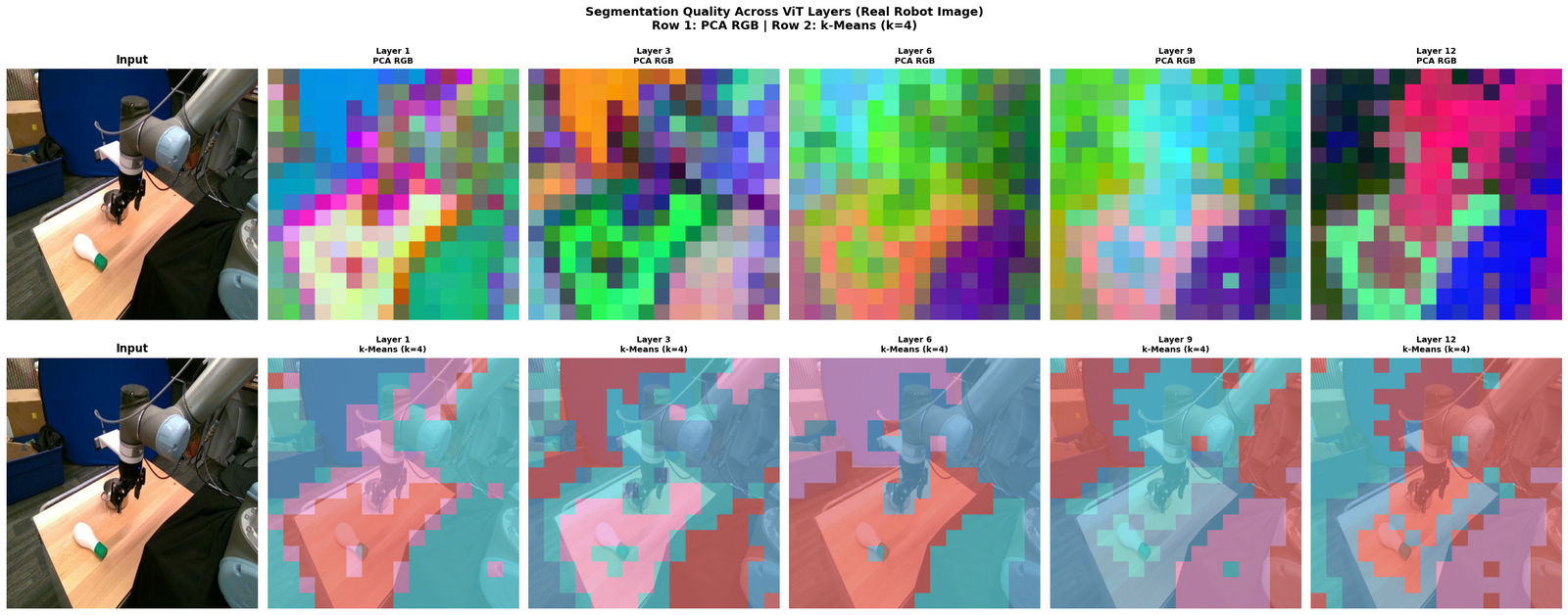
- Multi-layer comparison — how segmentation quality changes across layers
Key insight:
DINOv2 patch tokens naturally cluster into semantic regions (robot arm, objects, background) even without any segmentation supervision — a property called emergent segmentation.
Loading DINOv2-base...
Model loaded on cpu
Image: 518×518 pixels
Patch grid: 16×16, patch_size=32px
1. PCA Segmentation (Unsupervised)
Project patch features to 3D with PCA → use as RGB colors. Patches with similar features get similar colors → semantic regions emerge.
2. k-Means Clustering Segmentation
Cluster patch features into k groups. Each cluster = one semantic region.
3. Multi-Layer Segmentation Comparison
How does the segmentation quality change across the 12 transformer layers? Early layers: local texture. Late layers: semantic regions.
DINOv2 for Stereo Depth Estimation
Series: DINOv2 Downstream Tasks | Notebook 18
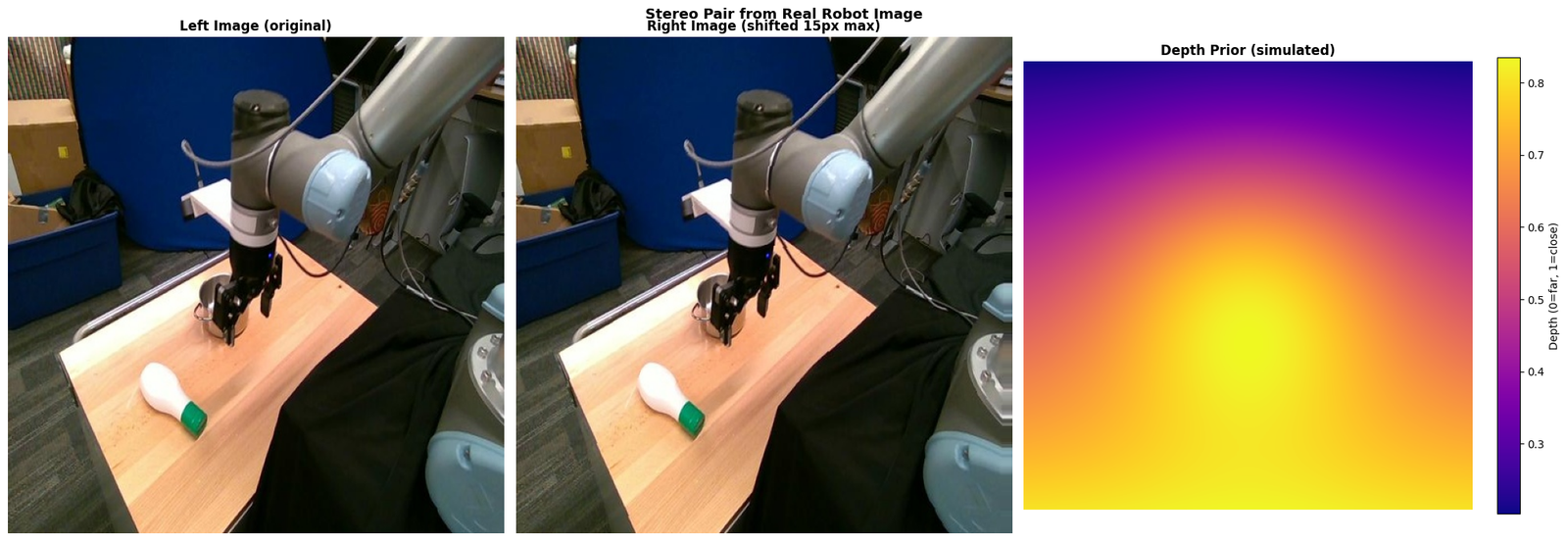
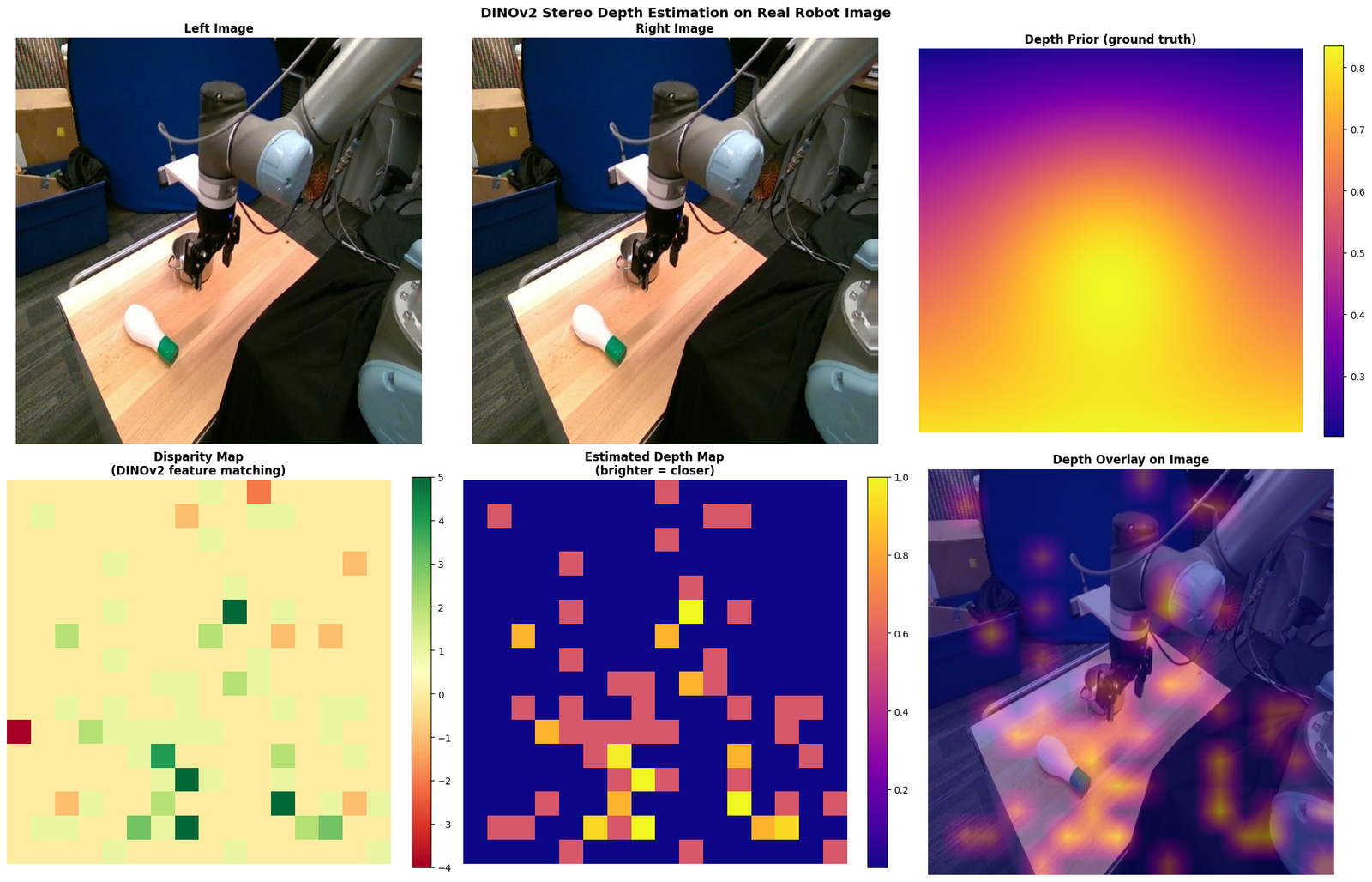
Stereo depth estimation computes a disparity map from a stereo image pair. We use DINOv2 features to find correspondences between left and right images of a real robot manipulation scene.
What we'll cover:
- Stereo pair simulation from the real robot image
- DINOv2 feature extraction for both images
- Disparity map via patch feature matching (epipolar constraint)
- Depth map from disparity
- 3D point cloud visualization
- Depth-colored image overlay
Key insight:
DINOv2 features are view-invariant — the same object patch in left and right images produces similar embeddings, making feature matching robust to illumination changes.
Using a slow image processor as `use_fast` is unset and a slow processor was saved with this model. `use_fast=True` will be the default behavior in v4.52, even if the model was saved with a slow processor. This will result in minor differences in outputs. You'll still be able to use a slow processor with `use_fast=False`.
Loading DINOv2-base...
Model loaded on cpu
Real robot image: 518×518 pixels
Extracting features for left image...
Extracting features for right image...
Patch grid: 16×16, patch_size=32px
Computing disparity map...
Disparity range: [-4.0, 5.0]
Mean confidence: 0.889
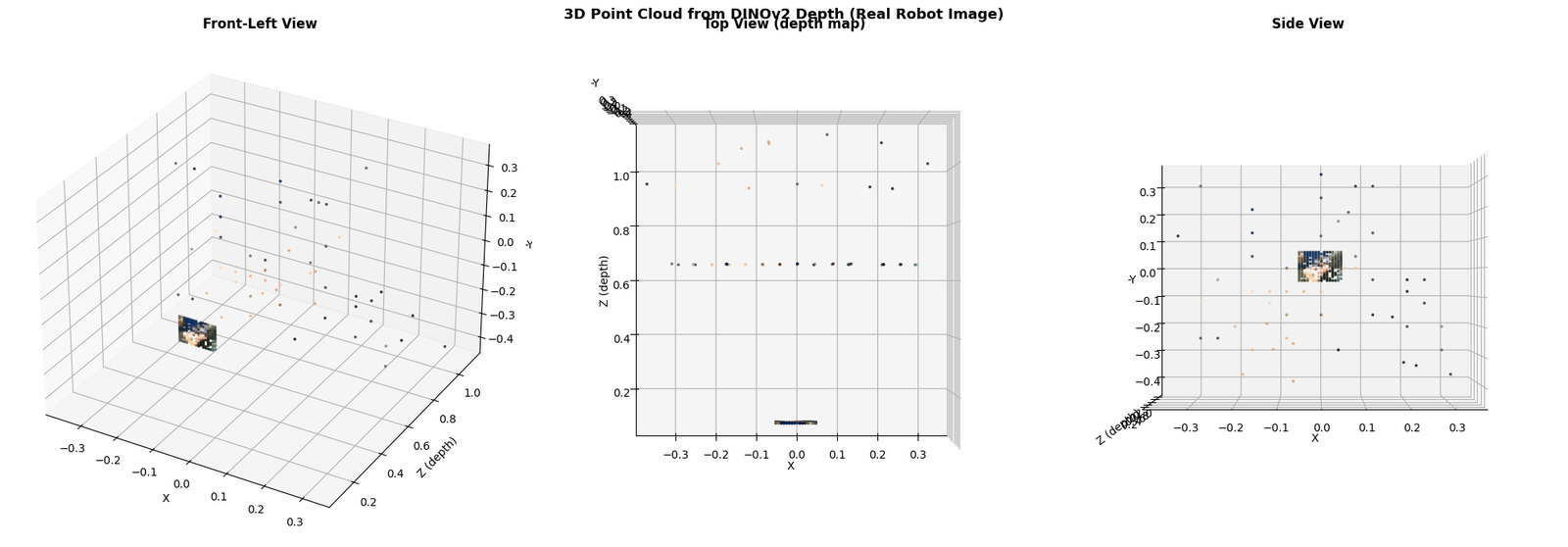
3D point cloud saved
Summary
| Step | Method | Key idea |
|---|---|---|
| Feature extraction | DINOv2 patch tokens | 768-dim per patch, view-invariant |
| Correspondence | Cosine similarity | Same patch → similar embedding |
| Disparity | Column offset of best match | Epipolar constraint (same row) |
| Depth | Z = f*b/d | Inverse disparity |
Production approaches for real stereo depth:
- Depth Anything v2 — DINOv2 backbone + metric depth head (state-of-the-art)
- DPT (Dense Prediction Transformer) — DINOv2 + dense upsampling head
- RAFT-Stereo — optical flow-based stereo with DINOv2 features