
GroundingDINO — detect anything you can name
GroundingDINO (Liu et al., 2023) is an open-set detector: instead of a fixed list of classes, you give it a free-text prompt ("a dog wearing a hat") and it localizes the referred objects — zero-shot. It achieves this by marrying a DETR-style detector with grounded language pre-training, fusing image and text at three stages.
Symbols used on this page are defined in the Nomenclature → deep learning & training.
Grounding DINO paper (arXiv:2303.05499)
14-notebook deep dive in deeplearning/notebooks/groundingDINO/
Architecture — two encoders, three fusions
C2,C3,C4
L×256 tokens
(fusion 1)
(fusion 2)
(fusion 3)
- Swin Transformer backbone → multi-scale image features (windowed + shifted-window attention).
- BERT text encoder → contextual token features for the prompt.
- Feature Enhancer (6 layers) — the first fusion: deformable self-attention on image, self-attention on text, and bidirectional image↔text cross-attention.
- Language-guided query selection — pick the top-900 image features most similar to the text as object queries.
- Cross-modal decoder — queries attend to image and text (the key innovation), refining boxes iteratively.
Scoring by alignment, not classification
There is no softmax over a fixed label set. Each object query produces a box and a contrastive alignment score against every text token — the dot product of the query's embedding with each word embedding. An object is "detected as X" when its query aligns with the word "X":
$$ s_{q,\ell} = \langle \mathbf{q}_q,\; \mathbf{t}_\ell\rangle,\qquad \text{class}(q)=\arg\max_\ell s_{q,\ell} $$Training uses Hungarian matching between predictions and ground truth, with a contrastive alignment loss plus L1 + GIoU box losses — the same matching idea as DETR/RF-DETR.
Cross-modal attention = phrase grounding
The decoder's text cross-attention is literally where a box "reads" which words describe it. The same scaled-dot-product attention you can play with here is what links the visual query to the phrase:
Zero-shot capability
Because detection is driven by language, GroundingDINO transfers to novel categories with no retraining — strong zero-shot COCO AP and the ability to detect long-tail or compositional concepts by prompt. It is the "detector" half of open-vocabulary pipelines (e.g. Grounded-SAM, where its boxes prompt SAM for masks).
Full notebook deep-dive
The complete, code-free explanations, math, and figures extracted from the model's Jupyter notebooks. The runnable notebooks are bundled with this site — browse the GroundingDINO notebooks (local copies).
GroundingDINO: Introduction & Paper Overview
Notebook 01 of 14
Paper: Grounding DINO: Marrying DINO with Grounded Pre-Training for Open-Set Object Detection Authors: Shilong Liu, Zhaoyang Zeng, Tianhe Ren, Feng Li, Hao Zhang, Jie Yang, Chunyuan Li, Jianwei Yang, Hang Su, Jun Zhu, Lei Zhang ArXiv: https://arxiv.org/abs/2303.05499 Year: 2023
---
Table of Contents
- What is GroundingDINO?
- Problem Statement: Open-Set Object Detection
- Key Contributions
- Comparison with Prior Work
- High-Level Architecture Overview
- Performance Benchmarks
- Zero-Shot Transfer Capabilities
- Notebook Series Overview
1. What is GroundingDINO? <a id='what-is-groundingdino'></a>
GroundingDINO is an open-set object detection model that combines:
- DINO (Detection with Transformers using Improved deNoising anchor boxes) — a state-of-the-art closed-set detector
- Grounded Pre-Training — a technique to align visual and language representations
The key insight: by marrying a powerful visual detector with language understanding, we get a model that can detect any object described in natural language, even objects never seen during training.
What makes it special?
`` Traditional Detector: Image → [Fixed N classes] → Bounding Boxes GroundingDINO: Image + Text Query → [Any described object] → Bounding Boxes ``
Example queries:
"cat"→ detects cats"the red cup on the table"→ detects specific cup"person wearing a hat"→ detects people with hats"all objects"→ detects everything"dog . cat . bird"→ detects multiple categories (dot-separated)
2. Problem Statement: Open-Set Object Detection <a id='problem-statement'></a>
The Challenge
Traditional object detectors (YOLO, Faster R-CNN, DETR) are closed-set: they can only detect objects from a fixed set of categories defined at training time.
Limitations:
- COCO has 80 categories — what about the other millions of object types?
- Cannot handle novel objects at test time
- Cannot understand spatial/relational descriptions
- Require expensive re-training for new categories
Open-Set Object Detection Definition
Given:
- An image $I \in \mathbb{R}^{H \times W \times 3}$
- A text query $T$ (e.g., "cat", "person wearing red shirt")
Predict:
- Bounding boxes $\{b_i\}$ where $b_i = (x_c, y_c, w, h)$ (normalized)
- Confidence scores $\{s_i\}$ for each box
- Phrase-level grounding (which words correspond to which box)
Formal Problem
$$f_{\theta}(I, T) \rightarrow \{(b_i, s_i, p_i)\}_{i=1}^{N}$$
where:
- $b_i \in [0,1]^4$ — normalized bounding box
- $s_i \in [0,1]$ — confidence score
- $p_i$ — phrase alignment (which tokens in $T$ correspond to $b_i$)
- $N$ — number of detected objects (variable)
3. Key Contributions <a id='key-contributions'></a>
The paper makes 5 key contributions:
Contribution 1: Tight Fusion Architecture
Unlike previous methods that loosely combine vision and language, GroundingDINO introduces deep cross-modal fusion at multiple stages:
- Feature-level fusion (Feature Enhancer)
- Query-level fusion (Language-Guided Query Selection)
- Prediction-level fusion (Cross-Modal Decoder)
Contribution 2: Language-Guided Query Selection
Instead of using fixed learned queries (like DETR), GroundingDINO selects queries guided by the text input. This ensures the model focuses on regions relevant to the text query.
Contribution 3: Cross-Modality Decoder
A novel decoder that performs cross-attention between visual features and text features at every decoder layer, enabling fine-grained alignment.
Contribution 4: Sub-Sentence Level Text Features
The model operates at the phrase/token level, not just sentence level, enabling fine-grained grounding of specific words to specific regions.
Contribution 5: State-of-the-Art Zero-Shot Transfer
Achieves 52.5 AP on COCO zero-shot (without any COCO training data), surpassing many fully-supervised models.
---
Summary Table
4. Comparison with Prior Work <a id='comparison'></a>
Evolution of Object Detection
| Model | Year | Type | Vocabulary | Key Feature |
|---|---|---|---|---|
| Faster R-CNN | 2015 | Two-stage | Fixed | Region proposals |
| YOLO | 2016 | One-stage | Fixed | Real-time detection |
| DETR | 2020 | Transformer | Fixed | End-to-end, no NMS |
| DINO | 2022 | Transformer | Fixed | Improved denoising |
| GLIP | 2022 | Grounded | Open | Language-image pretraining |
| OWL-ViT | 2022 | Transformer | Open | Simple open-vocab |
| GroundingDINO | 2023 | Transformer | Open | Tight fusion + DINO |
Key Differences from GLIP (closest prior work)
| Aspect | GLIP | GroundingDINO |
|---|---|---|
| Base detector | DyHead | DINO |
| Fusion depth | Shallow | Deep (3 stages) |
| Query selection | Fixed | Language-guided |
| Decoder | Standard | Cross-modal |
| COCO zero-shot AP | 49.8 | 52.5 |
5. High-Level Architecture Overview <a id='architecture-overview'></a>
GroundingDINO has a dual-encoder, single-decoder architecture:
`` ┌─────────────────────────────────────────────────────────────────┐ │ GroundingDINO Architecture │ ├─────────────────────────────────────────────────────────────────┤ │ │ │ Image ──→ [Swin Transformer] ──→ Multi-scale Features │ │ │ │ │ Text ──→ [BERT Encoder] ──→ Text Features │ │ │ │ │ [Feature Enhancer] │ │ (Cross-modal self-attention) │ │ │ │ │ [Language-Guided Query Selection] │ │ (Select top-K image features by text) │ │ │ │ │ [Cross-Modal Decoder] │ │ (6 layers of cross-attention) │ │ │ │ │ [Detection Head] │ │ (Box regression + Contrastive score) │ │ │ │ │ Output: Boxes + Scores + Phrases │ └─────────────────────────────────────────────────────────────────┘ ``
Three Stages of Fusion
- Feature Enhancer: Fuses image and text features using cross-attention
- Query Selection: Uses text to select relevant image regions as queries
- Decoder: Cross-modal attention at every decoder layer
This is fundamentally different from GLIP which only fuses at the feature level.
6. Performance Benchmarks <a id='performance'></a>
COCO Detection Results
| Setting | Model | AP | AP50 | AP75 |
|---|---|---|---|---|
| Zero-shot | GLIP-L | 49.8 | 67.4 | 54.3 |
| Zero-shot | GroundingDINO-T | 48.4 | 64.7 | 52.2 |
| Zero-shot | GroundingDINO-B | 56.7 | 74.3 | 62.6 |
| Supervised | DINO | 58.5 | 76.0 | 64.1 |
| Supervised | GroundingDINO-B | 63.0 | 80.3 | 68.8 |
ODinW (Object Detection in the Wild) - 35 datasets
| Model | Mean AP |
|---|---|
| GLIP-L | 49.8 |
| GroundingDINO-B | 52.5 |
Referring Expression Comprehension
| Dataset | MDETR | GLIP | GroundingDINO |
|---|---|---|---|
| RefCOCO val | 86.75 | 86.13 | 89.19 |
| RefCOCO+ val | 79.52 | 81.22 | 81.67 |
| RefCOCOg val | 81.64 | 80.10 | 82.75 |
7. Zero-Shot Transfer Capabilities <a id='zero-shot'></a>
One of the most impressive aspects of GroundingDINO is its zero-shot transfer capability.
What is Zero-Shot Transfer?
The model is trained on a large dataset (Objects365, GoldG, Cap4M, etc.) but never sees COCO training data. Yet it achieves 52.5 AP on COCO — better than many supervised models!
Training Data Used
- Objects365: 365 categories, 1.7M images
- GoldG: Grounded image-text pairs
- Cap4M: 4M image-caption pairs
- COCO (for supervised fine-tuning only)
Why Zero-Shot Works
- Language provides a universal interface — any concept can be described
- Large-scale grounded pre-training teaches visual-language alignment
- The model learns transferable representations not tied to specific categories
Practical Implications
- Deploy once, detect anything
- No need to collect labeled data for new categories
- Handles long-tail objects naturally
- Enables referring expression comprehension ("the second person from the left")
8. Notebook Series Overview <a id='series-overview'></a>
This series of notebooks covers every aspect of GroundingDINO:
| Notebook | Topic | Key Content |
|---|---|---|
| 01 | Introduction & Overview | Paper summary, contributions, benchmarks |
| 02 | Swin Transformer Backbone | Architecture, tensor shapes, visualizations |
| 03 | BERT Text Encoder | Tokenization, embeddings, attention |
| 04 | Feature Enhancer | Cross-modal fusion, attention patterns |
| 05 | Language-Guided Query Selection | Query selection mechanism |
| 06 | Cross-Modal Decoder | Decoder layers, cross-attention |
| 07 | Loss Functions | Contrastive loss, L1 loss, GIoU loss |
| 08 | Training Strategy | Optimizer, LR schedule, data augmentation |
| 09 | Setup & Installation | Environment, model download |
| 10 | Inference & Tensor Shapes | Running inference, shape tracking |
| 11 | Intermediate Layer Viz | Feature maps, attention maps |
| 12 | Cross-Modal Attention Viz | Text-image alignment visualization |
| 13 | Dataset Preparation | COCO download, preprocessing |
| 14 | Evaluation | COCO eval, zero-shot transfer |
---
Summary
GroundingDINO represents a significant advance in object detection by:
- Unifying visual detection and language understanding
- Enabling open-vocabulary detection without retraining
- Achieving state-of-the-art zero-shot performance
- Providing fine-grained phrase-level grounding
The key insight is that language is a universal interface for specifying what to detect, and by deeply fusing language and vision at multiple stages, we get a model that generalizes far beyond its training categories.
GroundingDINO: Swin Transformer Backbone
Notebook 02 of 14
This notebook covers the Swin Transformer visual backbone used in GroundingDINO, including:
- Architecture details and design choices
- Tensor shapes at every layer
- Window attention mechanism
- Multi-scale feature extraction
- Live implementation and visualization
---
Table of Contents
- Why Swin Transformer?
- Swin Transformer Architecture
- Patch Partition & Linear Embedding
- Window-Based Self-Attention (W-MSA)
- Shifted Window Attention (SW-MSA)
- Swin Transformer Block
- Hierarchical Feature Maps
- Tensor Shapes Through the Network
- Implementation & Visualization
1. Why Swin Transformer? <a id='why-swin'></a>
GroundingDINO uses Swin Transformer as its visual backbone because:
| Property | Benefit for Detection |
|---|---|
| Hierarchical features | Multi-scale representations for objects of different sizes |
| Local window attention | Efficient O(n) complexity vs O(n²) for global attention |
| Shifted windows | Cross-window connections without global attention |
| High resolution | Maintains spatial detail needed for precise localization |
| Pre-trained on ImageNet | Strong visual representations |
Swin Variants Used in GroundingDINO
| Model | Backbone | Params | COCO AP (zero-shot) |
|---|---|---|---|
| GroundingDINO-T | Swin-T | 172M | 48.4 |
| GroundingDINO-B | Swin-B | 253M | 56.7 |
| GroundingDINO-L | Swin-L | 341M | 57.2 |
Key Difference from ViT
`` ViT: Image → [16×16 patches] → Single-scale features → Transformer Swin: Image → [4×4 patches] → Hierarchical features → Transformer (4 stages, 4× downsampling each) ``
2. Swin Transformer Architecture <a id='architecture'></a>
Overall Structure
For an input image of size $H \times W \times 3$:
`` Input: H×W×3 ↓ Patch Partition (4×4): H/4 × W/4 × 48 ↓ Linear Embedding: H/4 × W/4 × C (C=96 for Swin-T) ↓ Stage 1: H/4 × W/4 × C (2 Swin blocks) ↓ Patch Merging Stage 2: H/8 × W/8 × 2C (2 Swin blocks) ↓ Patch Merging Stage 3: H/16 × W/16 × 4C (6 Swin blocks) ↓ Patch Merging Stage 4: H/32 × W/32 × 8C (2 Swin blocks) ``
For Swin-T (C=96) with 800×1333 input:
- Stage 1: 200×334×96
- Stage 2: 100×167×192
- Stage 3: 50×84×384
- Stage 4: 25×42×768
GroundingDINO uses Stages 2, 3, 4 as multi-scale features (FPN-like).
3. Patch Partition & Linear Embedding <a id='patch-partition'></a>
Patch Partition
The image is split into non-overlapping 4×4 patches:
$$\text{Input}: H \times W \times 3 \rightarrow \frac{H}{4} \times \frac{W}{4} \times (4 \times 4 \times 3) = \frac{H}{4} \times \frac{W}{4} \times 48$$
Linear Embedding
A linear layer projects the 48-dim patch features to C-dim:
$$\frac{H}{4} \times \frac{W}{4} \times 48 \xrightarrow{\text{Linear}} \frac{H}{4} \times \frac{W}{4} \times C$$
For Swin-T: C=96, Swin-S/B: C=96, Swin-L: C=192
Patch Merging (Downsampling)
Between stages, spatial resolution is halved and channels doubled:
$$\frac{H}{4} \times \frac{W}{4} \times C \xrightarrow{\text{Patch Merge}} \frac{H}{8} \times \frac{W}{8} \times 2C$$
Implementation: Take 2×2 neighboring patches → concatenate → linear projection
4. Window-Based Self-Attention (W-MSA) <a id='window-attention'></a>
The Problem with Global Attention
Standard self-attention has $O(N^2)$ complexity where $N$ is the number of tokens. For a 800×1333 image with 4×4 patches: $N = 200 \times 334 = 66,800$ tokens → $O(4.5 \times 10^9)$ operations!
Window Attention Solution
Partition the feature map into non-overlapping windows of size $M \times M$ (default M=7):
$$\text{Complexity: } O\left(\frac{HW}{M^2} \cdot M^4 \cdot d\right) = O(HW \cdot M^2 \cdot d)$$
This is linear in image size!
Window Attention Formula
For each window of $M^2$ tokens: $$\text{Attention}(Q, K, V) = \text{softmax}\left(\frac{QK^T}{\sqrt{d_k}} + B\right)V$$
where $B$ is the relative position bias — a learnable bias based on relative positions within the window.
Relative Position Bias
For a window of size $M \times M$, relative positions range from $[-(M-1), M-1]$. A learnable bias table $\hat{B} \in \mathbb{R}^{(2M-1) \times (2M-1)}$ is used:
$$B_{ij} = \hat{B}[\Delta x_{ij} + M - 1, \Delta y_{ij} + M - 1]$$
5. Shifted Window Attention (SW-MSA) <a id='shifted-window'></a>
The Problem with Regular Windows
Regular window attention has no cross-window connections — tokens in different windows never interact!
Shifted Window Solution
Alternate between:
- W-MSA: Regular window partition
- SW-MSA: Shifted window partition (shift by $\lfloor M/2 \rfloor$ in both dimensions)
`` Layer 1 (W-MSA): Layer 2 (SW-MSA): ┌──┬──┬──┐ ┌─┬──┬──┬─┐ │ │ │ │ │ │ │ │ │ ├──┼──┼──┤ → ├─┼──┼──┼─┤ │ │ │ │ │ │ │ │ │ ├──┼──┼──┤ ├─┼──┼──┼─┤ │ │ │ │ │ │ │ │ │ └──┴──┴──┘ └─┴──┴──┴─┘ ``
Cyclic Shift for Efficiency
Instead of creating irregular windows at boundaries, use cyclic shift + attention masking:
- Cyclically shift the feature map by $(-\lfloor M/2 \rfloor, -\lfloor M/2 \rfloor)$
- Apply regular window partition
- Use attention mask to prevent cross-region attention
- Reverse cyclic shift
6. Swin Transformer Block <a id='swin-block'></a>
Each Swin Transformer block consists of:
$$\hat{z}^l = \text{W-MSA}(\text{LN}(z^{l-1})) + z^{l-1}$$ $$z^l = \text{MLP}(\text{LN}(\hat{z}^l)) + \hat{z}^l$$
$$\hat{z}^{l+1} = \text{SW-MSA}(\text{LN}(z^l)) + z^l$$ $$z^{l+1} = \text{MLP}(\text{LN}(\hat{z}^{l+1})) + \hat{z}^{l+1}$$
MLP Structure
The MLP has 2 layers with GELU activation: $$\text{MLP}(x) = \text{Linear}(\text{GELU}(\text{Linear}(x)))$$
Hidden dimension = 4 × C (expansion ratio = 4)
7. Hierarchical Feature Maps <a id='hierarchical'></a>
GroundingDINO uses multi-scale features from Swin Transformer stages 2, 3, 4. These are fed into the Feature Pyramid Network (FPN) or directly to the Feature Enhancer.
Feature Scales
For input 800×1333 (typical detection input):
| Stage | Stride | Feature Size | Channels | Receptive Field |
|---|---|---|---|---|
| Stage 2 | 8 | 100×167 | 192 | Small objects |
| Stage 3 | 16 | 50×84 | 384 | Medium objects |
| Stage 4 | 32 | 25×42 | 768 | Large objects |
Projection to Common Dimension
All features are projected to 256-dim for the Feature Enhancer: $$\text{Stage}_i \xrightarrow{\text{Conv1×1}} 256\text{-dim}$$
8. Tensor Shapes Through the Network <a id='tensor-shapes'></a>
Complete tensor shape tracking for Swin-T with 800×1333 input:
9. Implementation & Visualization <a id='implementation'></a>
Let's use the actual Swin Transformer from timm to visualize real feature maps.
Summary
The Swin Transformer backbone in GroundingDINO:
- Processes the input image through 4×4 patch partition → linear embedding
- Applies hierarchical window attention (W-MSA + SW-MSA) in 4 stages
- Produces multi-scale features at strides 8, 16, 32
- Projects all scales to 256-dim for the Feature Enhancer
Key tensor shapes (800×1333 input, Swin-T):
- Input:
1 × 3 × 800 × 1333 - C2 (stride 8):
1 × 192 × 100 × 167 - C3 (stride 16):
1 × 384 × 50 × 84 - C4 (stride 32):
1 × 768 × 25 × 42 - After projection:
1 × 256 × H_i × W_ifor each scale
GroundingDINO: BERT Text Encoder
Notebook 03 of 14
This notebook covers the BERT-based text encoder used in GroundingDINO:
- Tokenization and input formatting
- BERT architecture internals
- Tensor shapes at every layer
- Token-level vs sentence-level features
- Sub-sentence phrase grounding
- Visualization of text embeddings and attention
---
Table of Contents
- Why BERT for Text Encoding?
- Tokenization & Input Formatting
- BERT Architecture
- Multi-Head Self-Attention in BERT
- Tensor Shapes Through BERT
- Token-Level Features for Grounding
- Text Feature Visualization
- Special Tokens & Phrase Alignment
1. Why BERT for Text Encoding? <a id='why-bert'></a>
GroundingDINO uses BERT (Bidirectional Encoder Representations from Transformers) as its text backbone because:
| Property | Benefit |
|---|---|
| Bidirectional | Understands context from both directions |
| Token-level outputs | Each token gets its own embedding → phrase grounding |
| Pre-trained | Rich semantic representations from large text corpora |
| Sub-word tokenization | Handles rare words and morphological variations |
| Attention patterns | Captures syntactic and semantic relationships |
BERT vs Other Text Encoders
| Encoder | Type | Output | Used in |
|---|---|---|---|
| CLIP text | Causal | [CLS] token only | CLIP, OWL-ViT |
| BERT | Bidirectional | All tokens | GroundingDINO, GLIP |
| T5 encoder | Bidirectional | All tokens | Flamingo |
| LLaMA | Causal | All tokens | LLaVA |
Key Insight: Token-Level Features
For phrase grounding, we need per-token features so each word can be matched to a specific region: `` Query: "cat sitting on the mat" Tokens: [CLS] cat sitting on the mat [SEP] ↓ ↓ ↓ ↓ ↓ ↓ ↓ f0 f1 f2 f3 f4 f5 f6 ← 256-dim features ↑ f1 matches bounding box of cat f5 matches bounding box of mat ``
transformers already installed
Using device: cuda
2. Tokenization & Input Formatting <a id='tokenization'></a>
WordPiece Tokenization
BERT uses WordPiece tokenization:
- Common words → single token:
cat→[cat] - Rare words → sub-words:
grounding→[ground, ##ing] - Unknown words →
[UNK]
Input Format
`` [CLS] token1 token2 ... tokenN [SEP] ``
GroundingDINO Text Format
Multiple categories are separated by .: `` "cat . dog . bird" → [CLS] cat . dog . bird [SEP] ``
Input Tensors
input_ids: Token IDs from vocabulary (vocab size = 30,522)attention_mask: 1 for real tokens, 0 for paddingtoken_type_ids: 0 for all tokens (single sentence)
======================================================================
BERT Tokenization Examples
======================================================================
Query: 'cat'
  Tokens: ['cat']
  IDs:    [101, 4937, 102]
  Length: 3 (including [CLS] and [SEP])
Query: 'cat . dog . bird'
  Tokens: ['cat', '.', 'dog', '.', 'bird']
  IDs:    [101, 4937, 1012, 3899, 1012, 4743, 102]
  Length: 7 (including [CLS] and [SEP])
Query: 'person wearing a red hat'
  Tokens: ['person', 'wearing', 'a', 'red', 'hat']
  IDs:    [101, 2711, 4147, 1037, 2417, 6045, 102]
  Length: 7 (including [CLS] and [SEP])
Query: 'the large brown dog sitting on the grass'
  Tokens: ['the', 'large', 'brown', 'dog', 'sitting', 'on', 'the', 'grass']
  IDs:    [101, 1996, 2312, 2829, 3899, 3564, 2006, 1996, 5568, 102]
  Length: 10 (including [CLS] and [SEP])
======================================================================
Vocabulary size: 30522
[CLS] token ID: 101
[SEP] token ID: 102
[PAD] token ID: 0
Max sequence length: 512
Batch Tokenization:
  input_ids shape:      torch.Size([3, 13])  (B, max_seq_len)
  attention_mask shape: torch.Size([3, 13])
  token_type_ids shape: torch.Size([3, 13])
Input IDs (first 3 sequences):
  [0] 'cat . dog'
      Tokens: ['[CLS]', 'cat', '.', 'dog', '[SEP]']
      Padded length: 13, Real length: 5
  [1] 'person wearing a red hat'
      Tokens: ['[CLS]', 'person', 'wearing', 'a', 'red', 'hat', '[SEP]']
      Padded length: 13, Real length: 7
  [2] 'the large brown dog sitting on the grass near the fence'
      Tokens: ['[CLS]', 'the', 'large', 'brown', 'dog', 'sitting', 'on', 'the', 'grass', 'near', 'the', 'fence', '[SEP]']
      Padded length: 13, Real length: 13
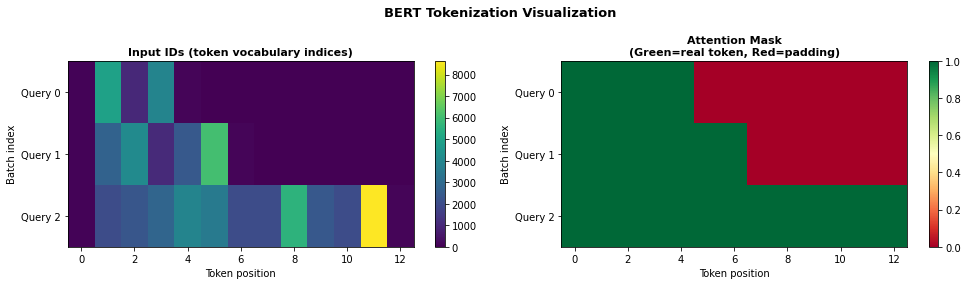
tensor([[1, 1, 1, 1, 1, 0, 0, 0, 0, 0, 0, 0, 0],
        [1, 1, 1, 1, 1, 1, 1, 0, 0, 0, 0, 0, 0],
        [1, 1, 1, 1, 1, 1, 1, 1, 1, 1, 1, 1, 1]])
3. BERT Architecture <a id='bert-arch'></a>
BERT-Base Configuration
| Parameter | Value |
|---|---|
| Hidden size (d_model) | 768 |
| Number of layers | 12 |
| Number of attention heads | 12 |
| Head dimension | 64 |
| FFN hidden size | 3072 (4× hidden) |
| Max sequence length | 512 |
| Vocabulary size | 30,522 |
| Total parameters | ~110M |
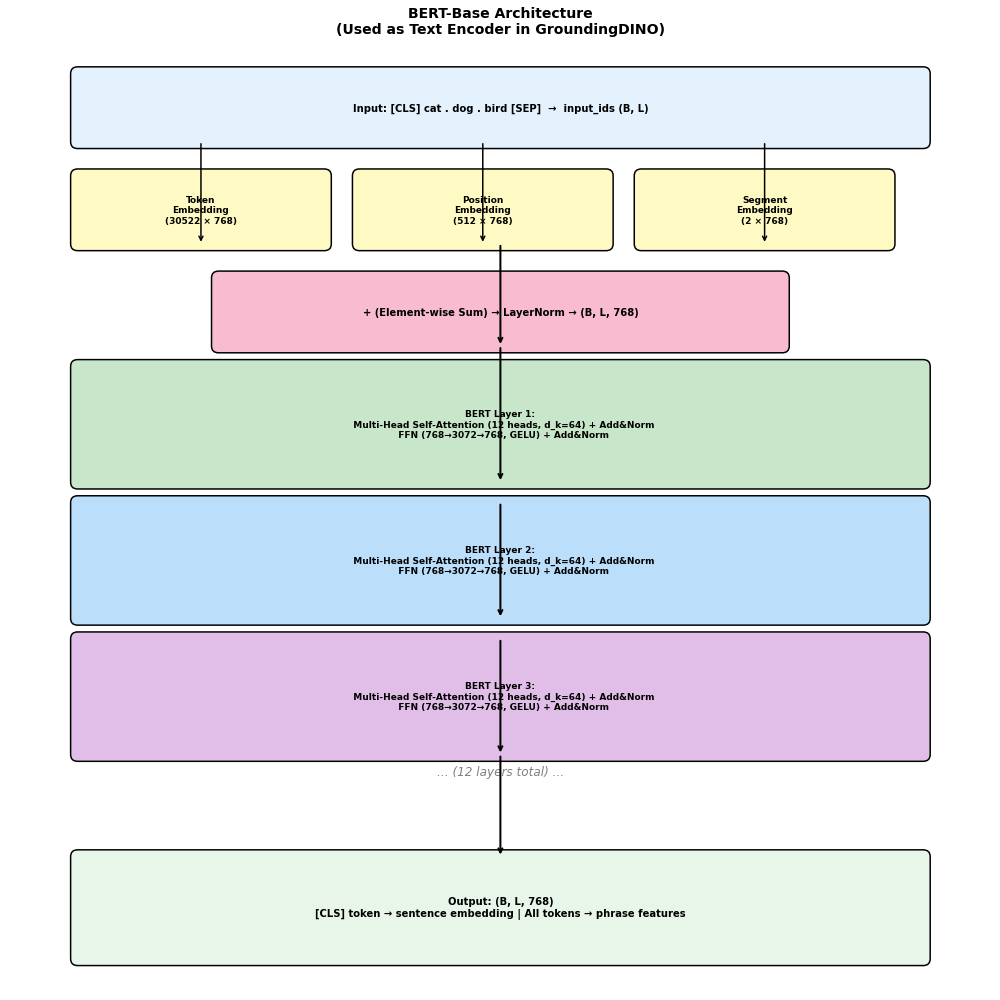
BERT Layer Structure
Each of the 12 BERT layers contains: `` Input x (B, L, 768) ↓ Multi-Head Self-Attention ↓ Add & LayerNorm ↓ Feed-Forward Network (768 → 3072 → 768) ↓ Add & LayerNorm ↓ Output (B, L, 768) ``
Embeddings
BERT input = Token Embedding + Position Embedding + Segment Embedding: $$E_{input} = E_{token} + E_{position} + E_{segment}$$
BERT-Base Configuration:
  Hidden size:          768
  Num hidden layers:    12
  Num attention heads:  12
  Head dimension:       64
  Intermediate size:    3072
  Max position embed:   512
  Vocab size:           30522
  Hidden act:           gelu
Total parameters: 109,482,240 (109.5M)
4. Multi-Head Self-Attention in BERT <a id='bert-attention'></a>
Attention Formula
$$\text{Attention}(Q, K, V) = \text{softmax}\left(\frac{QK^T}{\sqrt{d_k}}\right)V$$
For BERT-base:
- $d_{model} = 768$
- $h = 12$ heads
- $d_k = d_v = 768/12 = 64$
Multi-Head Attention
$$\text{MultiHead}(Q, K, V) = \text{Concat}(\text{head}_1, ..., \text{head}_h)W^O$$
where $\text{head}_i = \text{Attention}(QW_i^Q, KW_i^K, VW_i^V)$
Tensor Shapes in BERT Attention
For input (B, L, 768) with L=10 tokens: `` Q = x @ W_Q: (B, L, 768) @ (768, 768) → (B, L, 768) → (B, 12, L, 64) K = x @ W_K: (B, L, 768) @ (768, 768) → (B, L, 768) → (B, 12, L, 64) V = x @ W_V: (B, L, 768) @ (768, 768) → (B, L, 768) → (B, 12, L, 64) Attn = QK^T / sqrt(64): (B, 12, L, 64) @ (B, 12, 64, L) → (B, 12, L, L) Out = softmax(Attn) @ V: (B, 12, L, L) @ (B, 12, L, 64) → (B, 12, L, 64) Concat + proj: (B, 12, L, 64) → (B, L, 768) ``
BERT Self-Attention Tensor Shapes:
==================================================
Input x: torch.Size([2, 15, 768])  (B=2, L=15, D=768)
Q, K, V (before reshape): torch.Size([2, 15, 768])  (B, L, D)
Q, K, V (multi-head):     torch.Size([2, 12, 15, 64])  (B, H=12, L, d_k=64)
Attention scores:         torch.Size([2, 12, 15, 15])  (B, H, L, L)
Attention weights:        torch.Size([2, 12, 15, 15])  (B, H, L, L) [after softmax]
Context (attn @ V):       torch.Size([2, 12, 15, 64])  (B, H, L, d_k)
After concat heads:       torch.Size([2, 15, 768])  (B, L, D)
Output:                   torch.Size([2, 15, 768])  (B, L, D)
Final output: torch.Size([2, 15, 768])
5. Tensor Shapes Through BERT <a id='tensor-shapes'></a>
Complete tensor shape tracking for BERT-base with a sample query:
Query: 'cat sitting on the mat . dog running in the park'
Tokens: ['cat', 'sitting', 'on', 'the', 'mat', '.', 'dog', 'running', 'in', 'the', 'park']
Sequence length L = 13 (including [CLS] and [SEP])
BERT Output Shapes:
  last_hidden_state:  torch.Size([1, 13, 768])  (B, L, 768)
  pooler_output:      torch.Size([1, 768])  (B, 768) [CLS token after linear+tanh]
  hidden_states:      13 tensors (embedding + 12 layers)
    Each:             torch.Size([1, 13, 768])
  attentions:         12 tensors (12 layers)
    Each:             torch.Size([1, 12, 13, 13])  (B, num_heads, L, L)
Total shape entries: 44
          Component            Shape                        Description
          Input IDs           1 × 13           Token vocabulary indices
     Attention Mask           1 × 13                  1=real, 0=padding
   Token Embeddings     1 × 13 × 768        Lookup from 30522×768 table
Position Embeddings     1 × 13 × 768          Lookup from 512×768 table
 Segment Embeddings     1 × 13 × 768            Lookup from 2×768 table
 Embedding Sum + LN     1 × 13 × 768        Input to transformer layers
      Layer 1 Q/K/V 1 × 12 × 13 × 64                   12 heads, d_k=64
       Layer 1 Attn 1 × 12 × 13 × 13                  Attention weights
     Layer 1 Output     1 × 13 × 768               After FFN + residual
      Layer 2 Q/K/V 1 × 12 × 13 × 64                   12 heads, d_k=64
       Layer 2 Attn 1 × 12 × 13 × 13                  Attention weights
     Layer 2 Output     1 × 13 × 768               After FFN + residual
      Layer 3 Q/K/V 1 × 12 × 13 × 64                   12 heads, d_k=64
       Layer 3 Attn 1 × 12 × 13 × 13                  Attention weights
     Layer 3 Output     1 × 13 × 768               After FFN + residual
      Layer 4 Q/K/V 1 × 12 × 13 × 64                   12 heads, d_k=64
       Layer 4 Attn 1 × 12 × 13 × 13                  Attention weights
     Layer 4 Output     1 × 13 × 768               After FFN + residual
      Layer 5 Q/K/V 1 × 12 × 13 × 64                   12 heads, d_k=64
       Layer 5 Attn 1 × 12 × 13 × 13                  Attention weights
     Layer 5 Output     1 × 13 × 768               After FFN + residual
      Layer 6 Q/K/V 1 × 12 × 13 × 64                   12 heads, d_k=64
       Layer 6 Attn 1 × 12 × 13 × 13                  Attention weights
     Layer 6 Output     1 × 13 × 768               After FFN + residual
      Layer 7 Q/K/V 1 × 12 × 13 × 64                   12 heads, d_k=64
       Layer 7 Attn 1 × 12 × 13 × 13                  Attention weights
…
(58 lines total — see the notebook for the full output)
6. Token-Level Features for Grounding <a id='token-features'></a>
How GroundingDINO Uses BERT Features
GroundingDINO uses the full token-level output (not just [CLS]):
- Feature Enhancer: All token features participate in cross-modal attention
- Contrastive Loss: Each detected box is matched to specific tokens
- Phrase Grounding: Token features are used to identify which words correspond to which box
Projection to 256-dim
BERT outputs 768-dim features, but GroundingDINO uses 256-dim: $$\text{BERT output} \in \mathbb{R}^{B \times L \times 768} \xrightarrow{\text{Linear}} \mathbb{R}^{B \times L \times 256}$$
Text Feature Masking
The attention mask is used to ignore padding tokens in all subsequent operations.
7. Text Feature Visualization <a id='visualization'></a>
Let's visualize BERT attention patterns and how they capture semantic relationships.
8. Special Tokens & Phrase Alignment <a id='special-tokens'></a>
GroundingDINO Text Format
GroundingDINO uses a specific text format for multi-category detection:
```python
Single category
text = "cat"
Multiple categories (dot-separated)
text = "cat . dog . bird"
Referring expression
text = "the large brown dog sitting on the grass" ```
Phrase Alignment
After detection, each bounding box is matched to specific tokens:
- The model outputs a logit vector of size L (sequence length)
- High logits at token positions indicate the box corresponds to those words
- This enables phrase grounding: knowing which words describe which box
Token Position Tracking
For "cat . dog . bird" → [CLS] cat . dog . bird [SEP]:
- Token 1 (
cat) → category 1 - Token 3 (
dog) → category 2 - Token 5 (
bird) → category 3 - Tokens 2, 4 (
.) → separators (ignored)
Summary
The BERT text encoder in GroundingDINO:
- Tokenizes the text query using WordPiece tokenization
- Encodes tokens through 12 bidirectional transformer layers
- Outputs token-level features
(B, L, 768)— one vector per token - Projects to 256-dim for the Feature Enhancer
Key tensor shapes:
- Input:
(B, L)token IDs - Embeddings:
(B, L, 768) - Each layer Q/K/V:
(B, 12, L, 64) - Each layer attention:
(B, 12, L, L) - Final output:
(B, L, 768)→ projected to(B, L, 256)
The token-level features enable phrase grounding — matching specific words to specific detected regions.
GroundingDINO: Feature Enhancer (Cross-Modal Fusion)
Notebook 04 of 14
This notebook covers the Feature Enhancer — the first stage of cross-modal fusion in GroundingDINO:
- Architecture of the Feature Enhancer
- Image-to-text and text-to-image cross-attention
- Deformable self-attention for image features
- Tensor shapes at every step
- Visualization of cross-modal attention patterns
---
Table of Contents
- What is the Feature Enhancer?
- Architecture Overview
- Deformable Self-Attention (Image)
- Cross-Modal Attention (Image↔Text)
- Feature Enhancer Layer
- Tensor Shapes
- Implementation & Visualization
1. What is the Feature Enhancer? <a id='what-is'></a>
The Feature Enhancer is the first fusion stage in GroundingDINO. It takes:
- Image features from Swin Transformer (multi-scale, projected to 256-dim)
- Text features from BERT (token-level, projected to 256-dim)
And produces enhanced features where each modality has been informed by the other.
Why is this needed?
Without fusion, the image features don't "know" what text is being queried. The Feature Enhancer allows:
- Image features to attend to relevant text tokens
- Text features to attend to relevant image regions
- Both modalities to be aligned in a shared feature space
Key Design Choices
| Component | Choice | Reason |
|---|---|---|
| Image self-attention | Deformable | Efficient for multi-scale features |
| Text self-attention | Standard | Text sequences are short |
| Cross-modal attention | Standard | Bidirectional image↔text |
| Number of layers | 6 | Balance between capacity and efficiency |
Comparison with GLIP
GLIP uses a single cross-modal fusion layer. GroundingDINO uses 6 layers of deep fusion, enabling much richer cross-modal interactions.
2. Architecture Overview <a id='architecture'></a>
Feature Enhancer Structure
The Feature Enhancer consists of N=6 identical layers, each containing:
`` Image Features (B, Nv, 256) Text Features (B, L, 256) │ │ ▼ ▼ Deformable Self-Attn Standard Self-Attn (image → image) (text → text) │ │ ▼ ▼ Image-to-Text Cross-Attn Text-to-Image Cross-Attn (image queries, text keys) (text queries, image keys) │ │ ▼ ▼ FFN (image) FFN (text) │ │ ▼ ▼ Enhanced Image Features Enhanced Text Features (B, Nv, 256) (B, L, 256) ``
Where:
- $N_v$ = total visual tokens = sum of all scale tokens
- $L$ = text sequence length
- For 800×1333 input: $N_v = 100 \times 167 + 50 \times 84 + 25 \times 42 = 16700 + 4200 + 1050 = 21950$
3. Deformable Self-Attention (Image) <a id='deformable-attn'></a>
Why Deformable Attention?
Standard attention over all $N_v \approx 22,000$ visual tokens would be $O(N_v^2) \approx 5 \times 10^8$ — too expensive!
Deformable attention samples only K reference points per query:
$$\text{DeformAttn}(q, p, x) = \sum_{m=1}^{M} W_m \left[ \sum_{k=1}^{K} A_{mqk} \cdot W_m' x(p + \Delta p_{mqk}) \right]$$
where:
- $q$ = query feature
- $p$ = reference point (2D location)
- $\Delta p_{mqk}$ = learned offset for head $m$, query $q$, sample $k$
- $A_{mqk}$ = attention weight (scalar)
- $K$ = number of sampling points (default 4)
- $M$ = number of heads (default 8)
Complexity
- Standard attention: $O(N_v^2 \cdot D)$
- Deformable attention: $O(N_v \cdot K \cdot D)$ — linear in $N_v$!
Multi-Scale Deformable Attention
For multi-scale features, reference points are sampled from all scales: $$\text{MSDeformAttn}(q, \hat{p}, \{x^l\}) = \sum_{m=1}^{M} W_m \left[ \sum_{l=1}^{L} \sum_{k=1}^{K} A_{mlqk} \cdot W_m' x^l(\phi_l(\hat{p}) + \Delta p_{mlqk}) \right]$$
4. Cross-Modal Attention (Image↔Text) <a id='cross-modal'></a>
Image-to-Text Cross-Attention
Image features attend to text features: $$\text{ImgToText}(F_v, F_t) = \text{softmax}\left(\frac{F_v W_Q (F_t W_K)^T}{\sqrt{d_k}}\right) F_t W_V$$
- Query: Image features $(B, N_v, 256)$
- Key/Value: Text features $(B, L, 256)$
- Output: $(B, N_v, 256)$ — image features enriched with text context
Text-to-Image Cross-Attention
Text features attend to image features: $$\text{TextToImg}(F_t, F_v) = \text{softmax}\left(\frac{F_t W_Q (F_v W_K)^T}{\sqrt{d_k}}\right) F_v W_V$$
- Query: Text features $(B, L, 256)$
- Key/Value: Image features $(B, N_v, 256)$
- Output: $(B, L, 256)$ — text features enriched with visual context
Attention Mask
The text attention mask is used to prevent attending to padding tokens.
5. Feature Enhancer Layer <a id='enhancer-layer'></a>
Complete Layer Structure
Each Feature Enhancer layer processes both modalities in parallel:
Image branch: $$\hat{F}_v = F_v + \text{DeformSelfAttn}(\text{LN}(F_v))$$ $$\hat{F}_v = \hat{F}_v + \text{ImgToTextCrossAttn}(\text{LN}(\hat{F}_v), F_t)$$ $$F_v' = \hat{F}_v + \text{FFN}(\text{LN}(\hat{F}_v))$$
Text branch: $$\hat{F}_t = F_t + \text{SelfAttn}(\text{LN}(F_t))$$ $$\hat{F}_t = \hat{F}_t + \text{TextToImgCrossAttn}(\text{LN}(\hat{F}_t), F_v)$$ $$F_t' = \hat{F}_t + \text{FFN}(\text{LN}(\hat{F}_t))$$
6. Tensor Shapes <a id='tensor-shapes'></a>
Complete tensor shape tracking through the Feature Enhancer:
7. Implementation & Visualization <a id='implementation'></a>
Let's visualize how features change through the Feature Enhancer layers.
Summary
The Feature Enhancer in GroundingDINO:
- Takes multi-scale image features
(B, Nv, 256)and text features(B, L, 256) - Applies 6 layers of bidirectional cross-modal fusion
- Uses deformable self-attention for efficient image processing
- Produces enhanced features where each modality is informed by the other
Key tensor shapes:
- Image input/output:
(B, 21950, 256)for 800×1333 input - Text input/output:
(B, L, 256) - Cross-modal attention:
(B, 8, Nv, L)and(B, 8, L, Nv)
This is Stage 1 of 3 fusion stages in GroundingDINO.
GroundingDINO: Language-Guided Query Selection
Notebook 05 of 14
This notebook covers Language-Guided Query Selection — Stage 2 of fusion in GroundingDINO:
- What queries are and why they matter
- How text guides the selection of visual queries
- Comparison with DINO's fixed queries
- Tensor shapes and implementation
- Visualization of selected queries
---
Table of Contents
- What are Queries in DETR-based Detectors?
- DINO's Anchor-Based Queries
- Language-Guided Query Selection
- Mixed Query Selection
- Tensor Shapes
- Implementation & Visualization
1. What are Queries in DETR-based Detectors? <a id='what-are-queries'></a>
In DETR-style detectors, queries are learnable vectors that the decoder uses to "ask" about specific regions of the image.
DETR Query Mechanism
`` N learnable queries (N=300) ↓ Decoder (cross-attends to image features) ↓ N detection predictions (box + class) ``
Problem with Fixed Queries
In standard DETR/DINO:
- Queries are fixed and text-agnostic
- All N queries are used regardless of what text is queried
- Queries don't know what to look for
GroundingDINO's Solution
Select queries that are relevant to the text query:
- Use text features to score image regions
- Select top-K image regions as queries
- These queries already "know" what to look for
Why This Matters
`` Text: "cat" → Select image regions that look like cats → Decoder refines these cat-like regions → Better detection of cats! ``
2. DINO's Anchor-Based Queries <a id='dino-queries'></a>
DINO Query Types
DINO uses two types of queries:
- Content queries $c_q \in \mathbb{R}^{256}$: Learnable content embeddings
- Positional queries (anchors) $a_q \in \mathbb{R}^4$: Reference box positions $(x_c, y_c, w, h)$
Query Initialization in DINO
`` Method 1: Learned queries (fixed, text-agnostic) Method 2: Mixed query selection (from image features) ``
GroundingDINO Extension
GroundingDINO extends DINO's mixed query selection to be language-guided:
- Score image features by their similarity to text features
- Select top-K image features as initial queries
- Use their positions as anchor boxes
3. Language-Guided Query Selection <a id='lgqs'></a>
Algorithm
Given:
- Enhanced image features $F_v \in \mathbb{R}^{B \times N_v \times 256}$ (from Feature Enhancer)
- Enhanced text features $F_t \in \mathbb{R}^{B \times L \times 256}$ (from Feature Enhancer)
Step 1: Compute image-text similarity scores $$S = F_v \cdot F_t^T \in \mathbb{R}^{B \times N_v \times L}$$
Step 2: Aggregate over text tokens (max or mean) $$s_i = \max_j S_{ij} \in \mathbb{R}^{B \times N_v}$$
Step 3: Select top-K image features $$\text{idx} = \text{TopK}(s, K=900)$$
Step 4: Use selected features as initial queries $$Q_{init} = F_v[\text{idx}] \in \mathbb{R}^{B \times K \times 256}$$
Step 5: Use positions of selected features as anchor boxes $$A_{init} = \text{pos}[\text{idx}] \in \mathbb{R}^{B \times K \times 4}$$
Key Parameters
- $K = 900$ queries (same as DINO)
- Positions are normalized $(x_c, y_c, w, h) \in [0,1]^4$
4. Mixed Query Selection <a id='mixed-query'></a>
Two Types of Queries in GroundingDINO
GroundingDINO uses mixed query selection (from DINO):
- Content queries (dynamic): Selected from image features
- $c_q = F_v[\text{topk\_idx}]$ — image features at selected positions
- These carry semantic content about what's at each location
- Positional queries (anchors): Positions of selected features
- $a_q = \text{pos}[\text{topk\_idx}]$ — 4D box coordinates
- These tell the decoder where to look
Anchor Box Encoding
Anchor boxes are encoded as $(x_c, y_c, w, h)$ in normalized coordinates. They are converted to positional embeddings using sinusoidal encoding:
$$\text{PE}(a) = \text{MLP}(\text{SinEmbed}(a))$$
Denoising Training
During training, DINO adds noisy ground-truth boxes as additional queries for denoising training:
- Adds Gaussian noise to GT box positions
- Adds random label noise
- Forces the model to denoise → better training signal
5. Tensor Shapes <a id='tensor-shapes'></a>
6. Implementation & Visualization <a id='implementation'></a>
Summary
Language-Guided Query Selection in GroundingDINO:
- Computes image-text similarity:
(B, Nv, 256) × (B, 256, L) → (B, Nv, L) - Aggregates over text tokens:
(B, Nv, L) → (B, Nv)via max-pooling - Selects top-K=900 image features by score
- Outputs content queries
(B, 900, 256)and anchor boxes(B, 900, 4)
This is Stage 2 of 3 fusion stages — the queries are now text-aware!
GroundingDINO: Cross-Modal Decoder
Notebook 06 of 14
This notebook covers the Cross-Modal Decoder — Stage 3 of fusion in GroundingDINO:
- Decoder architecture with 6 layers
- Self-attention, image cross-attention, text cross-attention
- Iterative box refinement
- Detection head (box regression + contrastive score)
- Tensor shapes at every step
---
Table of Contents
- Decoder Overview
- Decoder Layer Structure
- Self-Attention on Queries
- Image Cross-Attention (Deformable)
- Text Cross-Attention
- Iterative Box Refinement
- Detection Head
- Tensor Shapes
- Implementation & Visualization
1. Decoder Overview <a id='overview'></a>
The Cross-Modal Decoder is the final stage of GroundingDINO. It takes:
- Queries from Language-Guided Query Selection:
(B, 900, 256) - Anchor boxes:
(B, 900, 4) - Enhanced image features:
(B, Nv, 256) - Enhanced text features:
(B, L, 256)
And produces:
- Bounding boxes:
(B, 900, 4)— refined box predictions - Contrastive scores:
(B, 900, L)— similarity to each text token
Key Innovation: Text Cross-Attention in Decoder
Unlike standard DINO decoder (which only has image cross-attention), GroundingDINO adds text cross-attention at every decoder layer:
``` Standard DINO Decoder Layer: Self-Attn → Image Cross-Attn → FFN
GroundingDINO Decoder Layer: Self-Attn → Image Cross-Attn → Text Cross-Attn → FFN ```
This allows each query to continuously refine its understanding of both the visual content AND the text query.
2. Decoder Layer Structure <a id='layer-structure'></a>
Mathematical Formulation
For each decoder layer $l$, given queries $Q^l$, image features $F_v$, text features $F_t$:
Step 1: Self-Attention $$\hat{Q}^l = Q^l + \text{SelfAttn}(\text{LN}(Q^l))$$
Step 2: Image Cross-Attention (Deformable) $$\tilde{Q}^l = \hat{Q}^l + \text{DeformCrossAttn}(\text{LN}(\hat{Q}^l), F_v, A^l)$$
where $A^l$ are the current anchor boxes (updated each layer)
Step 3: Text Cross-Attention ← GroundingDINO's key addition $$\bar{Q}^l = \tilde{Q}^l + \text{TextCrossAttn}(\text{LN}(\tilde{Q}^l), F_t)$$
Step 4: FFN $$Q^{l+1} = \bar{Q}^l + \text{FFN}(\text{LN}(\bar{Q}^l))$$
Step 5: Box Refinement $$\Delta b^l = \text{BoxHead}(Q^{l+1})$$ $$A^{l+1} = \text{sigmoid}(\text{inverse\_sigmoid}(A^l) + \Delta b^l)$$
3. Self-Attention on Queries <a id='self-attn'></a>
Purpose
Self-attention among the 900 queries allows them to:
- Suppress duplicate detections (NMS-free!)
- Share information between queries
- Coordinate to cover different objects
Tensor Shapes
`` Input: (B, 900, 256) Q = K = V = queries Q, K, V: (B, 8, 900, 32) [8 heads, d_k=32] Attn: (B, 8, 900, 900) Output: (B, 900, 256) ``
Note on Complexity
Self-attention over 900 queries: $O(900^2) = 810,000$ — manageable!
4. Image Cross-Attention (Deformable) <a id='img-cross-attn'></a>
Purpose
Each query attends to relevant image regions to gather visual evidence:
- Query = "what am I looking for?"
- Image features = "what's in the image?"
- Cross-attention = "find the relevant visual evidence"
Deformable Cross-Attention
Uses the current anchor box as the reference point: $$\text{DeformCrossAttn}(q, a, F_v) = \sum_{m,k} A_{mqk} \cdot W_m' F_v(\phi(a) + \Delta p_{mqk})$$
where $\phi(a)$ maps the anchor box center to feature map coordinates.
Tensor Shapes
`` Query: (B, 900, 256) Anchors: (B, 900, 4) → reference points Offsets: (B, 900, 8, 4, 2) [8 heads, 4 points, 2D offset] Weights: (B, 900, 8, 4) [8 heads, 4 points] Output: (B, 900, 256) ``
5. Text Cross-Attention <a id='txt-cross-attn'></a>
Purpose (GroundingDINO's Key Innovation)
Each query attends to text tokens to understand what it should detect:
- Query = "I found something at this location"
- Text features = "what words describe what I'm looking for?"
- Cross-attention = "which words match what I found?"
Tensor Shapes
`` Query: (B, 900, 256) Text: (B, L, 256) Q: (B, 8, 900, 32) K/V: (B, 8, L, 32) Attn: (B, 8, 900, L) ← each query attends to each text token Output: (B, 900, 256) ``
Connection to Contrastive Score
The text cross-attention weights (B, 8, 900, L) are related to the final contrastive scores used for detection confidence.
6. Iterative Box Refinement <a id='box-refinement'></a>
How Box Refinement Works
At each decoder layer, the box is refined: $$b^{l+1} = \sigma(\sigma^{-1}(b^l) + \Delta b^l)$$
where:
- $b^l$ = current box prediction (normalized)
- $\Delta b^l$ = predicted offset from box head
- $\sigma$ = sigmoid function
- $\sigma^{-1}$ = inverse sigmoid (logit)
Why Inverse Sigmoid?
Working in logit space allows:
- Unconstrained offsets (can be any real number)
- Sigmoid ensures output stays in [0,1]
- Gradients flow better than direct sigmoid
Box Head Architecture
`` Query (256) → Linear(256) → ReLU → Linear(4) → Δbox `` Separate box heads for each decoder layer (6 total).
7. Detection Head <a id='detection-head'></a>
Two Outputs
1. Box Regression Head $$\Delta b = \text{MLP}(q) \in \mathbb{R}^4$$ Applied at each decoder layer for iterative refinement.
2. Contrastive Score Head $$s = q \cdot F_t^T \in \mathbb{R}^L$$
The contrastive score is computed as the dot product between the query feature and each text token feature:
- High score at token $j$ → query matches word $j$
- Used for both detection confidence and phrase grounding
Final Score Computation
$$\text{score}_i = \max_j \sigma(s_{ij})$$
The detection confidence is the maximum score over all text tokens.
8. Tensor Shapes <a id='tensor-shapes'></a>
Summary
The Cross-Modal Decoder in GroundingDINO:
- Takes 900 language-guided queries + image features + text features
- Applies 6 layers of: Self-Attn → Image Cross-Attn → Text Cross-Attn → FFN
- Refines bounding boxes iteratively at each layer
- Outputs contrastive scores
(B, 900, L)and final boxes(B, 900, 4)
The text cross-attention at every decoder layer is GroundingDINO's key innovation — it ensures queries continuously align with the text query throughout the decoding process.
GroundingDINO: Training Strategy & Optimizers
Notebook 08 of 14
This notebook covers the complete training strategy for GroundingDINO:
- Optimizer configuration (AdamW)
- Learning rate schedule
- Parameter groups and weight decay
- Data augmentation
- Training datasets and pre-training
- Batch size and gradient accumulation
---
1. Optimizer: AdamW
GroundingDINO uses AdamW (Adam with decoupled weight decay):
$$m_t = \beta_1 m_{t-1} + (1-\beta_1) g_t$$ $$v_t = \beta_2 v_{t-1} + (1-\beta_2) g_t^2$$ $$\theta_t = \theta_{t-1} - \alpha \frac{m_t}{\sqrt{v_t} + \epsilon} - \alpha \lambda \theta_{t-1}$$
Hyperparameters
| Parameter | Value |
|---|---|
| Base LR | 1e-4 |
| Backbone LR | 1e-5 (10× smaller) |
| Text encoder LR | 1e-5 (10× smaller) |
| β₁ | 0.9 |
| β₂ | 0.999 |
| ε | 1e-8 |
| Weight decay | 1e-4 |
| Gradient clip | 0.1 |
2. Learning Rate Schedule
GroundingDINO uses a step decay schedule:
- Train for 25 epochs total
- Decay LR by 0.1× at epoch 11 and epoch 17
- Warmup for first 1000 iterations
Warmup Schedule
$$\text{LR}(t) = \text{LR}_{base} \cdot \frac{t}{T_{warmup}}, \quad t < T_{warmup}$$
Step Decay
$$\text{LR}(e) = \text{LR}_{base} \cdot 0.1^{\lfloor e / \text{step} \rfloor}$$
3. Training Configuration
Hardware & Batch Size
| Setting | Value |
|---|---|
| GPUs | 8× A100 80GB |
| Batch size per GPU | 2 |
| Total batch size | 16 |
| Gradient accumulation | 1 |
| Mixed precision | FP16 |
| Training epochs | 25 |
Data Augmentation
| Augmentation | Details |
|---|---|
| Random resize | Scale range [480, 800], max size 1333 |
| Random horizontal flip | p=0.5 |
| Color jitter | brightness, contrast, saturation |
| Random crop | After resize |
| Normalization | ImageNet mean/std |
Training Datasets
| Dataset | Images | Annotations | Type |
|---|---|---|---|
| Objects365 | 1.7M | 30M boxes | Detection |
| GoldG | 0.8M | Grounded captions | Grounding |
| Cap4M | 4M | Image captions | Weak supervision |
| COCO (optional) | 118K | 860K boxes | Fine-tuning |
4. Gradient Clipping & Mixed Precision
Gradient Clipping
Clips gradient norm to prevent exploding gradients: $$g \leftarrow g \cdot \min\left(1, \frac{\text{max\_norm}}{\|g\|}\right)$$
GroundingDINO uses max_norm=0.1.
Mixed Precision (FP16)
- Forward pass in FP16 (faster, less memory)
- Loss scaling to prevent underflow
- Gradient unscaling before clipping
- Optimizer step in FP32
5. Frozen vs Trainable Parameters
Parameter Freezing Strategy
| Component | Pre-training | Fine-tuning |
|---|---|---|
| Swin backbone | Trainable (low LR) | Trainable |
| BERT encoder | Trainable (low LR) | Trainable |
| Feature Enhancer | Trainable | Trainable |
| Query Selection | Trainable | Trainable |
| Decoder | Trainable | Trainable |
| Detection Head | Trainable | Trainable |
All parameters are trainable, but backbone and text encoder use 10× smaller LR.
Summary
GroundingDINO training strategy:
- Optimizer: AdamW with differential LRs (1e-4 base, 1e-5 for backbone/BERT)
- Schedule: Step decay at epochs 11 and 17, with warmup
- Regularization: Weight decay 1e-4, gradient clipping 0.1
- Efficiency: Mixed precision FP16, 8× A100 GPUs
- Data: Objects365 + GoldG + Cap4M for pre-training, COCO for fine-tuning
GroundingDINO: Setup, Installation & Model Download
Notebook 09 of 14
This notebook covers:
- Environment setup
- Installing GroundingDINO
- Downloading model weights from HuggingFace
- Verifying the installation
---
1. Environment Setup
2. Install GroundingDINO
3. Download Model Weights from HuggingFace
4. Load and Verify Model
5. Model Architecture Summary
Summary
Setup checklist:
- ✓ Clone GroundingDINO from GitHub
- ✓ Install with
pip install -e . - ✓ Download weights from HuggingFace to
/mnt/mydata/huggingface/ - ✓ Verify model loads correctly
Model files:
groundingdino_swint_ogc.pth— Swin-T backbone (~172M params)groundingdino_swinb_cogcoor.pth— Swin-B backbone (~253M params)
GroundingDINO: Inference & Tensor Shapes
Notebook 10 of 14
This notebook covers:
- Running inference with the actual GroundingDINO model
- Tracking tensor shapes through every layer
- Visualizing detections
- Understanding the output format
---
1. Load Model
2. Prepare Input Image
3. Input Preprocessing & Tensor Shapes
4. Run Inference
5. Visualize Detections
6. Complete Tensor Shape Tracking
7. Output Post-Processing
Summary
GroundingDINO inference pipeline:
- Preprocess: Resize image, normalize, tokenize text
- Forward pass: ~0.1s on GPU (Swin-T)
- Post-process: Filter by threshold, convert box format
- Output: Boxes (cxcywh normalized), scores, phrases
GroundingDINO: Intermediate Layer Visualization
Notebook 11 of 14
This notebook hooks into the actual GroundingDINO model to extract and visualize intermediate activations:
- Swin Transformer feature maps at each stage
- BERT token embeddings evolution
- Feature Enhancer outputs
- Decoder query evolution
- Box refinement at each decoder layer
---
1. Hook-Based Feature Extraction
2. Register Hooks on Key Layers
3. Run Inference and Extract Features
4. Visualize Swin Feature Maps
5. Visualize BERT Token Embeddings
6. Visualize Decoder Query Evolution
Summary
Key observations from intermediate layer visualization:
- Swin features: Progressively more abstract, lower resolution, higher channels
- BERT features: Token representations become more contextual in deeper layers
- Decoder queries: Boxes converge toward GT objects across 6 layers
- Feature norms: Stabilize after initial layers
GroundingDINO: Attention Visualization & Cross-Modal Attention
Notebook 12 of 14
This notebook visualizes all attention patterns in GroundingDINO:
- Swin window attention maps
- BERT self-attention patterns
- Feature Enhancer cross-modal attention (image↔text)
- Decoder text cross-attention (query→text)
- Phrase grounding visualization
---
1. BERT Self-Attention Visualization
2. Cross-Modal Attention Visualization (Feature Enhancer)
3. Decoder Text Cross-Attention (Phrase Grounding)
4. Attention Rollout Visualization
5. Swin Window Attention Visualization
Summary
Attention patterns in GroundingDINO:
- BERT self-attention: Captures syntactic/semantic relationships between text tokens
- Swin window attention: Local attention within 7×7 windows, shifted for cross-window connections
- Feature Enhancer cross-attention: Image regions attend to relevant text tokens (and vice versa)
- Decoder text cross-attention: Each detected box attends to its matching text phrase
- Attention rollout: Propagates attention through all layers for global view
GroundingDINO: Dataset Download & Preparation (COCO)
Notebook 13 of 14
This notebook covers:
- Downloading COCO 2017 dataset
- Understanding COCO annotation format
- Preparing data for GroundingDINO evaluation
- Converting annotations to text queries
- Visualizing COCO samples
---
1. Download COCO 2017
2. COCO Annotation Format
3. COCO Statistics
4. Convert COCO to GroundingDINO Format
5. Visualize COCO Samples
6. COCO Category to Text Query Mapping
Summary
COCO 2017 dataset for GroundingDINO:
- val2017: 5,000 images, ~36,000 annotations, 80 categories
- train2017: 118,000 images, ~860,000 annotations
- Format conversion: COCO
[x1, y1, w, h]→ GroundingDINO[cx, cy, w, h]normalized - Text query: Category names joined with
.separator
GroundingDINO: Evaluation on COCO & Zero-Shot Transfer
Notebook 14 of 14
This final notebook covers:
- Running GroundingDINO on COCO val2017
- Computing COCO AP metrics
- Zero-shot transfer evaluation
- Comparing with baselines
- Qualitative analysis
---
1. Load Model and COCO Data
2. COCO Evaluation Metrics
3. Run Evaluation on COCO val2017
4. Visualize Evaluation Results
5. Zero-Shot Transfer Analysis
6. Qualitative Analysis
7. Complete Results Summary
8. Complete Notebook Series Summary
Final Summary
GroundingDINO Architecture Recap
`` Image → [Swin Transformer] → Multi-scale features (C2, C3, C4) Text → [BERT Encoder] → Token features (L × 768 → L × 256) ↓ [Feature Enhancer] (6 layers) ├── Deformable self-attention (image) ├── Standard self-attention (text) ├── Image→Text cross-attention └── Text→Image cross-attention ↓ [Language-Guided Query Selection] └── Top-900 image features by text similarity ↓ [Cross-Modal Decoder] (6 layers) ├── Self-attention (queries) ├── Image cross-attention (deformable) ├── Text cross-attention ← KEY INNOVATION └── Box refinement (iterative) ↓ [Detection Head] ├── Boxes: (B, 900, 4) → filter by threshold └── Scores: (B, 900, L) → contrastive alignment ``
Performance
- Zero-shot COCO AP: 52.5 (Swin-B)
- Fine-tuned COCO AP: 63.0 (Swin-B)
- ODinW (35 datasets): 52.5 mean AP
- RefCOCO val: 89.19%
Model Files
- Weights:
/mnt/mydata/huggingface/groundingdino_swint_ogc.pth - Config:
/mnt/mydata/huggingface/GroundingDINO/groundingdino/config/ - COCO data:
/mnt/mydata/huggingface/coco2017/
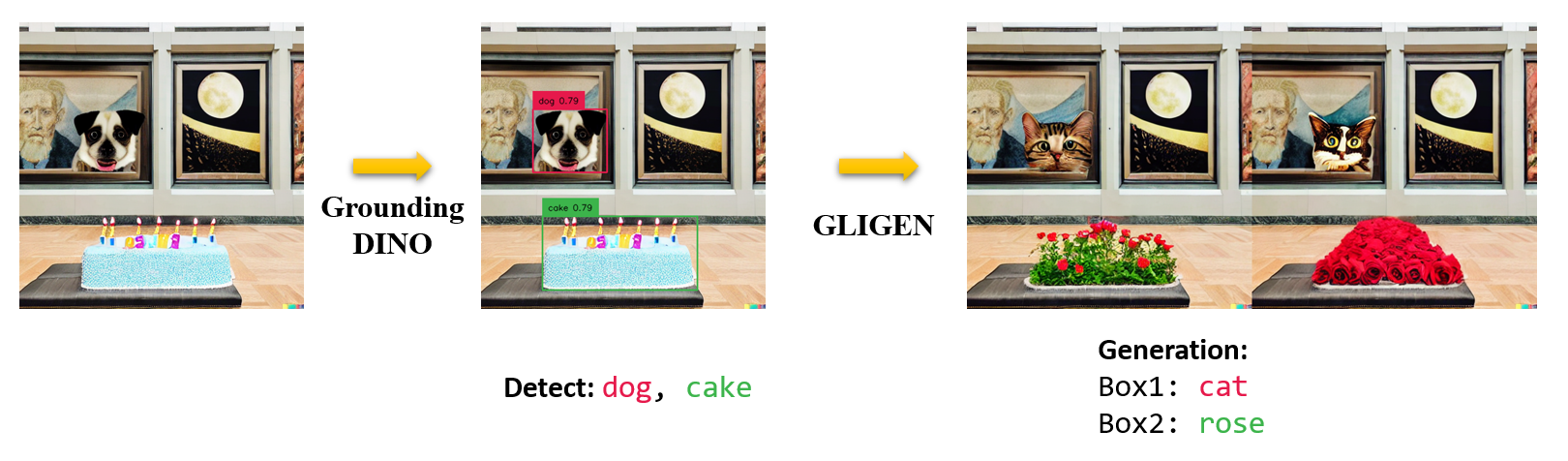
Marrying Grounding DINO with GLIGEN for Image Editing






Build environment
GLIGEN uses a modified diffusers. We highly recommoned to use new conda virtural environment for the notebook!
To do this, please run the following commands and rerun the notebook with the new environment:
``bash conda create -n gligen_diffusers python=3.10 conda activate gligen_diffusers ``
Load grounding dino models
final text_encoder_type: bert-base-uncased
Some weights of the model checkpoint at bert-base-uncased were not used when initializing BertModel: ['cls.predictions.transform.dense.weight', 'cls.seq_relationship.weight', 'cls.predictions.transform.LayerNorm.bias', 'cls.predictions.transform.dense.bias', 'cls.predictions.bias', 'cls.predictions.transform.LayerNorm.weight', 'cls.seq_relationship.bias']
- This IS expected if you are initializing BertModel from the checkpoint of a model trained on another task or with another architecture (e.g. initializing a BertForSequenceClassification model from a BertForPreTraining model).
- This IS NOT expected if you are initializing BertModel from the checkpoint of a model that you expect to be exactly identical (initializing a BertForSequenceClassification model from a BertForSequenceClassification model).
Model loaded from /home/liushilong/.cache/huggingface/hub/models--ShilongLiu--GroundingDINO/snapshots/d6b1ecf62f56b2affe410ed025352a07b57d4661/groundingdino_swint_ogc.pth
 => _IncompatibleKeys(missing_keys=[], unexpected_keys=['label_enc.weight'])
Load GLIGEN inpainting models
safety_checker/model.safetensors not found
`text_config_dict` is provided which will be used to initialize `CLIPTextConfig`. The value `text_config["id2label"]` will be overriden.
StableDiffusionGLIGENPipeline {
  "_class_name": "StableDiffusionGLIGENPipeline",
  "_diffusers_version": "0.15.0.dev0",
  "feature_extractor": [
    "transformers",
    "CLIPFeatureExtractor"
  ],
  "requires_safety_checker": true,
  "safety_checker": [
    "stable_diffusion",
    "StableDiffusionSafetyChecker"
  ],
  "scheduler": [
    "diffusers",
    "PNDMScheduler"
  ],
  "text_encoder": [
    "transformers",
    "CLIPTextModel"
  ],
  "tokenizer": [
    "transformers",
    "CLIPTokenizer"
  ],
  "unet": [
    "diffusers",
    "UNet2DConditionModel"
  ],
  "vae": [
    "diffusers",
    "AutoencoderKL"
  ]
}
Load demo image
Image downloaded from url: https://huggingface.co/ShilongLiu/GroundingDINO/resolve/main/art_dog_birthdaycake.png and saved to: art_dog_birthdaycake.png.
Run Grounding DINO


Image Inpainting
[[0.18195317685604095,
  0.3042256236076355,
  0.4422861933708191,
  0.5236865282058716],
 [0.21554315090179443,
  0.6760779619216919,
  0.7596603631973267,
  0.934249758720398]]

Marrying Grounding DINO with Stable Diffusion for Image Editing
     
!gdsd

Install diffusers
Load grounding dino models
final text_encoder_type: bert-base-uncased
Some weights of the model checkpoint at bert-base-uncased were not used when initializing BertModel: ['cls.predictions.transform.LayerNorm.bias', 'cls.predictions.bias', 'cls.predictions.transform.LayerNorm.weight', 'cls.seq_relationship.weight', 'cls.predictions.transform.dense.bias', 'cls.predictions.transform.dense.weight', 'cls.seq_relationship.bias']
- This IS expected if you are initializing BertModel from the checkpoint of a model trained on another task or with another architecture (e.g. initializing a BertForSequenceClassification model from a BertForPreTraining model).
- This IS NOT expected if you are initializing BertModel from the checkpoint of a model that you expect to be exactly identical (initializing a BertForSequenceClassification model from a BertForSequenceClassification model).
Model loaded from /home/liushilong/.cache/huggingface/hub/models--ShilongLiu--GroundingDINO/snapshots/4d4409dc29f29629f4ebb808a68ea67be53886b6/groundingdino_swint_ogc.pth
 => _IncompatibleKeys(missing_keys=[], unexpected_keys=['label_enc.weight'])
Load stable diffusion inpainting models
Load demo image
Image downloaded from url: https://huggingface.co/ShilongLiu/GroundingDINO/resolve/main/cats.png and saved to: cats.png.
Run Grounding DINO


Image Inpainting

final text_encoder_type: bert-base-uncased